How to Use Policy Reviews as a Subcontractor Prequalification Tool

How to Use Policy Reviews as a Subcontractor Prequalification Tool

Why Prequal Is the Best Time for Policy Review

The earlier you identify risk, the easier—and cheaper—it is to manage. That’s why teams like JRM have made policy review a part of the earliest phase of vendor evaluation, well before a bid is awarded. Risk teams are reviewing safety programs, financial health, and insurance coverage as a single package, giving them more leverage and insight when comparing subcontractors.

Once a contract is signed or a vendor is onsite, you lose flexibility. If coverage isn’t sufficient or if the policy excludes the work being performed, it’s often too late to switch vendors without causing project delays or cost overruns.

Note: Ready to explore how Jones can streamline your full policy verification? Talk to our team of experts today!

Let’s Chat!

What COIs Miss: Hidden Exclusions That Undermine Coverage

It’s a common mistake: a subcontractor submits a COI that lists valid dates, appropriate limits, and the right policy types. Everything looks fine—until an incident occurs and the claim is denied.

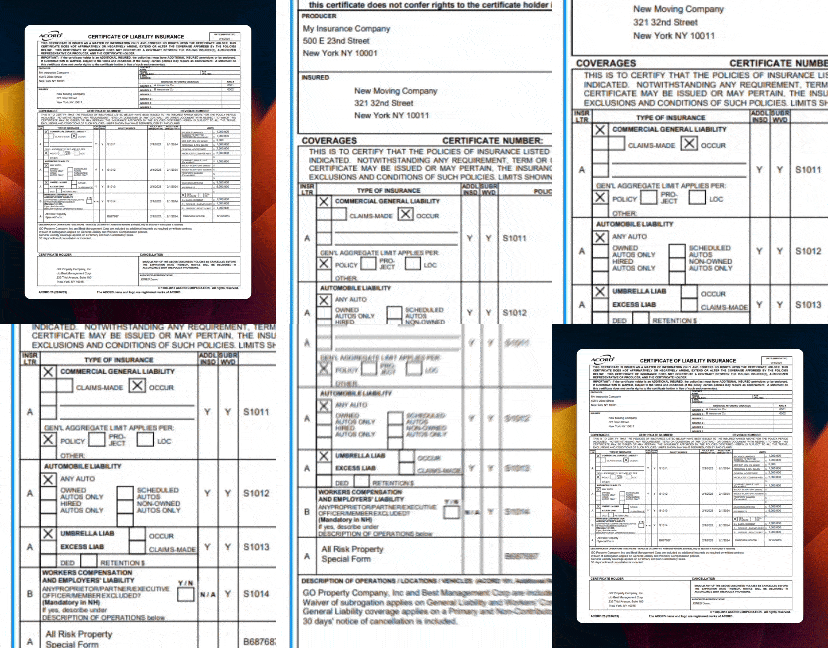
That’s because exclusions and limitations don’t appear on a COI. They live in the full policy document, often buried in endorsements. This blog post explains the limitations of COIs in greater depth). Here are some of the most common red flags teams uncover during policy review:

1. EIFS (synthetic stucco)
Hidden Policy Detail: Blanket exclusion even if EIFS isn’t installed

2. Height limits
Hidden Policy Detail: No work above 15 or 30 feet

3. Labor law (action-over)
Hidden Policy Detail: Excludes claims under NY or IL labor laws

4. Location-based restrictions
Hidden Policy Detail: No coverage in CA, CO, or NYC boroughs

5. Subcontractor restrictions
Hidden Policy Detail: No coverage if work is subbed out

6. Trade-specific limitations
Hidden Policy Detail: Only certain class codes or scheduled autos

These exclusions can apply even when they’re not directly related to the subcontractor’s scope. For example, EIFS exclusions may void coverage for all work on a building that has synthetic stucco, even if the vendor isn’t installing it.

How Teams Are Using Policy Reviews During Prequal

The most sophisticated risk programs use policy review as a way to assess vendor-level risk, not just project-specific coverage. That means every subcontractor is evaluated based on their overall insurability—how well their coverage aligns with the type of work they perform, where they perform it, and who their brokers and carriers are.

If a vendor has a strong safety record but limited coverage, they may still be approved—with limitations. Teams can assign vendors “approved with exemptions” status, which allows for conditional use based on project size, geography, or contract value.

This approach also improves internal alignment. Risk, Safety, and Procurement teams are aligned on the risk profile of each subcontractor from day one, which simplifies downstream approvals and avoids last-minute surprises.

Related: We Compared 5 Subcontractor Prequalification Software—Here’s What We Found Out 

What to Expect: Timeline and Process

Jones offers two plans for the policy verification: partial review and full review.

Partial policy verification offered by Jones:

Policies are verified against specific exclusions, clauses or provisions. Customers can pick up to 5 items (exclusions or endorsements) they want the Jones team to review. Usually those are:

  • Explosion, Collapse and Underground Hazard Exclusion
  • New York Labor Law Exclusion
  • Height/Gravity Exclusions
  • Designated Work/Operations/Location Exclusions
  • New York Five Borough Exclusion

Full policy verification offered by Jones

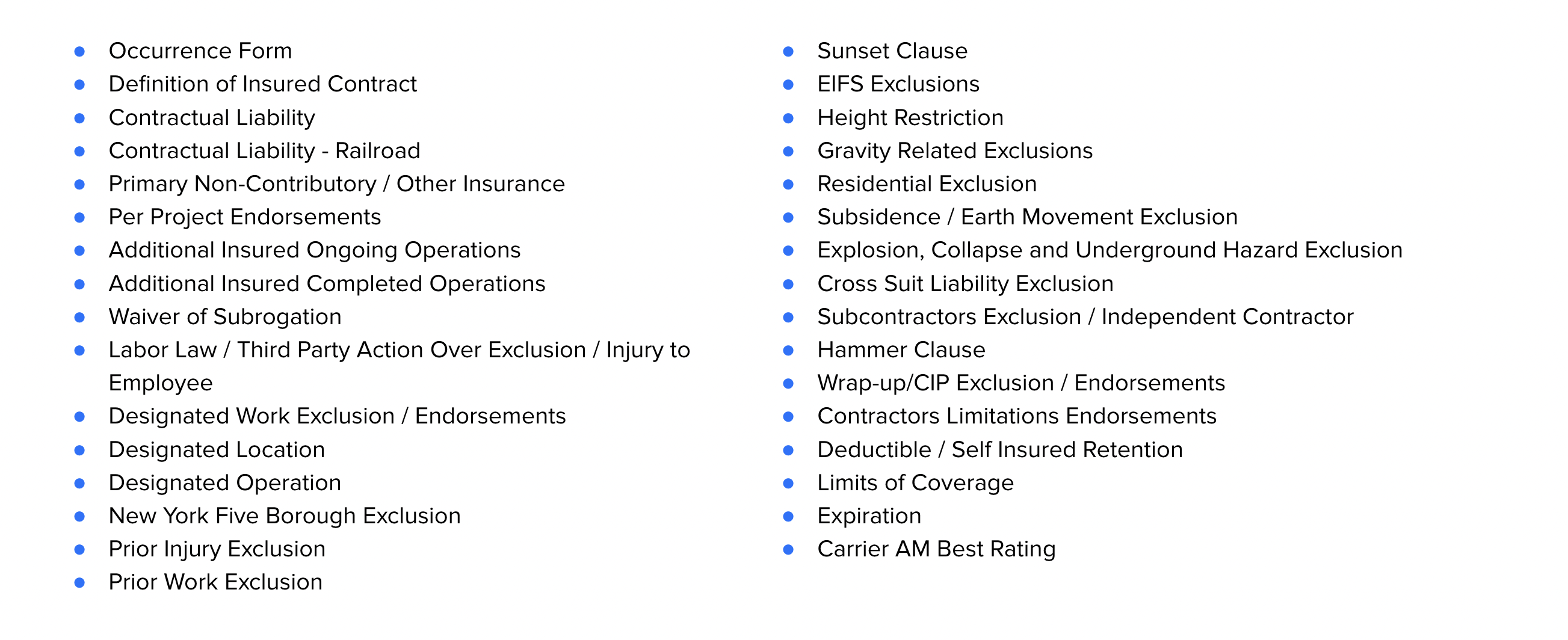
Jones’ comprehensive Full Policy Verification service includes ~40 items for CGL and Umbrella policies’ review. To name a few:

  • Hammer Clause
  • Wrap-up/CIP Exclusion / Endorsements
  • Contractors Limitations Endorsements
  • Deductible / Self Insured Retention
  • Limits of Coverage
  • Expiration
  • Carrier AM Best Rating

Form Definition of Insured Contract Contractual Liability Contractual Liability - Railroad Primary Non-Contributory / Other Insurance Per Project Endorsements Additional Insured Ongoing Operations Additional Insured Completed Operations Waiver of Subrogation Labor Law / Third Party Action Over Exclusion / Injury to Employee Designated Work Exclusion / EndorsementsOccurrence Designated Location Designated Operation New York Five Borough Exclusion Prior Injury Exclusion Prior Work Exclusion

  • Partial reviews typically take 24–48 hours
  • Full reviews range from 2–4 business days depending on document availability and vendor responsiveness

The process:

  1. Collect COI and policy (or endorsements) from the vendor
  2. Upload to your policy verification tool (e.g., Jones)
  3. Receive detailed flagging of exclusions, limitations, and coverage gaps
  4. Make an approval, waiver, or rejection decision with confidence

How to Request a Policy for Review

Here’s what to ask your vendors for during prequal:

  • Complete CGL policy (or dec page + endorsements)
  • Additional insured endorsement (CG 20 10 and CG 20 37)
  • Waiver of subrogation endorsement
  • Umbrella/excess policy forms (if applicable)

If a vendor hesitates, explain that policy review is part of your standard risk management process—not an exception. Many vendors will agree once they understand it’s a portfolio-wide requirement, not a personal ask.

What If Vendors Push Back?

Some vendors may hesitate to share full policies. Here’s how teams respond:

  • Reassure vendors that policies are reviewed internally only for exclusions—not pricing or proprietary terms
  • Accept redacted documents if exclusions and endorsements are visible
  • Provide a checklist so vendors understand exactly what’s being reviewed

Clear communication, upfront expectations, and standardization across all subcontractors help reduce friction.

ROI: Why Policy Review Is Worth It

One missed exclusion can lead to a denied claim, legal disputes, and out-of-pocket payments. Risk teams now treat those losses as project costs—not overhead—and are baking insurance review into their financial forecasting.

Policy review helps prevent that by turning a reactive process into a proactive one. When done at the prequal stage, it becomes an early warning system—catching coverage issues before they become margin-killers.

Conclusion: Prequal Is Your Leverage Point

Subcontractor policy reviews are no longer a luxury—they’re a necessity. By moving this step to the prequal stage, construction teams are avoiding costly surprises, reducing claims exposure, and gaining leverage before contracts are even signed.

If you want to reduce insurance-related risk without slowing down your process, policy verification during prequal is the most strategic move you can make.

Quick FAQ: Policy Review in Prequal

What’s the difference between a COI and a policy?

A COI is a one-page summary. The policy is the full legal contract and contains exclusions, endorsements, and conditions not visible on the COI.

What is a policy review?

An audit of a third party’s insurance policy to identify exclusions, coverage gaps, or limitations before work begins.

When should policy reviews happen?

Before bidding, during submittals, and before jobsite access is approved—ideally at the prequal stage.

What documents should I request?

Ask for the CGL policy (or dec page), key endorsements, and umbrella forms. Focus on exclusions.

How long does it take with Jones?

Partial reviews: 24–48 hours. Full reviews: 2–4 business days.

Tired of Reviewing COIs and Endorsements Manually?

Jones automates the collection and review of COIs for property management companies, owner-operators, and general contractors across the US. Reach out to us via the form below to find out more about how Jones can help your organization manage your insurance documents.

How Jones Supercharges ERP Integrations with AI Agents For Insurance Compliance

How Jones Supercharges ERP Integrations with AI Agents For Insurance Compliance

What Is Insurance Verification Software?

Insurance verification software automates the process of tracking insurance certificates for vendors, tenants, and subcontractors against their required insurance standards. AI agents specialized in insurance compliance take this a step further—reading, interpreting, and validating insurance documents in real time, flagging risks automatically, and syncing compliance tasks across the tools teams already use.

Real Estate: Making Insurance Compliance Invisible (In a Good Way)

When I talk to property managers and operations leaders, one thing that comes up all the time is how insurance workflows still feel like a separate, manual process—even though they touch almost everything that happens in a building.

“It’s like insurance compliance is always a separate workflow,” one property manager told me. “It’s not built into the way we actually work.”

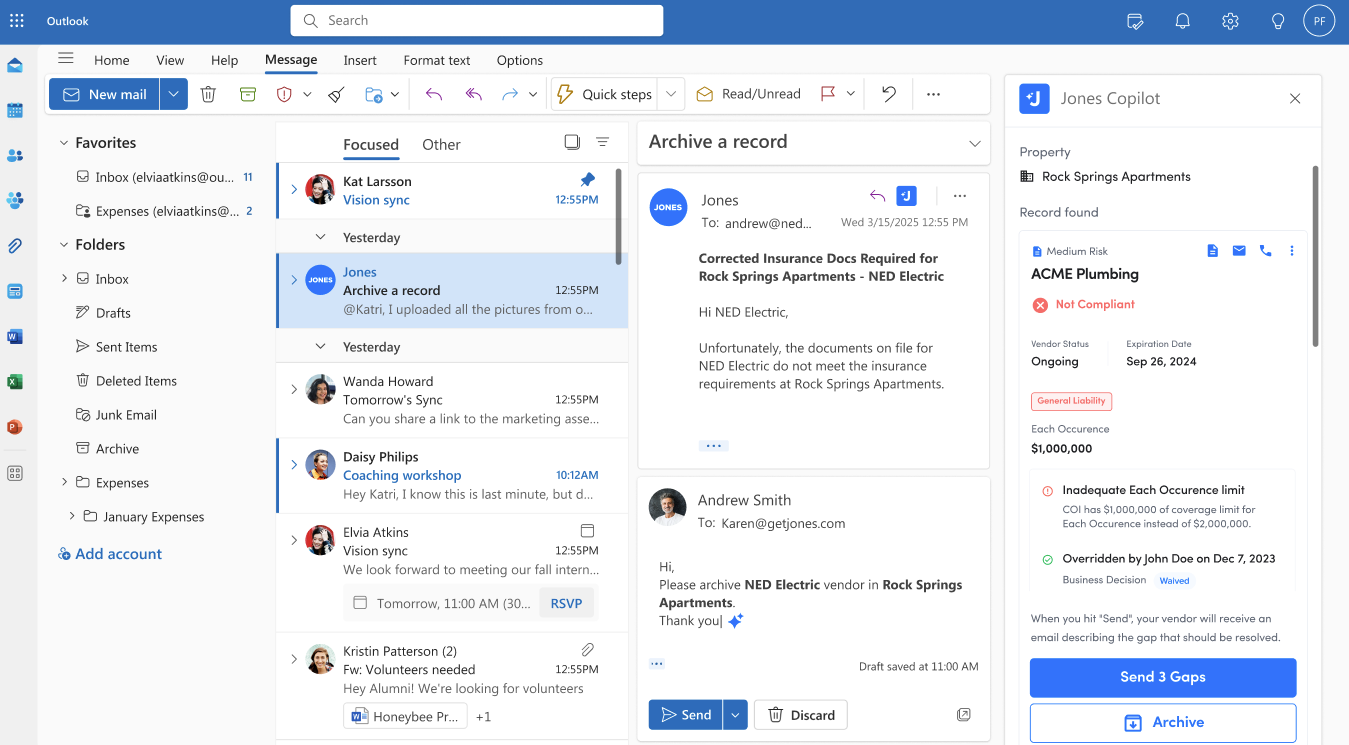
That’s starting to change as AI agents get embedded directly into the systems and tools property teams already use every day. Take email for example: property managers operate over 80% of their day in Microsoft Outlook, and that’s where insurance compliance should be nested.

Just last week, Jones released a Microsoft Outlook Copilot enabling clients to instantly view compliance reports, gaps, and issues—all without leaving Outlook.

Jones Microsoft Outlook Copilot enables clients to instantly view compliance reports, gaps, and issues

Note: Ready to explore how Jones can streamline your COI management process? Talk to our team of experts today!

Let’s Chat!

Access Control: Letting the Right Vendors In (Without the Risk)

At the property level, access control is the first line of defense. You need to know that anyone stepping on site has compliant insurance—but traditionally, that means a lot of emails, spreadsheets, and manual checks before clearing a vendor to work.

Now, with insurance verification integrated into platforms like MRI Software and Yardi, that step can happen automatically. When a vendor shows up, their insurance status is already synced and approved—or flagged if there’s an issue.

In a recent Customer Advisory Board, a group manager told me:

“We used to spend half a morning chasing COIs to approve a vendor. Now we get a ping in our system if there’s a problem, and otherwise we don’t even think about it.”

Compliance becomes part of the normal flow of work—not a separate fire drill.

Procurement & Bidding: Sourcing Vendors With Coverage For The Job

During procurement, insurance often gets treated as an afterthought. Teams focus on price, availability, and qualifications—but if a vendor can’t meet the insurance requirements later, it can come back to haunt with an unexpected insurance claim.

By integrating AI agents into procurement systems early, teams can screen for insurance compliance during the bidding phase. One owner-operator summed it up perfectly:

“If a vendor’s insurance is shaky, their project risk usually is too.”

Insurance isn’t just a risk check—it’s often a proxy for operational reliability. Catching it early means fewer surprises later. At Jones, we’re leveraging years of insurance experience to build Insurance Auditing Agents that can produce an instant snapshot of COI compliance. Stay tuned for more this June!

Related: COI vs Policy: What Certificates of Insurance Don’t Tell You (And How to Close the Risk Gap)

Building Operations: Bridging the Gaps Between Systems

Even when vendors are compliant, there’s often a delay between verifying insurance and updating that data across systems. We hear this a lot:

“The vendor was cleared yesterday, but they’re still showing red in the building ops platform!”

AI agents can now push real-time insurance data directly into systems like Prism, MRI, and Yardi, so operations teams aren’t stuck doing double data entry—or worse, accidentally blocking work because the system isn’t updated.

When insurance status flows automatically into work order systems, service requests, and access control, the result is simple: Vendors can get to work faster, and property teams spend less time chasing paperwork. It’s one of those things that seems small until you live it—and then you wonder how you ever operated any other way.

Construction: Solving for Risk Without Slowing Down Projects

One thing I hear over and over when talking to construction leaders is this:
“Insurance compliance is critical to mitigate claims payouts, but it keeps pulling our teams away from building.”

The real bottleneck isn’t the importance of insurance itself—it’s the way workflows are still disconnected from how projects actually run day-to-day. AI agents, integrated into the software systems teams already use, are starting to change that.

Pre-Qualification: Getting It Right Before Work Starts

During pre-qualification, the last thing project teams want is a hidden insurance problem that surfaces once the project is already moving. That’s why more teams are embedding AI agents directly into their prequal workflows—to spot coverage gaps and problematic exclusions before a vendor steps on site.

One GC we work with put it this way:

“If you catch a missing endorsement at prequal, it’s a relatively painless fix. Catch it after a claim on site, and it’s a $250k – $500k problem.”

The goal isn’t just faster onboarding—it’s avoiding those costly surprises.

Project Management: Keeping Compliance Where the Work Happens

Project managers already have enough to track. Jumping between platforms to check insurance status shouldn’t be one of them.

That’s why we’re seeing more teams integrate AI insurance agents directly into tools like Procore or Autodesk Construction Cloud. When compliance status lives inside the same system managing RFIs, submittals, and daily logs, it actually gets used. It’s easier to hold vendors accountable. It’s easier to catch issues early. And most importantly, it’s easier to keep projects moving without risk hanging over your head.

One project exec recently told me:

“It’s not that we didn’t care about insurance before—it’s that we didn’t have time to chase it manually.”

Bringing compliance into project management means teams can stay focused on building, without losing sight of the risk. At Jones, clients are increasingly adopting our concierge offering, Jones Operator, to completely offload the insurance workflow and maximize operational savings.

Note: Want to learn more about our new concierge plan? Here’s a brochure that explains how it works!

Let’s Chat!

Payments: Using Pay Apps as a Backstop for Risk

When it comes time to approve a subcontractor’s pay app, it’s easy to assume insurance is still valid—but a lot can change between contract signing and payment.

By connecting AI insurance agents to platforms like Sage 300, Procore Pay, and Viewpoint Vista, project teams are now able to double-check compliance automatically before releasing payments. It’s an extra layer of protection, especially for exposures like completed operations where risk doesn’t end when the work does.

One controller told me recently:

“We caught an expired policy at pay app review. If we’d paid without checking, we’d be carrying the risk ourselves.”

Payments are already a natural checkpoint in construction. Using them as a smart compliance gate just makes sense—and with the right integrations, it doesn’t slow anything down.

Benefits of Integrations for Real Estate and Construction Teams

  • Faster vendor onboarding
  • Reduced insurance gaps
  • Fewer project delays
  • Smarter procurement decisions
  • Seamless financial compliance
  • Lower administrative burden
  • Improved regulatory compliance posture

Bottom Line: Better Workflows Start with Integrated AI Agents

The shift toward agentic workflows isn’t about replacing property or construction management systems—it’s about making them smarter. By integrating AI agents specialized in insurance verification into platforms like MRI, Yardi, Sage 300, Procore Pay, and Viewpoint Vista, teams gain real-time visibility, faster cycle times, and fewer compliance-related delays.

As the industry continues to navigate increasing regulatory scrutiny and tighter margins, these integrated workflows are becoming more than just a convenience. They’re a strategic advantage.

Frequently Asked Questions (FAQs):

Q: What is COI verification software?
A: COI verification software helps companies automatically collect and review certificates of insurance (COIs) from vendors, tenants, or subcontractors. It ensures that third parties meet all insurance requirements before work begins or continues — reducing liability exposure without the need for manual tracking.

Q: Can insurance compliance be integrated directly into Procore and Yardi?
A: Yes. With the latest AI integrations, platforms like Procore, Yardi, MRI, and Sage 300 can now pull in real-time insurance compliance data. This means teams can verify vendor coverage automatically, without leaving their main project or property management system.

Q: Why is insurance compliance critical for construction payments?
A: Before paying a subcontractor, it’s essential to confirm they still meet all insurance requirements, especially for completed operations risks. Verifying compliance at the pay application stage helps protect against costly claims down the road and ensures all work is properly insured through project closeout.

Tired of Reviewing COIs and Endorsements Manually?

Jones automates the collection and review of COIs for property management companies, owner-operators, and general contractors across the US. Reach out to us via the form below to find out more about how Jones can help your organization manage your insurance documents.

COI vs Policy: What Certificates of Insurance Don’t Tell You (And How to Close the Risk Gap)

COI vs Policy: What Certificates Don’t Show About Insurance Coverage

What Is a COI (and What Is It Missing)?

A Certificate of Insurance (COI) is a summary document issued by an insurance provider. It includes:

  • Policyholder name
  • Carrier and policy number
  • Effective and expiration dates
  • Types of coverage (CGL, Auto, Workers’ Comp, etc.)
  • Coverage limits

But here’s the problem:
COIs don’t include exclusions, endorsements, or policy conditions—the things that actually determine if coverage applies when something goes wrong.

“A COI can look perfect, but the policy can exclude the exact type of work being done.”
– Jessica Lopes, Director of Risk and Compliance, Jones

Why Relying on a COI Alone Is Risky

If the subcontractor’s or tenant’s policy contains an exclusion, you may discover you were never truly covered. That means:

  • Injury claims denied
  • Property damage uncovered
  • Full liability on the owner or GC

In a way, COIs give a false sense of security as it’s not even a legally biding document. The real level of protection lies in an insurance policy.

Related: Common Insurance Exclusions That Put Owners and GCs at Risk (Coming Soon)

Note: Ready to explore how Jones can streamline your full policy verification? Talk to our team of experts today!

Let’s Chat!

Exclusions That Certificates of Insurance (COIs) Can Hide

These are real exclusions uncovered in policies that appeared “compliant” at the COI level:

Examples of Common Insurance Exclusions Hidden in Policies

These exclusions are rarely visible on COIs—but appear frequently in actual policies, often buried in endorsements. Here are the ones that catch most teams off guard:

  1. EIFS: Blanket exclusion even if the vendor isn’t installing EIFS, and just working on the building.
  2. Height limits: No coverage for work above 15 or 30 feet, common with scaffolding, windows, or roofing.
  3. Labor law (action-over): Excludes liability for injury claims under NY or IL labor law—especially costly in GC contexts.
  4. Location-based restrictions: Coverage may be excluded for entire regions (e.g., California, Colorado, or NYC boroughs).
  5. Subcontractor restrictions: No coverage if the primary vendor subcontracts the work to others.
  6. Trade-specific limitations: Coverage applies only to listed class codes or designated operations—everything else is excluded.

“We’ve seen subs with valid COIs whose policies exclude the entire job site.”
– Hisrain Reis, Policy Verification Manager at Jones.

COI vs. Policy: What’s the Real Difference?

Certificates of Insurance (COIs) are quick-reference summaries. Insurance policies are the actual legal contracts that determine coverage. Here’s how they compare:

  • 📄 COI (Certificate of Insurance): Summary document used for tracking and proof of insurance
  • 📜 Policy: Full legal contract issued by the insurer that determines what is—and isn’t—covered

Key Differences

  • Coverage Details: COI provides summary; policy includes exclusions, endorsements, and full terms
  • Legally Binding: Claims are settled based on the policy—not the COI
  • Visibility of Risk: COI does not show hidden limitations like height, EIFS, or labor law exclusions
  • Use in Compliance: COIs are useful for tracking; policies are essential for verifying real protection

For more information, read this post where we compiled common questions about COIs and insurance policies.

What Jones Offers (Beyond COI Tracking)

While most tools stop at COI collection, Jones provides:

  • Automated COI collection + renewal alerts
  • Full or partial policy reviews with exclusion audits
  • Clear notes for internal approval, waiver, or rejection

For policy verification, Jones offers two approaches:

1. Partial Policy Review

Policies are verified against specific exclusions, clauses or provisions. Usually those are:

  • Explosion, Collapse and Underground Hazard Exclusion
  • New York Labor Law Exclusion
  • Height/Gravity Exclusions
  • Designated Work/Operations/Location Exclusions
  • New York Five Borough Exclusion

Customers can pick up to 5 items (exclusions or endorsements) they want the Jones team to review.

2. Full Policy Review

Jones’ comprehensive Full Policy Verification service includes the following items for CGL and Umbrella policies’ review:

 Form Definition of Insured Contract Contractual Liability Contractual Liability - Railroad Primary Non-Contributory / Other Insurance Per Project Endorsements Additional Insured Ongoing Operations Additional Insured Completed Operations Waiver of Subrogation Labor Law / Third Party Action Over Exclusion / Injury to Employee Designated Work Exclusion / EndorsementsOccurrence Designated Location Designated Operation New York Five Borough Exclusion Prior Injury Exclusion Prior Work Exclusion
Whether you’re a GC trying to lower risk on job sites or a REIT onboarding tenants across multiple locations, policy review is the only way to verify real coverage.

Don’t Rely on a COI Alone—Check What It Doesn’t Show

“We’ve seen teams that thought they were 100% compliant—until they looked at the actual policies. The COI hid everything.”
– Jessica Lopes, Director of Risk & Compliance at Jones

Frequently Asked Questions (FAQs)

Q: Why isn’t a Certificate of Insurance (COI) enough to verify insurance coverage?
A: A COI summarizes key insurance details but doesn’t show the full policy language, including exclusions that could leave your company exposed to uninsured risks. Nor is it legally binding.

Q: What types of insurance gaps can only be found in the full policy?
A: Common hidden gaps include Residential Exclusions, Completed Operations Exclusions, Labor Law (Action Over) Exclusions, Height, and other limitations that are not disclosed on COIs.

Q: How does full policy review improve insurance compliance?
A: Reviewing the actual policy documents ensures that vendors, subcontractors, and tenants meet all coverage requirements (not just stated limits).

Tired of Reviewing COIs and Endorsements Manually?

Jones automates the collection and review of COIs for property management companies, owner-operators, and general contractors across the US. Reach out to us via the form below to find out more about how Jones can help your organization manage your insurance documents.

Vendor Certificates of Insurance: What Property Managers Need to Know

Vendor Certificates of Insurance: What Property Managers Need to Know

What is a Vendor Certificate of Insurance (COI)?

A vendor Certificate of Insurance (COI) is a document that shows a vendor working on your property has active insurance coverage. It’s your assurance that if that vendor accidentally damages property, injures someone, or faces a claim, their insurance carrier — not your company — is responsible for covering the costs.

For example, if a landscaping company accidentally damages a building’s sprinkler system while working on the grounds, a valid COI with the appropriate liability coverage shows their insurance covers the repairs, not your budget.*

This is especially important for:

  • Property managers onboarding new service providers
  • Asset managers ensuring building-wide compliance
  • General contractors coordinating multiple subcontractors
  • Facilities managers working with maintenance vendors
  • PMs managing compliance region- or company-wide

Every vendor represents potential risk — and COIs are the first line of defense.

*COIs don’t include endorsements, or policy exclusions—the things that actually determine if coverage applies when something goes wrong. For more information on COIs vs. full policy review, read the post below.

Related: COI vs. Insurance Policy: FAQs for Risk & Compliance in Real Estate and Construction

Note: Ready to explore how Jones can improve your COI management? Talk to our team of experts today!

Let’s Chat!

Why Do Property Managers Need Vendor COIs?

Vendor COIs are about more than just paperwork — they are a crucial risk management tool that safeguards your organization in various scenarios.

Consider a property management team onboarding a new janitorial vendor for a Class A office building. 

Similarly, a general contractor working on a new mixed-use development might hire subcontractors for electrical, plumbing, or roofing work. Each subcontractor should provide a COI proving their own liability and workers’ compensation coverage, protecting the GC from absorbing claims related to those subs’ activities.

For owners and asset managers, COIs provide critical documentation proving compliance with lease agreements, lender requirements, and investor expectations (although we must point out that even a COI is not a legally binding document.)

What Insurance Should a Vendor COI Include?

The required insurance on a vendor COI depends on the vendor’s role and the risks they bring. Typically, property managers will look for several types of coverage:

  • General Liability: Protects against claims of bodily injury or property damage caused by the vendor. This is foundational coverage for nearly all vendors.
  • Workers’ Compensation: Covers injuries sustained by their workers on the job. Especially critical in construction or maintenance work.
  • Commercial Auto Insurance: Necessary if the vendor uses vehicles for their operations on your property — such as a contractor hauling equipment or a pest control company using service vans. Also makes up for shortfalls in GL coverage.
  • Umbrella or Excess Liability: Provides additional coverage beyond standard policy limits, ideal for higher-risk vendors like roofing companies or structural contractors.
  • Additional Insured Endorsements: Adds your company as an insured party on the vendor’s policy, giving you extra protection in claims situations. Additional Insured Endorsement is not always required; sometimes, it’s enough to mention it in the DOO on a COI.

For example, a property manager at a luxury apartment complex might require general liability and workers’ comp from their pool maintenance vendor, while a facilities manager at a corporate campus might also require commercial auto insurance from delivery or security providers.

When Should Property Managers Request a Vendor COI?

The simple rule is: request a COI any time a vendor is performing work that could expose your property or people to risk.

This includes:

  • Routine service providers like HVAC, janitorial, and landscaping vendors
  • Specialty contractors like elevator repair companies or waterproofing experts
  • Construction subcontractors working under a GC
  • Tenant vendors accessing common areas in a multi-tenant building
  • Event vendors setting up temporary installations or equipment

For example, an asset manager overseeing a retail shopping center would request COIs from both seasonal snow removal vendors and short-term holiday pop-up shops operating within the property.

This ensures continuous protection across diverse vendor types and activities.

How to Request and Review a Vendor COI

Successfully managing vendor COIs begins with setting clear expectations and following a consistent process. Every interaction with a vendor regarding insurance should be structured and transparent to avoid confusion and delays.

Clearly Communicate Insurance Requirements

Start by informing your vendor of exactly what insurance they need to carry before beginning work. Provide them with a document or checklist outlining:

  • The types of coverage required (e.g., General Liability, Workers’ Comp, Commercial Auto)
  • The minimum coverage limits (often specified in lease agreements or company policies)
  • Whether your company (or the owner) must be listed as an Additional Insured
  • The Certificate Holder information, which should include your company’s legal name and mailing address

For instance, a property manager onboarding a new pest control vendor might require $1 million in General Liability coverage, Workers’ Comp coverage for all employees, and Additional Insured status for the management company.

Receive the COI Directly from the Vendor’s Insurance Provider

Encourage vendors to have their insurance agent send the COI directly to you. This ensures the document hasn’t been altered or edited by the vendor themselves.

Review the COI Carefully

Once you receive the COI, take the time to verify it thoroughly:

  • Are the types of coverage listed correct for the work being performed? A landscaping vendor should have General Liability and Workers’ Comp, while a moving company might also need Commercial Auto.
  • Are the coverage limits sufficient according to your building or ownership requirements?
  • Are the effective dates valid — meaning the coverage is currently active and won’t expire during the term of their work?
  • Is your company listed as the Certificate Holder in the correct format?
  • Does the COI explicitly state Additional Insured status if required?

Example Use Case

Consider a facilities manager onboarding a window cleaning vendor for a high-rise building. Beyond confirming the vendor has General Liability coverage, the manager should look for Workers’ Comp (given the physical nature of the job), Commercial Auto if vehicles will be used, and verify that the company is listed as Additional Insured. This level of detail ensures the building is protected from claims if a vendor employee is injured on-site or damages property during their work.

How Jones Simplifies This Entire Process

Managing this process manually — for every vendor, across every property — quickly becomes unsustainable. That’s why many property managers and asset owners turn to Jones for COI management.

Jones automates the COI request process, ensuring vendors receive clear instructions and insurance requirements upfront. Once vendors upload their COIs through a no-login portal, Jones automatically reviews the documents for accuracy, verifies that all requirements are met (including Additional Insured language), and tracks policy expiration dates.

Instead of chasing down documents and manually reviewing each COI, property managers can rely on Jones’ real-time dashboards to know exactly which vendors are compliant, which are missing documents, and which policies are expiring soon — saving time, reducing risk, and ensuring full visibility across their entire portfolio.

Common Mistakes Property Managers Make with Vendor COIs

Even experienced property managers can fall into common traps when handling vendor Certificates of Insurance. Let’s explore these mistakes in detail and why they matter.

Accepting Expired COIs or Failing to Track Renewals

One of the most frequent mistakes is accepting a COI at the start of a vendor relationship but never checking its expiration date. Over time, policies lapse, vendors forget to renew, and suddenly a claim occurs when the vendor’s insurance is no longer valid.

For example, a facilities manager at a corporate office building may have onboarded an HVAC vendor years ago. If the vendor’s COI expired six months prior and a leak from their equipment causes significant damage, the property owner could be stuck with the repair bill and and possible claims from tenants or other impacted/flooded entities.

Not Requiring Additional Insured Status When Necessary

Being listed as a Certificate Holder confirms you received the COI — but it doesn’t mean you’re protected under the policy. Property managers often overlook requiring Additional Insured status, which extends coverage to their business in certain claims.

Consider a general contractor managing a retail build-out project. If a subcontractor accidentally injures a pedestrian, the GC could face legal action. Without being listed as Additional Insured, the subcontractor’s insurance might not cover the GC’s legal fees.

Using One-Size-Fits-All Insurance Requirements

Different vendors present different risks. Requiring the same insurance limits from a large roofing contractor and a small cleaning service doesn’t make sense — and could slow down onboarding or strain vendor relationships.

An asset manager working with seasonal snow removal crews might prioritize general liability coverage and commercial auto insurance, while a tenant-facing art installer might require lower limits but still need proof of workers’ compensation.

Storing COIs in Siloed Email Threads with No System for Retrieval

Managing COIs through scattered email chains is not only inefficient — it’s risky. When audits, claims, or lender reviews happen, locating the right document quickly becomes a fire drill.

Imagine a property manager responsible for a portfolio of 20 commercial properties being asked to provide COIs for all vendors within 48 hours. If COIs are buried in inboxes or on individual desktops, meeting that deadline could be impossible — increasing compliance risk and damaging stakeholder trust. Avoiding these mistakes starts with a proactive approach to COI management — and the right tools to support your process.

This is exactly where vendor COI tracking software like Jones can make all the difference. Instead of relying on emails or spreadsheets, Jones provides a centralized, searchable repository for every COI document across your entire vendor network. Property managers can instantly filter COIs by vendor, property, expiration date, or compliance status — eliminating the need to dig through old email threads.

Plus, with Jones’ automated renewal reminders and real-time dashboards, teams can proactively stay ahead of expirations and vendor compliance issues. And in the case of audits or claims, Jones allows teams to export all relevant COIs in seconds, providing a professional, organized response that builds trust with lenders, owners, and auditors — and dramatically reduces stress for internal teams.

Why Jones is the Smartest Way to Manage Vendor COIs

Jones helps property teams take control of vendor COI management by addressing the most common pains property managers face — and delivering gains that drive operational efficiency and peace of mind:

User Pains Jones Solves

  • Vendors ignoring COI requests or sending incomplete documents
  • Hours wasted chasing vendors for renewals
  • Risk of uninsured vendors working on-site
  • Confusing, inconsistent insurance requirements across properties
  • Siloed COI storage leading to panic during audits
  • Stress of manually reviewing complicated insurance documents

Gains Property Managers Get with Jones

  • Automated outreach ensures vendors submit accurate COIs on time
  • No more manual follow-ups or last-minute scrambles
  • Clear compliance dashboards that show exactly who is approved
  • Custom insurance requirements by vendor type eliminate confusion
  • Centralized, searchable COI repository makes audits stress-free
  • Expert COI review offloads complexity from internal teams

Jones helps property teams take control of vendor COI management by:

  • Saving countless hours on manual document collection and follow-up
  • Reducing compliance risk across all vendors and properties
  • Improving vendor onboarding speed and communication
  • Providing total visibility with real-time compliance dashboards
  • Ensuring accuracy with outsourced COI review by insurance experts
  • Integrating seamlessly with existing property management and construction platforms

Manual COI management often leads to errors, delays, and liability risk. It’s time-consuming, inconsistent, and difficult to scale — especially for teams managing a large portfolio of vendors across multiple properties. That’s where Jones stands out as the leading solution for property managers, asset owners, and general contractors.

Jones provides a centralized, automated platform that simplifies the entire COI lifecycle — from initial collection to ongoing tracking and renewal management — saving teams countless hours and reducing exposure to risk.

Automated COI Collection and Renewal Tracking

Jones eliminates the need for manual email follow-ups by requesting COIs from vendors, providing them with clear insurance requirements, and sending automated reminders when expiration dates approach. This ensures you stay ahead of compliance gaps without lifting a finger.

Customized Insurance Requirements per Vendor Type

Different vendors bring different levels of risk. Jones allows property managers to enforce tailored insurance requirements based on vendor category, project type, or location — whether it’s a snow removal company, a janitorial service, or a construction subcontractor.

Real-Time Compliance Dashboards

Jones provides live dashboards that give property teams total visibility into vendor compliance across all properties. Managers can quickly see which vendors are approved, which are non-compliant, and what actions need to be taken to resolve issues.

COI Review by Insurance Professionals

Instead of relying on busy property teams to interpret complex insurance documents, Jones offers COI review by insurance experts. This ensures that every document meets your exact requirements, from Additional Insured status to specific coverage limits.

Seamless Integrations with Industry Tools

Jones integrates directly with platforms like MRI, Yardi, Procore, and CMiC, so COI compliance is connected to the systems you already use for vendor management and project oversight. No need for double data entry or disconnected systems.

Vendor-Friendly Upload Portal

Vendors receive a guided, no-login-needed experience that makes it easy to upload COIs and understand compliance requirements — improving vendor relationships while reducing back-and-forth communication.

Real-World Impact

A senior asset manager at a commercial real estate firm using Jones was able to eliminate 90% of manual COI tracking efforts across dozens of properties. Instead of managing spreadsheets or chasing emails, their team now operates from a single source of truth, enabling faster vendor onboarding, easier audits, and greater confidence in compliance.

Jones doesn’t just make COI management easier — it transforms it into a scalable, proactive risk management process that grows with your business.

A senior asset manager at a commercial real estate firm using Jones can instantly view COI compliance across dozens of properties — reducing admin workload and increasing confidence in their risk management program.

Final Thoughts

Managing vendor Certificates of Insurance isn’t just about collecting paperwork — it’s about protecting your business, meeting legal obligations, and reducing operational risk.

Whether you’re a property manager, facilities leader, asset owner, or general contractor, proactive COI management ensures your vendors are carrying their fair share of liability — not passing that risk onto you.

With the right approach (and the right tools, like Jones), managing vendor COIs can go from a constant headache to a streamlined, automated process that keeps your properties protected and your operations running smoothly.

Tired of Reviewing COIs and Endorsements Manually?

Jones automates the collection and review of COIs for property management companies, owner-operators, and general contractors across the US. Reach out to us via the form below to find out more about how Jones can help your organization manage your insurance documents.
COI vs. Insurance Policy: FAQs for Risk & Compliance in Real Estate and Construction

COI vs. Insurance Policy: FAQs for Risk & Compliance in Real Estate and Construction

Table of Contents

What’s the difference between a COI and an insurance policy?

A certificate of insurance (COI) is a summary document that shows basic coverage details like limits, carrier, and policy dates. It’s often one page and used to prove insurance was issued.

An insurance policy is the full legal contract. It includes conditions, limitations, and exclusions—meaning the policy, not the COI, determines whether a claim is paid. This post outlines the COI vs policy comparison in greater detail.

Is a COI enough to confirm insurance coverage?

No. A COI cannot show exclusions, geographic limitations, or hidden clauses. Many risk managers assume the COI matches the policy—but that’s not always the case.

Real example: A COI showed complete coverage, but the actual policy excluded projects over 25 residential units, leaving the client unprotected.

What are the most common insurance exclusions hidden in policies?

  • EIFS (Exterior Insulation and Finish Systems) exclusions
  • Height restrictions (e.g., no work above 30 feet)
  • Labor law exclusions or “action-over” clauses
  • State/location exclusions (e.g., California, New York)
  • Designated work/operations limitations
  • Classification limitations (coverage only applies to listed trades)

These exclusions are not shown on COIs—only found in the full policy.

What’s an EIFS exclusion in insurance?

EIFS exclusions remove coverage for anything involving synthetic stucco materials—even if the subcontractor isn’t applying EIFS directly. If EIFS is present on a building, the policy may exclude related work.

What is a height exclusion and why does it matter?

A height exclusion limits coverage for work done above a certain elevation (e.g., 30 feet). It can make entire projects ineligible—even if the COI appears compliant.

What is a labor law or action-over exclusion?

These exclusions remove protection when an injured worker sues beyond workers’ comp under contractual liability. They’re especially common in New York and neighboring states.

How can I tell if a policy excludes work in my state?

Some policies contain location-based exclusions that bar coverage in entire states or counties (e.g., California, Colorado, NYC, or the Bronx). These are not shown on COIs.

How does Jones verify insurance policies?

Jones offers two methods of policy verification:

  • Full Policy Verification: Review of the entire policy with detailed notes.
  • Partial Policy Verification: Focused review of 3–5 high-priority risks.

What is partial vs. full policy verification?

Full policy verification covers every clause, endorsement, and limitation. Partial verification targets specific risks based on project scope.

Can I use policy review to prequalify subcontractors or tenants?

Yes. More risk teams are using policy reviews before onboarding vendors to flag exclusions early. This allows you to prequalify subcontractors based on project needs and avoid downstream risk.

Note: Ready to explore how Jones can improve your COI management? Talk to our team of experts today!

Let’s Chat!

Tired of Reviewing COIs and Endorsements Manually?

Jones automates the collection and review of COIs for property management companies, owner-operators, and general contractors across the US. Reach out to us via the form below to find out more about how Jones can help your organization manage your insurance documents.
Top COI Construction Software Benefits for Compliance and Risk Management

Top COI Construction Software Benefits for Compliance and Risk Management

What is COI Construction Software?

COI construction software is a specialized digital tool that helps construction companies manage vendor and subcontractor Certificates of Insurance at scale.

Think of it as a smarter, faster way to:

  • Collect COIs from subcontractors
  • Track expiration dates in real time
  • Enforce compliance requirements (like Additional Insured status)
  • Get notified before coverage lapses
  • Store all insurance documentation in one searchable place

The days of spreadsheets, shared drives, and back-and-forth emails are over. In their place is COI construction software — purpose-built to handle the complexity of the construction world.

Related: We Compared The 4 Best COI (Certificate of Insurance) Tracking Software Tools – So You Don’t Have To

Why COI Management is So Challenging in Construction

The construction industry faces unique insurance challenges that make COI management particularly difficult.

First, the sheer volume of vendors and subcontractors involved in a typical project is staggering. On a large commercial development, it’s not unusual to have dozens — sometimes hundreds — of subs all performing specialized work. Every one of them needs to carry specific insurance coverage.

Second, construction contracts often require different types of coverage based on the scope of work. For example:

  • Crane operators may need higher liability limits due to fall risk.
  • Electrical contractors often require specialized endorsements.
  • Material delivery companies must show proof of Commercial Auto coverage.

Finally, COIs aren’t static documents. Insurance policies renew (or expire) frequently — often during the middle of a project. Without a system in place to track expirations and follow up for renewals, a GC could unknowingly allow uninsured vendors to continue working on-site — creating enormous liability.

This is exactly where COI construction software proves its value.

Note: Ready to explore how Jones can improve your COI management? Talk to our team of experts today!

Let’s Chat!

How COI Construction Software Solves Compliance Challenges

Construction projects are fast-moving, high-stakes environments — and managing compliance in the middle of that chaos is no easy task. COI construction software exists to bridge that gap and give construction teams proactive control over risk.

The right COI construction software provides construction teams with a powerful risk management toolkit.

Without a solution in place, the typical COI management process is reactive and error-prone. 

Teams spend hours emailing subcontractors, tracking documents in spreadsheets, and hoping they don’t miss an expiration date. That manual approach might work for a handful of vendors — but it breaks down completely when managing dozens or hundreds of subcontractors across multiple projects.

COI construction software transforms this by shifting teams from reactive to proactive risk management. Here’s how:

  • Automated COI collection ensures vendors receive clear, standardized insurance requests the moment they’re onboarded — eliminating back-and-forth confusion.
  • Customizable insurance requirement templates guarantee that every vendor type (HVAC, roofing, electrical) has specific, enforceable requirements tailored to their work and associated risks.
  • Automated reminders go out well before policies expire, giving vendors plenty of time to renew coverage and upload updated documents. No more last-minute surprises.
  • Real-time dashboards provide operations teams with instant visibility into vendor compliance across all active projects. One glance tells you exactly who is compliant, whose insurance is expiring, and which vendors are out of compliance.
  • Centralized document storage makes every COI easily accessible for audits, claims processing, lender requests, or owner reporting — reducing the scramble to locate paperwork when it matters most.

Practical Example

Let’s say you’re a GC managing a multi-phase commercial development project. You’re working with 65 subcontractors over a 14-month build. Without COI construction software, your project coordinator might spend hours every week chasing COIs, updating spreadsheets, and notifying project managers when coverage lapses.

With COI construction software in place, COIs are automatically collected, verified, and tracked — freeing your coordinator to focus on high-value tasks like scheduling, logistics, or vendor management.

Key Features to Look for in COI Construction Software

If you’re evaluating COI software for construction, here are the must-have features to look for:

Automated COI Collection & Renewal Tracking

Construction moves fast. Manual follow-ups don’t cut it. Look for platforms that automate document requests and renewal notifications.

Custom Insurance Requirement Templates

Every subcontractor brings different risk. The best platforms let you customize requirements based on vendor role, project type, or location.

Real-Time Compliance Dashboards

You need visibility at a glance. Dashboards should show compliance status by project, vendor, or portfolio.

Searchable Document Repository

Gone are the days of digging through email threads. Modern COI software should offer a searchable, centralized storage system.

COI Review Support

Some platforms (like Jones) offer COI review services, so your team doesn’t have to become insurance experts.

Integrations with Construction Tech Stack

Your COI platform should integrate with tools like Procore, CMiC, Sage 300 CRE, Sage Intacct, or your project management software — reducing double data entry and improving workflow efficiency.

The Real-World Impact of COI Construction Software

Imagine a GC managing multiple projects across several states. With hundreds of subcontractors, the operations team used to spend hours each week tracking COIs manually. Missing documents, expired policies, and inconsistent requirements created friction on every job site.

After adopting a dedicated COI construction software platform, the team now has:

  • Faster vendor onboarding
  • Zero uninsured vendors working onsite
  • Fewer project delays related to compliance gaps
  • Easier audits and reporting for owners and lenders
  • A scalable process that works across every project

The result? Less risk, less stress, and more time focused on building — not chasing paperwork.

For many construction companies, the move to dedicated COI software doesn’t just save time — it fundamentally changes the way their risk management and operations teams work.

Faster Vendor Onboarding

Manual onboarding is one of the biggest bottlenecks in construction. Waiting days or weeks for insurance documents slows projects down before they even start. With automated COI collection, vendors are guided through exactly what they need to provide, making onboarding faster and frictionless.

Zero Uninsured Vendors Working Onsite

Without COI software, it’s dangerously easy for uninsured or underinsured vendors to slip through the cracks. Automated tracking ensures that only fully compliant vendors are allowed to work on your job sites.

Fewer Project Delays Related to Compliance Gaps

Missing or expired COIs can trigger delays during inspections, audits, or project closeouts. With real-time compliance dashboards and proactive notifications, construction teams can resolve insurance gaps before they impact the schedule.

Easier Audits and Reporting for Owners and Lenders

Modern construction projects often involve multiple stakeholders — owners, lenders, insurers — who expect clear, documented proof of risk management practices. COI software provides exportable reports and clean audit trails that make compliance easy to demonstrate.

A Scalable Process Across Every Project

Perhaps the biggest impact is scalability. What works for managing COIs on one project might completely fall apart when managing ten projects simultaneously. COI construction software gives teams a standardized, repeatable process that works across every job site — no matter how many vendors, subs, or moving parts are involved.

Practical Example

A regional construction firm working on residential and commercial builds across three states implemented COI construction software to manage over 200 vendors annually. What used to take multiple full-time employees to track and manage now takes a fraction of the time — with fewer errors, faster vendor approvals, and dramatically reduced compliance risk.

Today, their project teams spend less time chasing documents and more time focused on building — while their risk management leaders sleep easier knowing every vendor is properly insured.

How Jones Powers COI Management for Construction Teams

Jones is a leading COI construction software platform built specifically for GCs, developers, and construction risk managers. It helps teams automate COI collection, enforce compliance requirements, and gain total visibility into vendor insurance status.

With Jones, construction teams can:

  • Automate COI collection and renewal tracking
  • Apply custom insurance templates by vendor type or risk level
  • View real-time compliance dashboards
  • Access expert COI review services
  • Integrate seamlessly with Procore, CMiC, and other tools

Construction is complex — COI management doesn’t have to be.

Final Thoughts

COI construction software isn’t just a nice-to-have — it’s becoming a must-have for risk-conscious construction teams.

In an industry built on moving fast and managing risk, software like Jones gives construction companies the tools they need to stay compliant, protect their projects, and focus on what they do best: building.

Ready to see how Jones can transform your COI management process?

Learn more about COI management for construction teams.

Tired of Reviewing COIs and Endorsements Manually?

Jones automates the collection and review of COIs for property management companies, owner-operators, and general contractors across the US. Reach out to us via the form below to find out more about how Jones can help your organization manage your insurance documents.
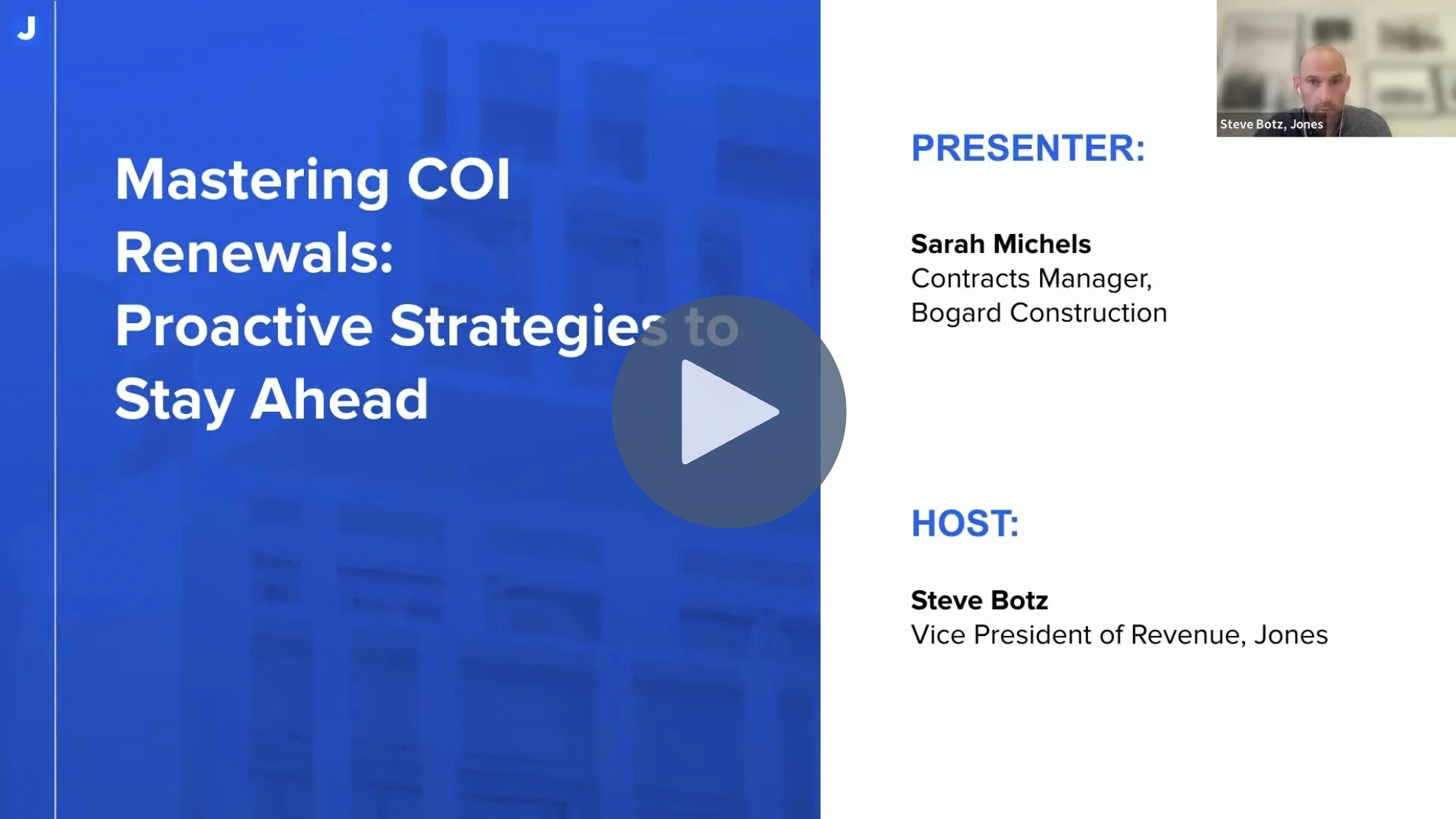
Mastering COI Renewals: Best Practices and Lessons from Bogard Construction

Mastering COI Renewals

Key Insights from the Mastering COI Renewals Webinar

Skip directly to the webinar recording.

Here are some of the most valuable lessons shared by Sarah Michels, Contracts Manager at Bogard Construction, during our conversation on COI renewals:

  • Renewals aren’t just date checks — Policy terms often change at renewal (e.g., switching from “any auto” to “scheduled autos only”), and it’s easy to miss if you’re only verifying expiration dates.

  • Coverage gaps can go unnoticed, even with strong internal processes — Sarah’s team discovered issues that had slipped through despite detailed manual reviews, prompting them to revise indemnity language in their subcontractor agreements.

  • A dedicated COI inbox can dramatically reduce friction — Consolidating document intake through a single email (like coi@bogardconstruction.com) helped streamline their entire workflow.

  • Clear internal ownership is critical — Knowing exactly who is responsible for collection, auditing, and escalation made it easier for Bogard to stay on top of compliance across hundreds of subs.

  • The ROI of automation is measurable — By automating outreach, auditing, and system updates through Jones, Bogard saved nearly 2,000 hours a year and avoided hiring 2.5 additional team members.

  • Even teams not using a platform can improve — Sarah emphasized that any company can strengthen its renewal process by reviewing internal policies, tightening communication, and following a defined framework.

Watch the “Mastering COI Renewals” webinar recording:

Learn how Bogard’s team uncovered hidden policy changes, rewrote their indemnity agreements, and saved 2,000+ hours a year.

Click to Watch Webinar Recording

Note: Would you rather have Jones manage the collection and review of your COIs and endorsements? Talk to our team of experts today!

Let’s Chat!

Step-by-Step: The COI Renewal Checklist

Here’s the exact checklist shared in the webinar that Sarah recommends using, even if you’re not a Jones customer:

✅ Step 1: Establish a Source of Truth

Choose one system to house all COI data and expiration dates—no more cross-referencing Excel, accounting systems, and project platforms.

✅ Step 2: Centralize Communication

Create a single, dedicated email inbox for all incoming COIs (e.g., coi@yourcompany.com) and communicate that address to brokers and vendors.

✅ Step 3: Automate the Renewal Timeline

Set 45-, 30-, and 15-day reminders and define what escalation looks like if there’s no response.

✅ Step 4: Review Policy Terms (Not Just Expiration Dates)

Always check the details. Did the vendor switch from “any auto” to “scheduled auto only”? Is the liability “per occurrence” or “aggregate”?

✅ Step 5: Revisit Your Indemnity Language

Work with legal to adjust contract language based on what’s realistic and enforceable during renewal season.

✅ Step 6: Assign Ownership Internally

Decide who owns the collection, who owns the review, and what happens when documents are incomplete or incorrect.

Webinar Recap:

Prior to using Jones, Sarah’s team at Bogard Construction was juggling COIs across multiple platforms: Excel, AP, and their project management system.

“We used to double—actually triple—enter information. Trying to handle the volume that we had—hundreds of subs annually—it’s just a lot.”

Even with detailed processes and an insurance-savvy team, important details were still missed. At one point, the team discovered that some subcontractors had quietly changed carriers or switched to more limited coverage without flagging it.

This triggered a legal review and a rewrite of their indemnity clauses. From that point forward, scheduled autos were only allowed if the subcontractor contractually agreed to use only those listed vehicles on-site.

As part of their process transformation, Bogard implemented the checklist shared above, and then partnered with Jones to automate the execution.

One of the simplest—but most impactful—changes was setting up a dedicated inbox for all COIs:

“We have one email address now: coi@bogardconstruction.com. It took a few months to streamline that, but now our inboxes aren’t getting cluttered with COIs—they go directly to Jones.”

COIs were automatically routed, reviewed, and synced into the systems the team already used—Procore and Sage 300—without duplicate entry.

With Jones managing the outreach, triaging, and auditing, Sarah’s team gained back nearly 2,000 hours of staff time annually. That was enough to avoid hiring 2.5 full-time team members.

“We’ve been able to do it with what we have because of things like Jones. That gave us back almost 2,000 hours a year.”

Instead of COIs being a constant bottleneck, the renewal process became a background operation—visible when needed, invisible when running well.

Final Thoughts: Even Without a Platform, Get Your Process in Order

Sarah emphasized that even if your team isn’t using a dedicated COI management solution, you can still improve by tightening up your internal process.

Review your policies. Centralize your communication. Revisit your audit flow. And most importantly—don’t assume a renewal means nothing changed.

“Sometimes a renewal is not just a renewal. Coverage changes, and it’s easy to miss.”

Tired of Reviewing COIs and Endorsements Manually?

Jones automates the collection and review of COIs for property management companies, owner-operators, and general contractors across the US. Reach out to us via the form below to find out more about how Jones can help your organization manage your insurance documents.
How Rising Tariffs Are Quietly Driving Up Insurance Costs in Construction

How Rising Tariffs Are Quietly Driving Up Insurance Costs in Construction

How Tariffs Ripple Into Insurance

When tariffs go up on critical building materials—like steel, aluminum, or lumber—the price of those materials increases. That doesn’t just affect your upfront project budget. It also affects how much it will cost to repair or replace those materials if there’s damage during construction. For insurers, higher rebuild costs mean higher claims. And that almost always translates into higher premiums.

But that’s only part of the picture.

Tariffs can also slow down the supply chain. When imported materials are harder to source or more expensive, contractors may need to find alternative suppliers or wait longer for deliveries. That stretches project timelines. And when a site remains under construction longer than planned, it increases the time it’s exposed to risk—fire, theft, vandalism, weather damage, you name it.

Builder’s Risk and GL: Where Costs Creep In

Let’s break this down into two areas where rising tariffs quietly push up insurance costs: Builder’s Risk and General Liability coverage.

Builder’s Risk Insurance Costs

Builder’s Risk policies are directly tied to the value of materials and the duration of the project. When tariffs drive up the cost of materials like steel or copper, the total insured value of the project increases. Insurers price premiums based on that value, so higher material costs mean more expensive coverage.

For example, let’s say a mid-size contractor is building a $50 million commercial property. If tariffs increase the cost of imported steel by 15%, that might bump the insured project value up by several million dollars. The insurer now has to price for that extra risk—and that gets passed down in the form of higher premiums.

Delays compound this. Tariffs can disrupt supply chains, forcing contractors to wait longer for key materials. That extends the build timeline, which means the builder’s risk policy has to be extended too. Insurers charge for those extensions—often at a higher rate because longer exposure equals more risk.

General Liability Coverage Extensions

With General Liability (GL), delays can mean more days with workers and equipment on-site. That’s more chances for injury, damage, or third-party claims. The longer the exposure, the more it costs to cover. Here, the impact is more about time and activity. Longer projects mean workers, subcontractors, and heavy equipment are around longer. More time on-site raises the chances of an incident. And that’s exactly what insurers look at when adjusting premiums or setting terms.

For instance, a delayed project might require the GL policy to cover several extra months. That’s not just a formality—insurers may reprice that added coverage based on the extended exposure and the kinds of subcontractors involved. In some cases, they’ll even require additional documentation or endorsements to keep the policy in good standing.

In both cases, these added insurance costs aren’t just theoretical—they show up in project budgets, bid competitiveness, and margins. And for mid to large contractors juggling multiple projects across regions, even small premium increases can add up fast.

Note: Ready to outsource the collection and review of your COIs and endorsements? Talk to our team of experts today!

Let’s Chat!

What This Means for Construction Leaders

For project managers, developers, and risk managers, this creates a double bind: costs are rising, and so are insurance requirements from lenders and owners, since they too are exposed to the increased risk of project duration, material costs, and labor. The pain can go in the opposite direction too – if insurance certificates are delayed or non-compliant, that can hold up payments, cause costly work stoppages, or even lead to contract breaches.

This is where a platform like Jones comes in. By using AI and software to streamline insurance compliance, we help construction companies keep projects moving, avoid insurance-related delays, and manage risk proactively. Our software helps you track certificate validity, ensure subcontractor compliance in real-time, and respond quickly when insurers tighten requirements due to macroeconomic trends like tariffs. And since this is all tied into Procore and other systems, you can ensure projects are running as smoothly as possible through our turnkey product integration.

Bottom Line

Rising tariffs may feel like a policy issue far from the job site—but their impact hits close to home in construction. They raise material costs, slow projects down, and push insurance premiums higher. In this environment, staying ahead of insurance compliance is more important than ever—and AI-powered tools like Jones can help make that a competitive advantage.

Frequently Asked Questions (FAQs)

Q: How do rising tariffs impact insurance premiums in construction?
A: Tariffs drive up the cost of critical materials like steel, lumber, and aluminum. When building materials get more expensive, insurance policies — especially Builder’s Risk — have to adjust the insured project value, which means higher premiums for contractors and developers.

Q: Why are Builder’s Risk insurance costs so sensitive to material price increases?
A: It’s because Builder’s Risk policies are tied directly to the value of the project. If your project suddenly costs 20% more because of tariffs on materials, the insurance carrier needs to cover that extra exposure — and the premium goes up to reflect that risk.

Q: Does General Liability (GL) insurance get affected too?
A: Indirectly, yes. While GL isn’t tied as tightly to material costs as Builder’s Risk, higher overall project values can impact things like project-specific endorsements or coverage extensions. It’s one more reason to recheck your insurance mid-project if timelines or budgets shift.

Q: What can construction companies do to stay ahead of rising insurance costs?
A: The smartest teams build policy reviews into their project risk management process. They work closely with brokers to stay on top of value changes, renegotiate Builder’s Risk extensions when needed, and use insurance compliance tools to catch potential gaps before they turn into costly problems.

Tired of Reviewing COIs and Endorsements Manually?

Jones automates the collection and review of COIs for property management companies, owner-operators, and general contractors across the US. Reach out to us via the form below to find out more about how Jones can help your organization manage your insurance documents.
What Is a Certificate of Insurance (COI)? A Complete Business Guide

What is a certificate of insurance (COI)?

What Is a COI?

COI stands for Certificate of Insurance. A Certificate of Insurance (COI) is a standardized document that proves an individual or organization holds active insurance coverage.

It serves as formal documentation confirming that a vendor, contractor, tenant, or service provider has valid insurance coverage.

A COI is not an insurance policy itself, but it summarizes the critical information from one or more policies, enabling businesses to verify compliance quickly and efficiently.

What Does COI Stand For in Business Terms?

A COI functions as a compliance tool and risk mitigator.

It has become an indispensable component of risk management for businesses across sectors. COIs are especially crucial in environments involving third-party vendors, high-liability tasks, and regulated industries such as construction and real estate.

Understanding what a COI is—and using it effectively—can save your company from costly legal exposure and operational disruptions.

How is a Certificate of Insurance used in Business?

Verifying Third-Party Coverage

Businesses often rely on third-party vendors or subcontractors. A COI verifies that these external parties hold valid insurance—so if something goes wrong, the liability doesn’t fall back on your business.

Example: A facilities management company hires a landscaping vendor. Before work begins, the manager requests a COI with general liability and workers’ compensation to ensure the vendor can cover any property damage or staff injuries.

Ensuring Contractual and Regulatory Compliance

Many service agreements, leases, and construction contracts explicitly require COIs. Without them, companies risk breaching contracts or violating regulatory expectations.

Example: A real estate firm leases office space to a law firm. The lease mandates that tenants provide a COI showing general liability and commercial auto insurance to cover delivery-related risks.

Reducing Operational Risk

A COI provides proof that risk has been transferred appropriately to the insured party. In sectors where delays and damages can lead to major costs, this is essential.

Example: A general contractor working with multiple subcontractors needs COIs to ensure each subcontractor carries appropriate coverage before starting work. This reduces the GC’s liability in the event of an incident.

Note: Looking for certificate of insurance tracking software? We compared 4 best COI tracking software tools – read our guide!

Let’s Chat!

Industries That Commonly Require COIs

Construction

General contractors and developers often engage dozens of subcontractors on a single project. Each must submit a COI demonstrating coverage like general liability, workers’ comp, and commercial auto.

Example: A subcontractor hired for electrical work must show proof of $1M liability and up-to-date workers’ compensation before stepping on-site.

Property Management & Real Estate

Property managers need COIs to ensure vendors (e.g., janitorial, HVAC, snow removal) and tenants have adequate insurance coverage. Failure to do so could mean assuming liability for accidents or damages.

Example: A property management firm onboarding a new tenant at a commercial office complex will request a COI showing general liability and property insurance.

Facilities Management

Facilities managers coordinate a range of services from equipment maintenance to cleaning. COIs are vital to ensure external providers are covered for on-site incidents.

Example: A facilities manager hiring a pressure washing company for a large hotel must confirm liability coverage in case the high-pressure equipment damages the property.

Hospitality & Events

From caterers to production crews, third-party service providers in the hospitality industry present varied risks. COIs ensure that each partner assumes their own liability.

Example: An event planner coordinating a corporate conference requires COIs from AV vendors, furniture rentals, and the catering team.

Logistics & Transportation

Whether it’s moving goods or people, transportation involves liability risks. COIs confirm that service providers can cover accidents or loss.

Example: A warehouse contracting with a local delivery company requests a COI that includes commercial auto and cargo liability coverage.

What Information Is Included in a Certificate of Insurance?

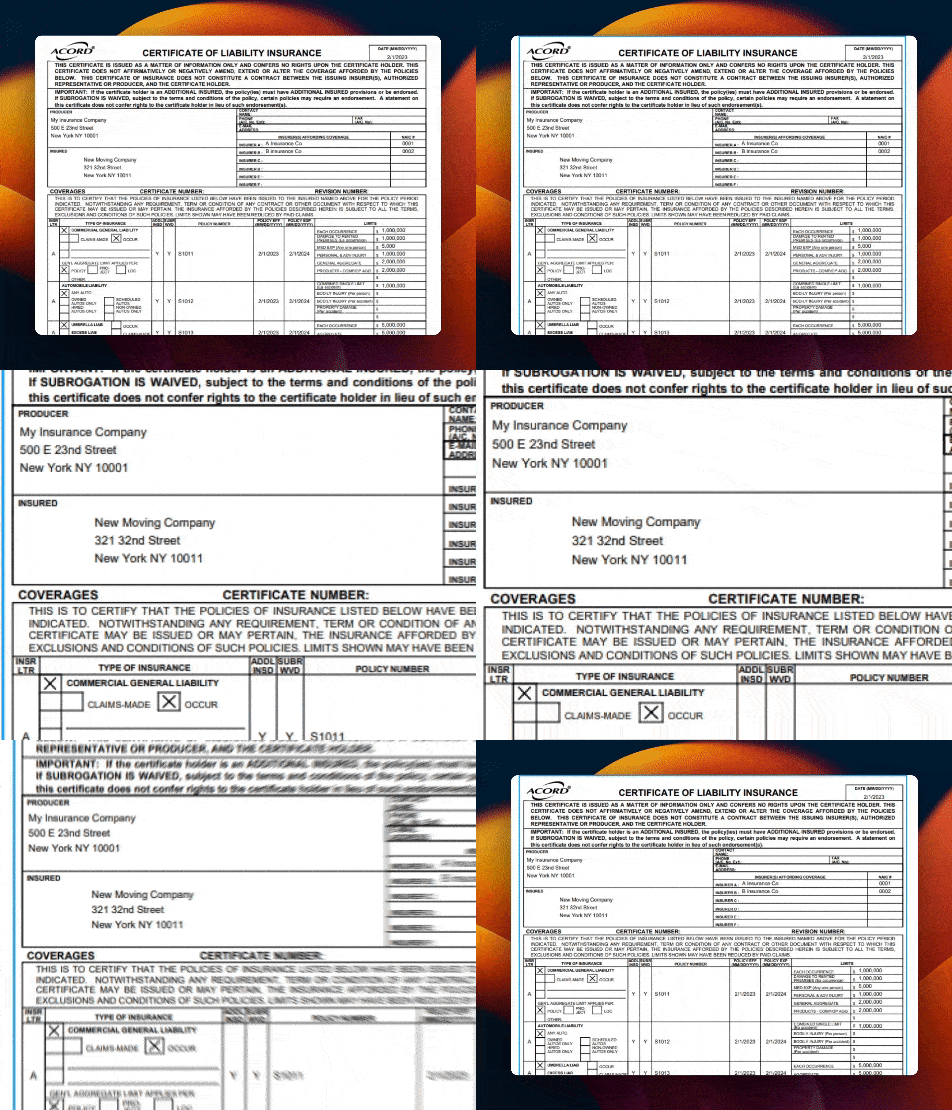
how to read a certificate of insurance zoom in

A Certificate of Insurance (COI) is a critical document in vendor and contractor compliance — but to truly understand its value, property managers, asset owners, and general contractors need to know what information it contains and why it matters.

Here’s a breakdown of the key elements typically found on a COI — along with an important final piece that’s often overlooked: policy provisions.

Named Insured

This is the entity or individual that owns the insurance policy. The named insured must directly match the vendor or contractor performing the work. If the names don’t align, the COI may not provide any coverage for their work on your property.

Insurance Carrier(s)

Lists the insurance companies underwriting each policy. Working with reputable, financially stable carriers gives greater assurance that any future claims will be honored.

Types of Coverage

The COI summarizes the vendor’s active policies. For real estate and construction projects, the most common types include:

  • General Liability: Covers bodily injury and property damage caused to third parties.
  • Workers’ Compensation: Covers medical costs and lost wages if vendor employees are injured on the job.
  • Commercial Auto: Covers vehicles used for business operations, like deliveries or transporting materials.
  • Umbrella/Excess Liability: Adds extra liability coverage above standard policy limits, critical for high-risk work.
  • Professional Liability (Errors & Omissions): Relevant for design professionals such as architects, engineers, or consultants.

Policy Numbers

Unique identifiers for each policy, which allow for quick verification with the insurance carrier if needed.

Coverage Limits

Defines the maximum amount the insurer will pay per occurrence and in aggregate. For example, a typical General Liability policy might offer $1 million per occurrence and $2 million in aggregate coverage.

Effective & Expiration Dates

Ensures that the coverage is active and current. Expired COIs mean the vendor is non-compliant and potentially uninsured for any claims during the gap.

Certificate Holder

The entity requesting proof of insurance — typically the property manager, asset owner, or general contractor. This confirms the COI is intended specifically for your project or property.

Additional Insured Language

This section indicates whether the requesting party (your organization) is added to the vendor’s policy as an Additional Insured. This extends certain policy protections to you, which is often contractually required in real estate and construction agreements.

how to read a COI zoom in 2


Policy Provisions to Look for in a COI

Beyond the basic coverage details, many COIs include important policy provisions that further clarify the protections available. These provisions provide extra layers of risk mitigation and are often negotiated within contract terms.

Primary & Non-Contributory Language

This provision specifies that the vendor’s insurance will respond first (primary) in the event of a claim, without seeking contribution from the property owner’s or GC’s insurance (non-contributory). This protects your policy limits from being eroded by claims tied to vendor activities.

Waiver of Subrogation

This prevents the vendor’s insurer from seeking reimbursement (subrogation) from your company after paying a claim. It limits the likelihood of your company facing additional legal or financial action tied to vendor claims.

Notice of Cancellation

Some COIs include a provision requiring the insurer to notify the Certificate Holder in advance (usually 30 days) if the policy is going to be canceled. This helps avoid surprises and allows teams to request updated coverage before a lapse occurs.

Endorsements Listing

While not always present directly on the COI, endorsements (attachments modifying the standard policy) are critical. These may cover:

  • Additional Insured status
  • Waiver of Subrogation
  • Primary & Non-Contributory wording
  • Project-specific or location-specific requirements

Why Policy Provisions Matter for Risk Management

Understanding and verifying these policy provisions is crucial for effective COI review. Simply having a COI is not enough — construction and property teams need to ensure that the right language and protections are in place.

When used correctly, these provisions:

  • Protect your organization’s insurance policies from unnecessary claims
  • Limit liability exposure tied to vendor incidents
  • Strengthen your contractual position during disputes or claims
  • Create a more defensible compliance posture during audits or litigation

For property managers, asset owners, and construction teams working with dozens (or hundreds) of vendors, this level of detail is essential to reducing risk and operating safely across every project or property.

When Do You Need a COI?

A COI is required any time you engage with third parties who might expose your business to liability. Key scenarios include:

Hiring Contractors or Subcontractors

Construction and facilities teams should collect COIs from all trades before work begins.

Example: A general contractor hiring a roofer needs proof of general liability and workers’ comp in case an employee falls on-site.

Onboarding Vendors or Tenants

In real estate, COIs are required for everything from HVAC repairs to janitorial services.

Example: A commercial landlord onboarding a new tenant requires a COI that includes general liability and property insurance to protect against tenant-caused damage.

Complying with Lender, Investor, or Corporate Policies

Financial stakeholders often require that insured vendors are on file for risk assessment purposes.

Example: A REIT mandates that all property managers submit COIs for active vendors quarterly.

Operating in High-Risk Environments

Any task involving electrical, structural, or hazardous work demands documented insurance.

Example: A facilities team bringing in a pressure washing vendor to clean parking structures checks the COI to confirm the vendor is covered for property damage.

Why a COI Alone Isn’t Enough

It’s important to remember that while a Certificate of Insurance provides proof of coverage, it doesn’t actually grant coverage to your organization on its own. The COI is simply a summary of the vendor’s active insurance policies — not a contract or guarantee of protection.

For this reason, collecting a COI should always be part of a broader risk management strategy that includes well-crafted Master Service Agreements (MSAs) and indemnity provisions within vendor contracts. These legal agreements spell out the responsibilities of each party, provide additional protection in the event of a claim, and ensure that risk transfer mechanisms like Additional Insured status and Waivers of Subrogation are contractually enforceable — not just listed on a piece of paper.

In short: a COI confirms a vendor has insurance, but it’s your contracts that help ensure that insurance responds when you need it most.

Why Are COIs Important for Businesses?

COIs aren’t just about compliance—they’re about protection, efficiency, and long-term risk reduction.

Transfer Liability

If a vendor causes harm, the COI ensures that your company isn’t financially responsible. Without proof of coverage, your business may be held liable by default.

Ensure Operational Continuity

Missing COIs can stall projects. Many firms won’t allow work to start until all documents are received and verified.

Example: A contractor can’t access a site until they provide an approved COI with correct coverage and active dates.

Meet Contractual and Legal Obligations

COIs are often legally required in contracts, leases, and vendor agreements. Failing to collect them could breach terms.

Enable Scalable Vendor Management

For growing property portfolios or construction pipelines, COIs create a uniform standard for compliance.

Example: A property management company operating 40+ buildings uses a COI workflow to ensure all service providers meet insurance requirements without manual follow-up.

Strengthen Audit and Legal Defensibility

Organized COI documentation allows you to respond quickly to audits or disputes. Digital records are especially helpful during claims investigations.

Common Misunderstandings About COIs

  • “A COI means I’m covered.” Not necessarily. A COI summarizes policy terms—it doesn’t provide actual coverage.
  • “I’m listed as the certificate holder, so I’m protected.” Certificate holder status only means you’ve received proof—it doesn’t mean you’re insured.
  • “All COIs are the same.” COIs vary by insurer, type of coverage, and specific endorsements. Always check the fine print.
  • “I don’t need to review COIs if I’ve collected them.” You must verify that they meet your company’s contract requirements and standards: correct coverage types, policy limits, and dates.
  • “Once I have a COI, I’m covered indefinitely.” Policies expire—COIs must be updated regularly to remain compliant.

Digital COI Management Tools: Why Jones Stands Out

Manually tracking Certificates of Insurance (COIs) across dozens—or even hundreds—of vendors is time-consuming, error-prone, and risky. Jones offers a modern solution: a centralized platform that automates and simplifies every step of COI management while helping companies reduce liability and improve vendor relationships.

Jones is purpose-built for high-compliance industries such as commercial real estate, construction, and property management. Whether you’re a general contractor managing dozens of subcontractors or a property manager overseeing multi-tenant buildings, Jones helps ensure every third party is properly insured and fully compliant—without the administrative overhead.

Key Capabilities of Jones:

  • Contract Tracking & eSignature Management
    Track vendor agreements, contracts, and waivers alongside COIs in a single platform. Jones makes it easy to request signatures, store executed contracts, and maintain a clear audit trail — reducing administrative overhead and keeping all compliance documentation in one place.
  • Automated COI Collection & Renewal Tracking
    Jones automatically collects COIs from vendors and tracks expiration dates, sending reminders before lapses occur so you never fall out of compliance.
  • Custom Insurance Requirements by Vendor or Role
    Assign specific insurance rules based on vendor type, building, project, or trade. Jones flags issues and blocks non-compliant vendors from operating until they’re resolved.
  • Live Compliance Dashboards
    Risk managers and field teams can instantly see who’s compliant and who’s not, across all properties or projects.
  • White-Glove Review Services
    Jones can serve as your outsourced compliance team, reviewing COIs and endorsements against your requirements and marking vendors approved or not approved.
  • Self-Serve Vendor Experience
    Vendors can upload documents, respond to requests, and correct deficiencies via a simple, guided interface—without the need for logins or long training.
  • Integration with Industry Tools
    Jones integrates with platforms like MRI, Yardi, Procore, and CMiC—syncing vendor data and ensuring insurance compliance is always in lockstep with operations.
  • Portfolio-Wide Standardization
    For property owners and asset managers, Jones enables standardized compliance policies and reporting across every building, region, or operating partner.

The Impact of Jones:

  • Faster vendor onboarding
  • Fewer project delays due to missing paperwork
  • Reduced risk of uninsured claims
  • A lighter load for legal, operations, and property management teams

Jones isn’t just software—it’s a smarter way to manage risk. Whether you manage three properties or three hundred, Jones makes COI compliance scalable, auditable, and headache-free.

Tired of Reviewing COIs and Endorsements Manually?

Jones automates the collection and review of COIs for property management companies, owner-operators, and general contractors across the US. Reach out to us via the form below to find out more about how Jones can help your organization manage your insurance documents.