Don’t have a Jones account yet? Schedule a call with our team today!
The Importance Of Automated COI Tracking For CMiC Users
Challenges with manual COI tracking
Relying on manual processes to collect, review, and track subcontractor COIs may have worked in the past, but in today’s fast-paced construction industry, they leave you vulnerable to errors and inefficiencies. Here are some reasons why:
- Time-consuming process: Handling all the parts of COI collection and review is time-consuming and can be overwhelming. For example, the team at Bogard Construction, a California-based GC, was spending 15 hours per week manually managing COIs before they switched to Jones. The most time-consuming part for them was reviewing each insurance document for compliance – but collecting COIs, following up with subcontractors, and working to resolve any deficiencies in coverage were taking up hours each week.
- High risk of human errors in tracking expiration dates: Dealing with a handful of COIs can be manageable, but overseeing the renewal of hundreds at scale increases the risk of human error. All it takes is one expired COI to put your company at a significant amount of risk, like this story about an insurance company denying coverage for a claim due to a policy that expired just one day earlier.
- Lack of real-time updates, leading to potential project delays: A recent PwC report showed that the average days payable outstanding (DPO) for contractors in the US ballooned to over 60 days in 2022. What’s the primary culprit? Jones data shows that 60% of subcontractor payment delays are caused by inefficient insurance compliance.
Why integrating COI tracking software with CMiC is essential
Integrating your COI tracking software with CMiC eliminates the need for teams to switch between systems, and provides a centralized platform to view and manage subcontractor compliance. With software like Jones, teams no longer need to manually update insurance information across systems to issue subcontractor payments. You can create new jobs, request insurance documents from subcontractors, and view their compliance status directly in CMiC. The ability to perform all of these workflows within CMiC helps maintain accuracy and efficiency. Let’s dive into how the Jones bi-directional integration with CMiC works.
How Jones Easily Integrates With CMiC
Bi-directional integration features
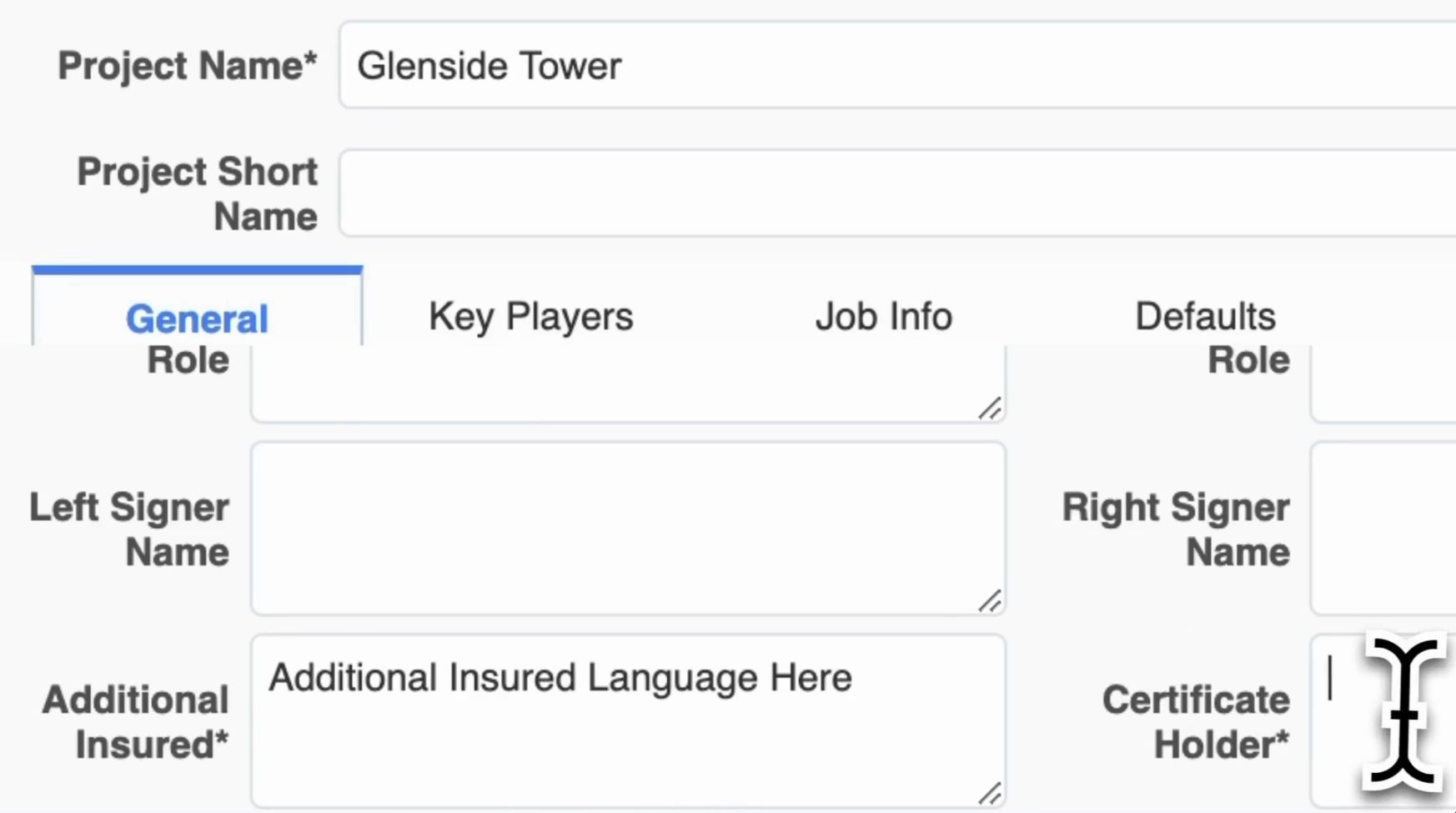
- Create new projects: With Jones, you can add a new project in CMiC like you normally would. You’ll see two new fields “Additional Insured” and “Certificate Holder”. The job will automatically be created in Jones.
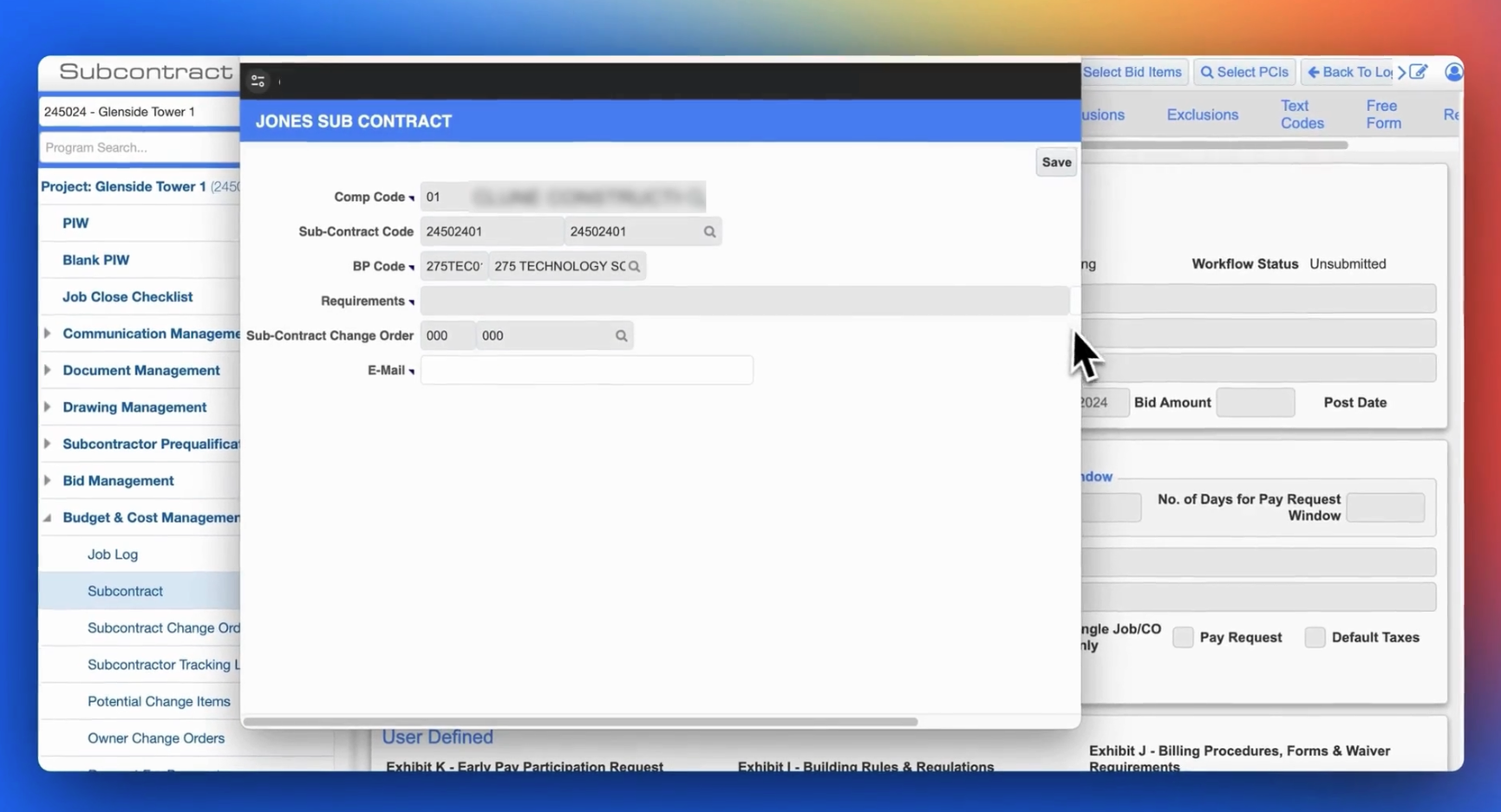
- Automated COI collection: Simplify COI requests directly within CMiC. Click on “User Extensions” and you’ll then be prompted to select a set of requirements, and enter the COI point of contact. The subcontractor will receive an email that looks like this requesting their insurance documents.
- View subcontractor insurance details: Once Jones reviews the insurance documents for compliance (learn more on how Jones reviews COIs here), the insurance details will appear within the ERP and Field tabs in CMiC. The policies, amounts, expiration dates, and compliance status are all automatically updated in CMiC.
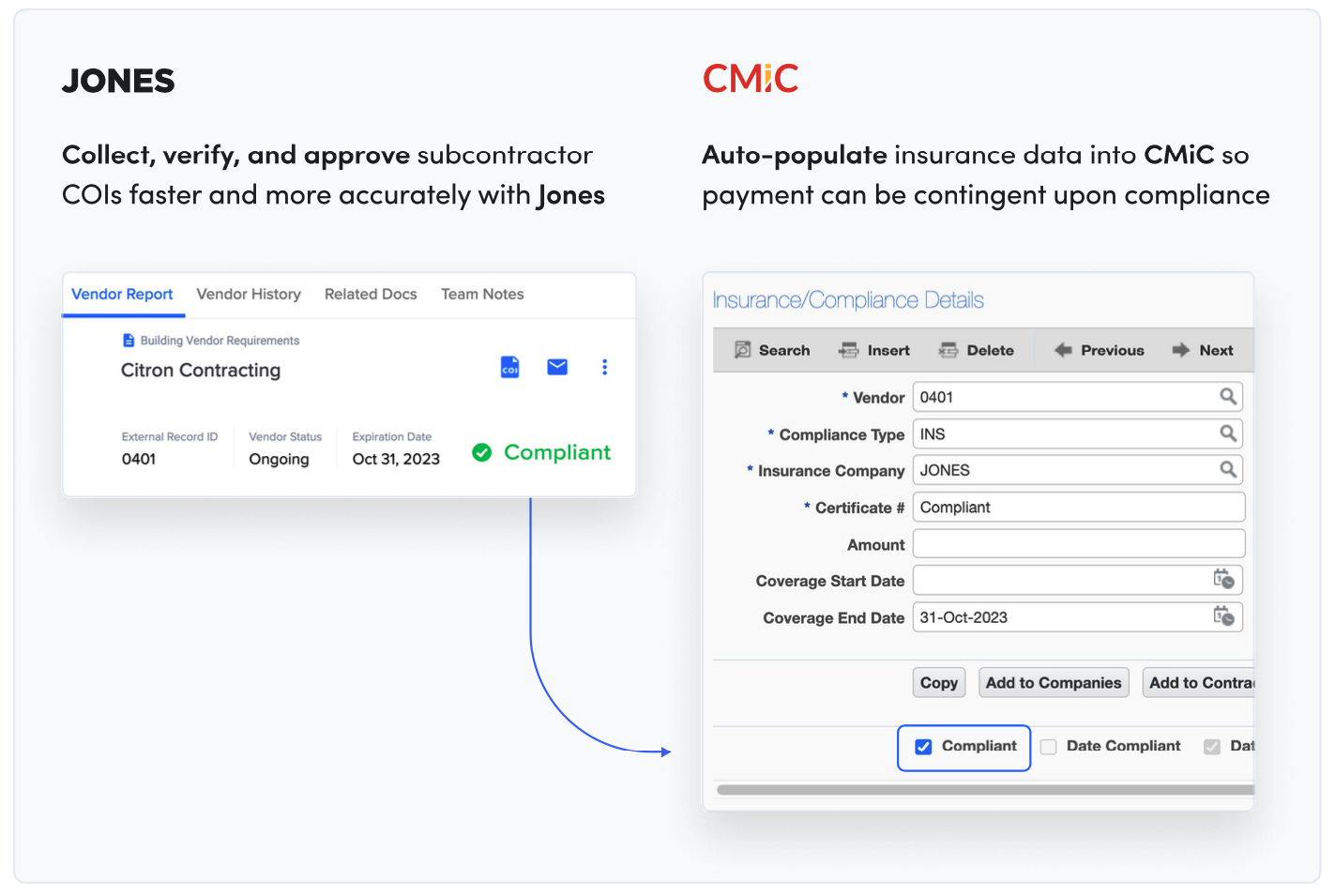
- Import CMiC contact users to Jones: Choose which CMiC contact user roles should have access to Jones. For example, you can grant only project managers and accountants access to Jones, but not superintendents.
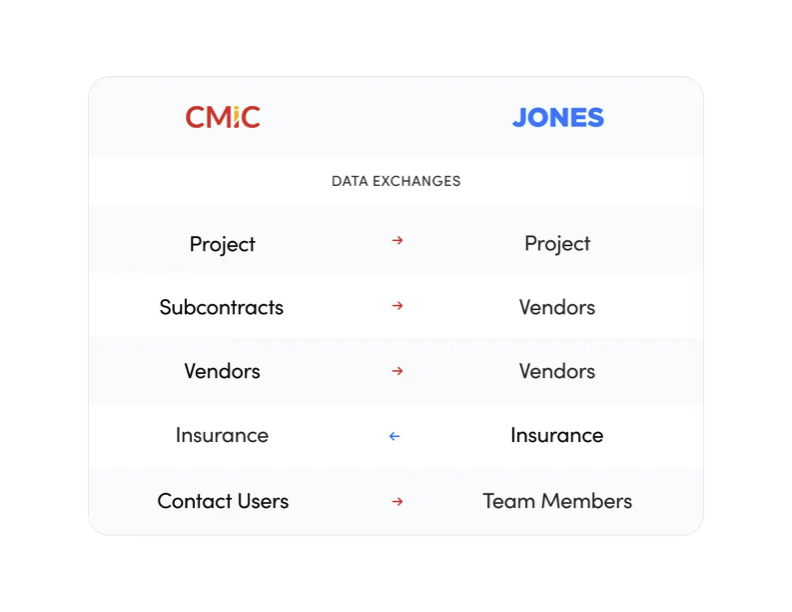
- Ensure timely data sync: Get automatic updates for COI compliance in both systems. All data is pushed from CMiC → Jones every 30 minutes, and from Jones → CMiC every night.
- Monitor expiration tracking and alerts: Set proactive reminders for COI renewals. Learn more on how Jones helps prevent expired COIs from falling through the cracks in our blog post here.
Benefits of bi-directional integration
There are many reasons you’d want your COI tracking tool to have a bi-directional integration with CMiC:
- Eliminate redundant data entry
- Perform essential COI management tasks directly within CMiC, without needing to leave the platform
- Minimize compliance risks with real-time updates
- Enable faster project approvals and reduce payment delays
Unlike other COI tracking tools that may claim to have bi-directional integration capabilities, Jones is the only COI tracking software for CMiC with an Official Partner Built Integration. Let’s dive more into the benefits for your company.
Key Benefits Of Using Jones For CMiC Users
Time and cost savings
Companies like SavCon, a New York and West Palm Beach-based GC, report a 50% reduction in time spent managing subcontractor compliance once using Jones. Here are some reasons why:
- Reduce manual labor by automating compliance workflows: Imagine all the other things your team can do with their time when they’re not reviewing and chasing down COIs from subcontractors…
- Accelerate COI collection and approval processes: Get subcontractors working on projects faster with automated collection, reviews, and resolution of deficiencies in coverage.
- Eliminate manual data entry: Your team won’t need to spend hours manually updating insurance information between platforms when they’re using the Jones bi-directional integration with CMiC. Subcontractor insurance details are auto-populated and available within CMiC.
Enhanced risk management
Eliminate exposure to risk and protect projects from claims. Here’s how Jones helps:
- Identify coverage gaps automatically
- Automated resolution of gaps and proactive auto-renewal emails
- Access pre-collected insurance certificates, documents, and contacts
- Schedule reports on compliance rates
Improved subcontractor experience
Jones takes the frustration out of compliance for your subcontractors.
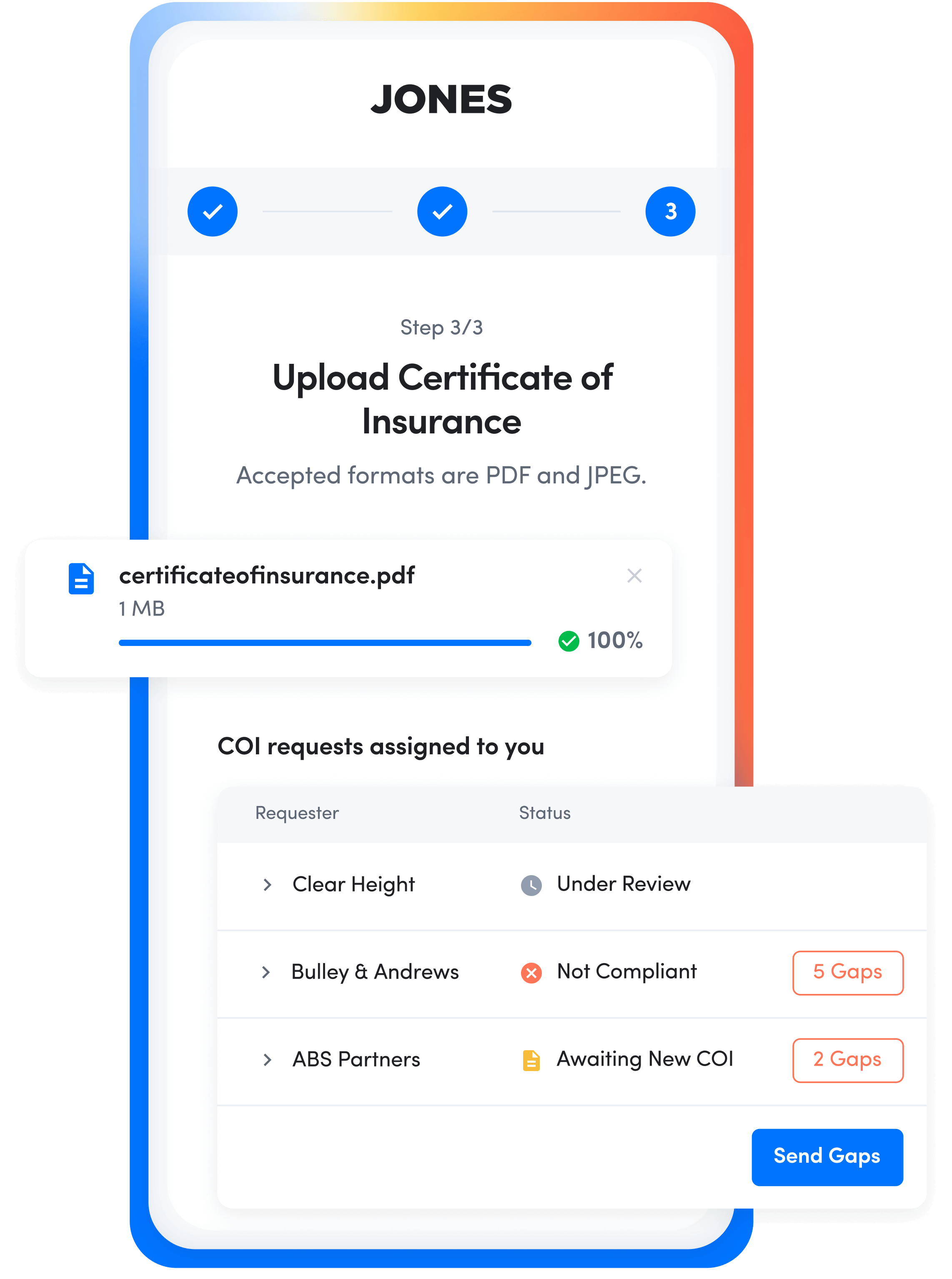
- Easy document submission through the Jones platform (see a video walkthrough here)
- Straightforward, no log-in access to upload insurance documents
- Manage multiple COI requests across different projects
- Pre-validated compliance data on The Jones Network and the ability to submit insurance with annual (blanket) insurance requirements reduces the need to collect new COIs for each project
Real-World Success Story Of The Jones CMiC Integration
Clune Construction before using Jones
Clune Construction is a Chicago-based ENR 400 general contractor working on projects across the country. Before using Jones, Clune’s project coordinators and admins were manually tracking subcontractor COIs.
“When it came to insurance, there was nothing in CMiC for us” – Steve Green, Vice President of Corporate Technology and Systems at Clune Construction.
Manually tracking COIs and not having insurance information available in CMiC led to inefficient workflows and slowed down Clune’s team. Additionally, Clune didn’t have a single source of truth for subcontractor compliance since every project team managed COIs individually by region. This made it difficult for teams to run compliance reports and get insight into risk across projects.
Outcomes after using the Jones CMiC Integration
Since using the Jones CMiC integration, Clune Construction now has one spot where anyone across the company can log in and view which subcontractors are compliant or not.
“With the Jones integration, our team can completely handle subcontractor insurance and see all the information they need directly in our CMiC account. Jones allows us to create new jobs, add new subcontractors, write reports, create subcontractor compliance dashboards, and perform other tasks without leaving CMiC, which, in turn, helps us avoid logging into several systems and risking errors.” – Steve Green, Vice President of Corporate Technology and Systems at Clune Construction.
Want to see how other GCs are boosting efficiency and saving time with Jones? Learn how Bulley & Andrews, another Chicago-based ENR 400 general contractor, saved hundreds of hours after switching to Jones for real-time subcontractor compliance tracking.
Step-by-Step Guide: Setting Up Jones With CMiC
We’ll send you a step-by-step guide on how to up the Jones integration within your CMiC account. It goes over six main areas:
- Adding user extension fields
- Adding customer tables
- Assigning user extension fields to existing tables
- Adding fields in newly created custom tables
- Changing label names of UE fields
- Adding Jones policy types in Compliance Codes
You can follow the steps and get the integration all set up on your own, or we can configure it behind the scenes for you. Here are some other steps you’ll need to take:
- Create an account on Jones. This is a straightforward 5-step process, and you can learn more in our guide here.
- Choose which CMiC contact user roles should have access to Jones. Provide a list to our team mapping CMiC contact users to their corresponding Jones user permissions (for example: a ‘project manager’ contact user in CMiC can have ‘compliance manager’ user permissions in Jones).
- Select if you’d like to display overall vendor compliance, compliance on a per-policy level, or both. You can also choose if you want to see all of the policies reviewed or just a select few.
- Decide if you want to have project-specific insurance requirements, blanket insurance requirements, or a mix of both. Check out our blog post here on blanket insurance requirements and when it’s ideal to use them.
FAQs about the Jones and CMiC Integration
- What happens if a subcontractor’s COI expires mid-project?
- Ideally, this wouldn’t happen because Jones sends a series of emails 30 days before insurance documents are set to expire (learn more here). However, if a COI does expire, the compliance status will change in CMiC and you’ll be able to withhold payments. The subcontractor will be notified, and they’ll be able to upload a new set of insurance documents via an easy no-log-in link.
- How often is data synced between Jones and CMiC?
- All data is sent from CMiC → Jones every 30 minutes, and from Jones → CMiC every night. For example:
- If you add a new subcontractor to a job in CMiC, the subcontractor will receive an email request for insurance documents within 30 minutes.
- If Jones finishes reviewing a subcontractor’s insurance documents at 4 pm EST on a Tuesday, the compliance status, expiration date, and other information will auto-populate in CMiC later that night.
- All data is sent from CMiC → Jones every 30 minutes, and from Jones → CMiC every night. For example:
- How does Jones review COIs for compliance?
- Great Question! We use an AI engine plus our team of COI review experts. Learn more in our blog post on 11 FAQs for how Jones reviews COIs and endorsements for compliance.
- How long does it take Jones to review a COI?
- Jones reviews insurance documents within 24 business hours. You can get in touch with our sales team to learn more about on-demand rush audits as well.
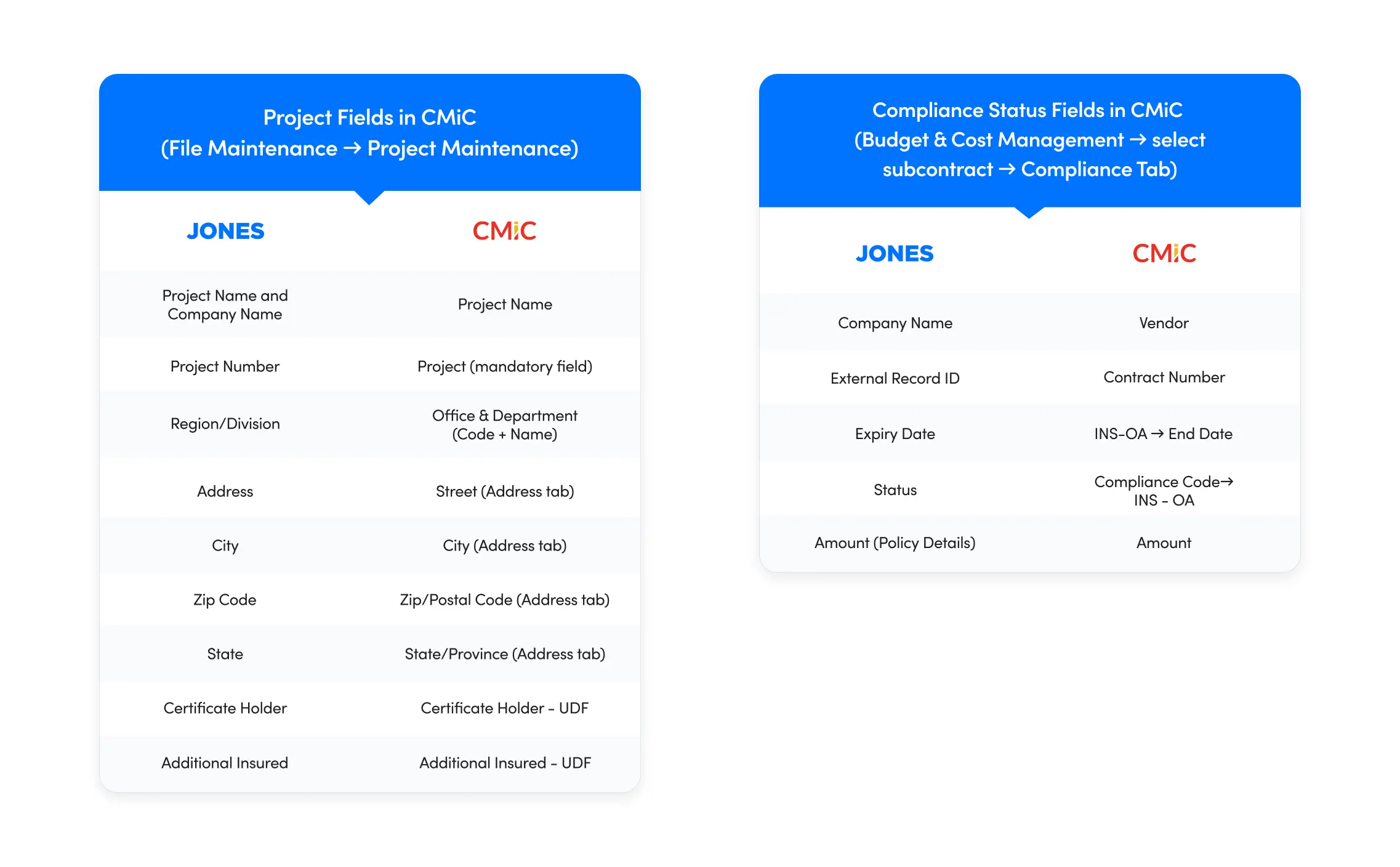
- What are all the fields synced between CMiC and Jones?
- Check out our chart below detailing the fields in Jones and the corresponding fields they sync to in CMiC.
Final Thoughts on the Jones CMiC Integration
Jones is the only COI tracking solution with an official CMiC Partner Built Integration (check out all of CMiC’s Partner Built Integrations here). The Jones integration simplifies COI management and helps general contractors get COIs compliant faster within CMiC.
Book a demo with our team to see Jones in action and learn more about how our integration with CMiC can transform the way your company manages subcontractor compliance.