Three Most Common Mistakes Property Managers Make When Reviewing COIs

Mistakes when reviewing COIs - Jones

Mistake 1: Endorsements ≠ Provisions

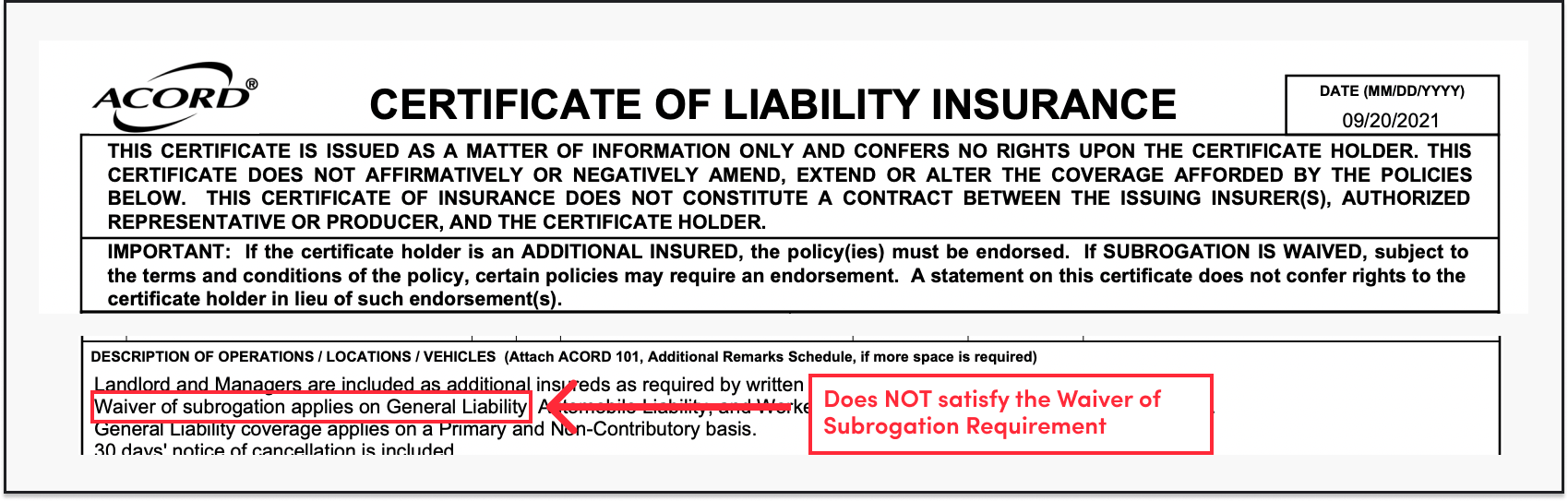
Scenario: Your building requires a Waiver of Subrogation endorsement.

❌ Don’t: Search for it in a COI document.
Waiver of Subrogation on a COI - Jones

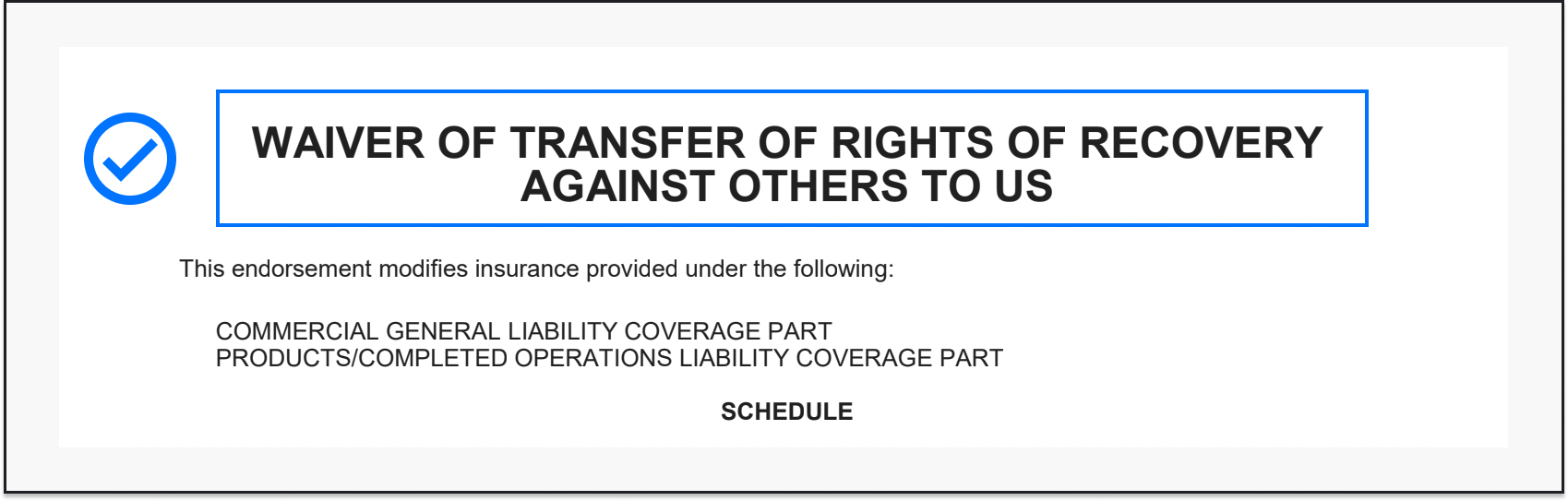
✅ Do: Look for a separate page that references a Waiver of Subrogation.
Waiver of Subrogation Endorsement - Jones

Even if the check box for waiver of subrogation is checked and the description of operations says “Waiver of Subrogation,” if an endorsement document is required, this will not suffice. The same rule applies to any kind of endorsement. Noting this on a COI is not enough, search for a separate endorsement document.

Mistake 2: Workers’ Compensation ≠ Employer’s Liability

Scenario: the Employer’s Liability limits meet the required limits for Employer’s Liability.

❌ Don’t: Accept this as satisfying the required limits for Workers’ Compensation.
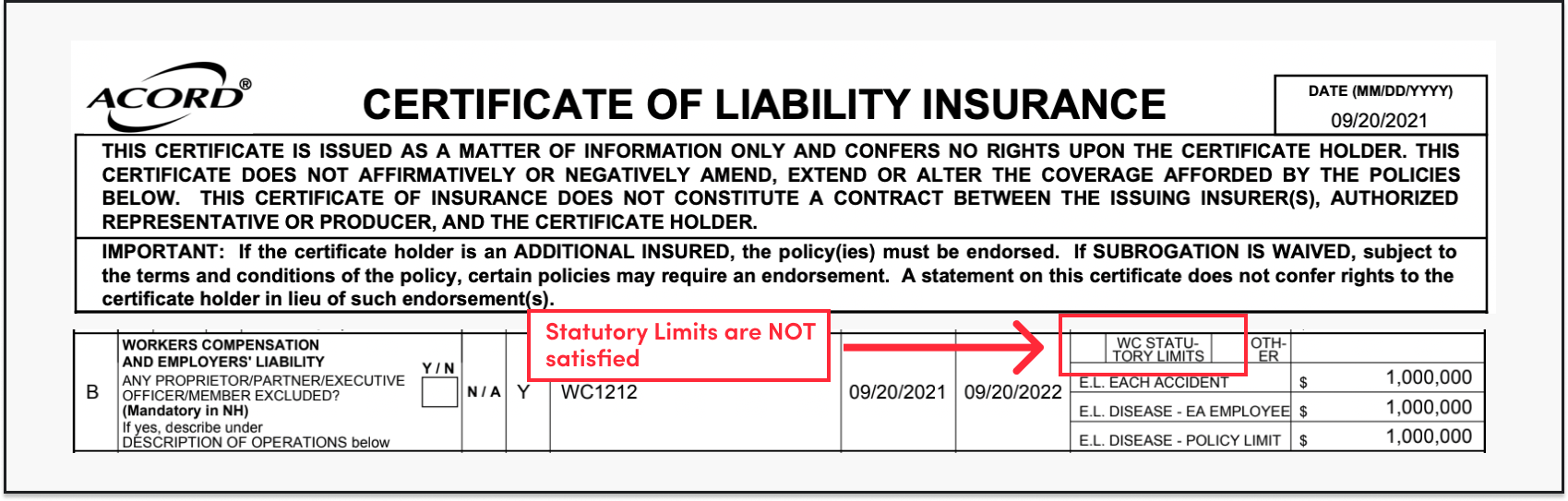
Workers' Compensation - Jones

✅ Do: Check if the “Per statute” checkbox is marked above the Employer’s Liability limits on the COI.
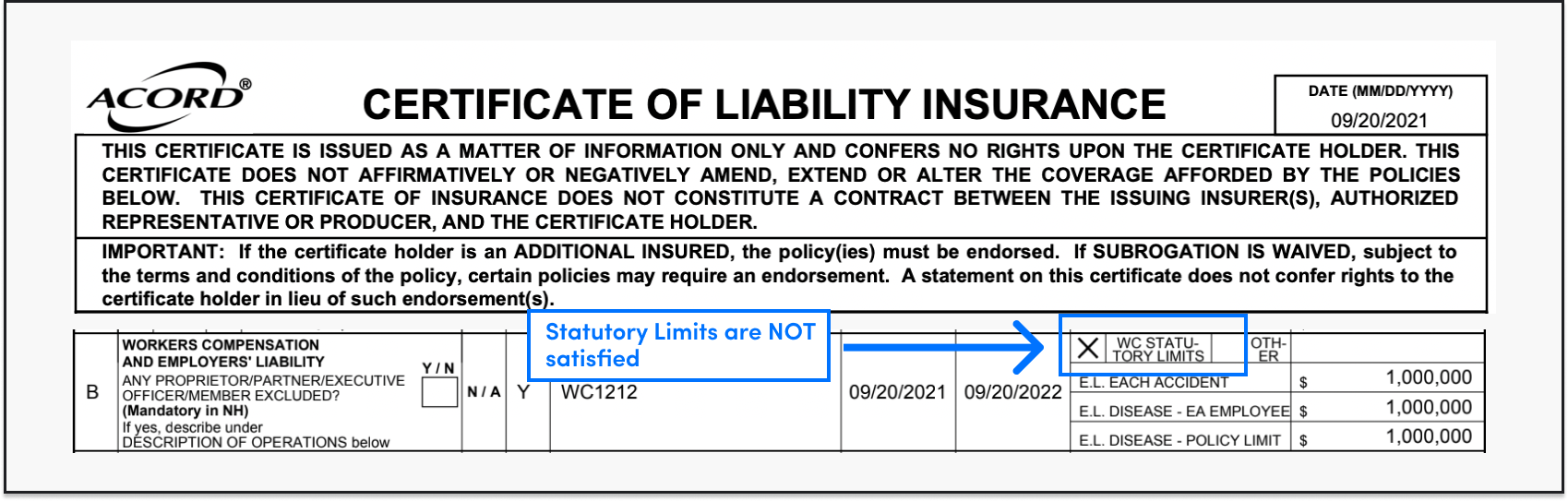
Workers' Compensation Satisfied Requirement - Jones

While Employer’s Liability and Workers’ Compensation often come bundled together, they are two separate kinds of insurance that serve different purposes and have different limits.

Workers’ comp is a no-fault kind of insurance, which means that you as an employer, do not need to be liable for the policy to be paid out. If an employee gets injured, Workers’ comp will pay their medical bills and their lost wages, no questions asked.

The employer’s liability is fault dependent. You have to be liable for employer’s liability to kick in.

If you look at a COI, you will see three limits in the Workers’ compensation row that refer only to the employer’s liability. Meanwhile, there’s a checkbox for Workers’ compensation.

This checkbox indicates whether the Workers’ compensation limits meet the requirements of the state.

Insurance requirements will often specify limits that are required for employer’s liability, as well as per statute limits. Both requirements need to be met. One does not satisfy the other.

Mistake 3: General Liability ≠ Property Insurance

Scenario: Your building requires Property Insurance

❌ Don’t: Use any limit of General Liability to satisfy the Property Insurance requirement. Sometimes, we see property managers accepting the “damage to rented premises” limit in the General Liability row in lieu of Property Insurance. Don’t do this.
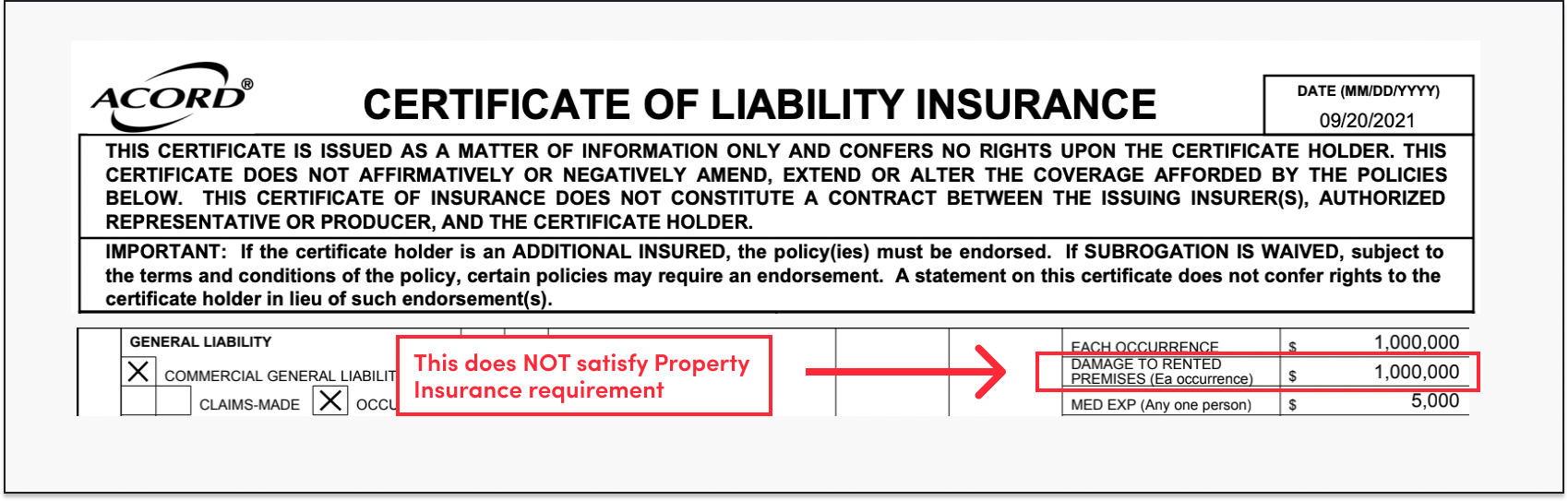
Property component of the general liability - Jones

✅ Do: Look for Property Insurance on the bottom miscellaneous row of an Accord 25 where free text is written or on a separate COI specifically dedicated to property insurance.
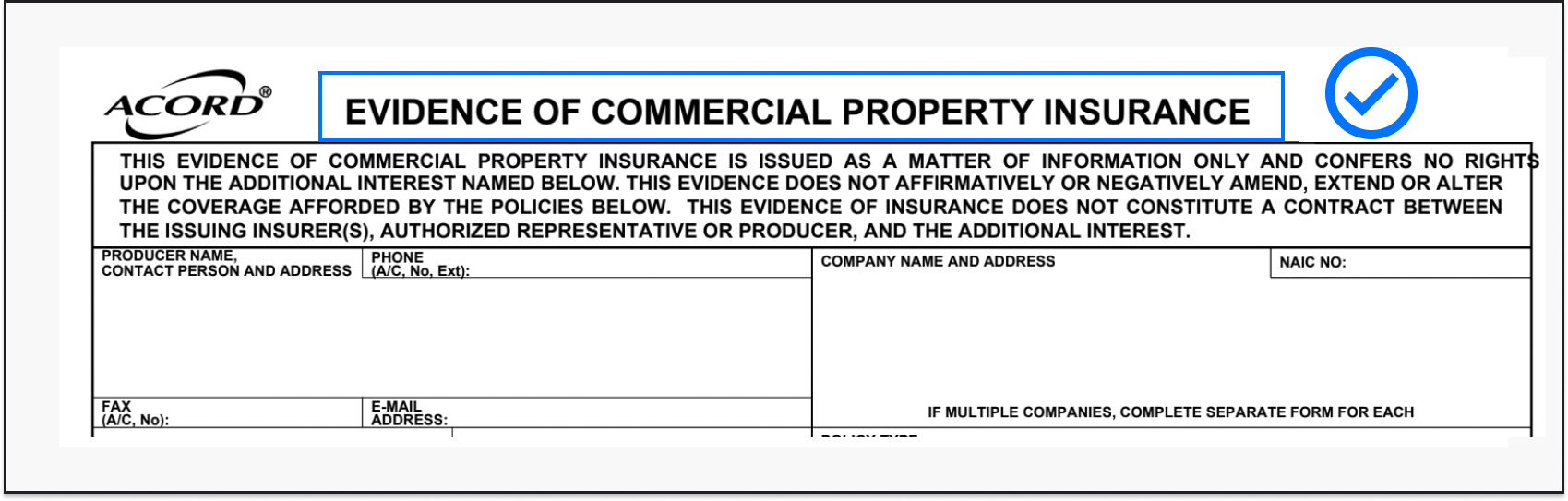
Property Insurance - Jones

Here is why tenants and vendors need to have property insurance and why general liability doesn’t work in this case.

General liability, indeed, covers property damage—but only third-party property damage. For example, if a vendor accidentally damages a landlord’s property, the landlord is protected from loss.

However, if a vendor’s property ends up damaged while in the building, it would NOT be covered by General Liability, which, in turn, may result in a lawsuit against the landlord and property managers.
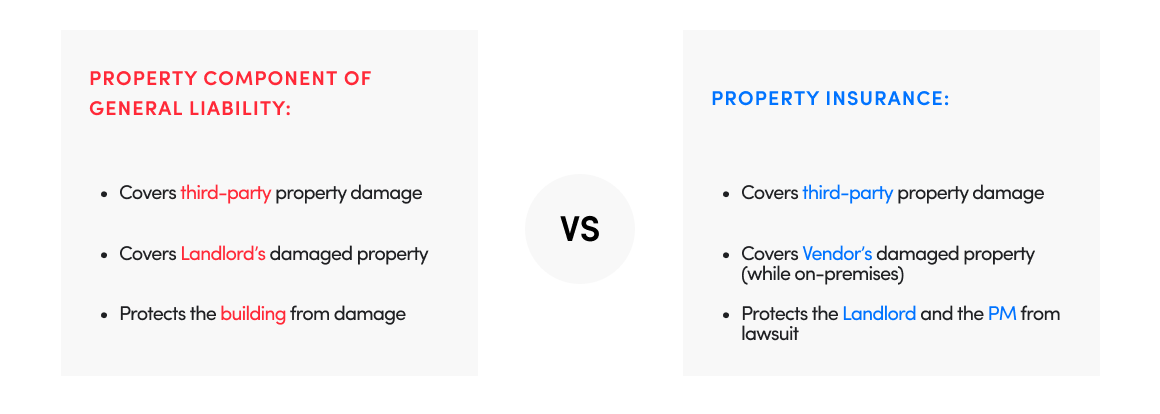
Property Insurance vs. Property Component - Jones

To avoid this, buildings often require first-party protection – which is a separate coverage referred to as Property Insurance. This will cover damages to tenants’ or vendors’ own property while on-premises.
Three Actionable Insights Your Aggregate Insurance Compliance Stats Can Reveal

Compliance Charts - Jones

How to get aggregate compliance data charts?

For Jones customers, things are easier – as of January 2022, compliance charts are available on every account dashboard. You can skip right to the next section.

If you don’t have Jones, additional steps will be required. Here is a guideline to create a basic compliance analysis using excel.

Step 1:
Compile your properties’ data in one place, add columns for property/project, Record Name (tenant or vendor), Record Type (Tenant/Vendor), Compliance Status, Expiration Date

Step 2:
Organize the compliance status for each of your properties in the “Compliance Status” column. Here are some categories you can use::

  • Compliant (all requirements are satisfied)
  • Non-compliant (at least one requirement is missing or insufficient)
  • Awaiting COI (no insurance documents are on file)
  • Waived (one or more gaps exist but they do not present a material risk)
  • Expired (one or more policies have expired)

Step 3:
Create a Chart by highlighting your data and leveraging Excel’s native charts and graphs functionality. This will allow you to produce a bar or pie chart to visualize the information.

Here are some examples of stories your compliance data can tell.

1. Check for any outliers on properties or project

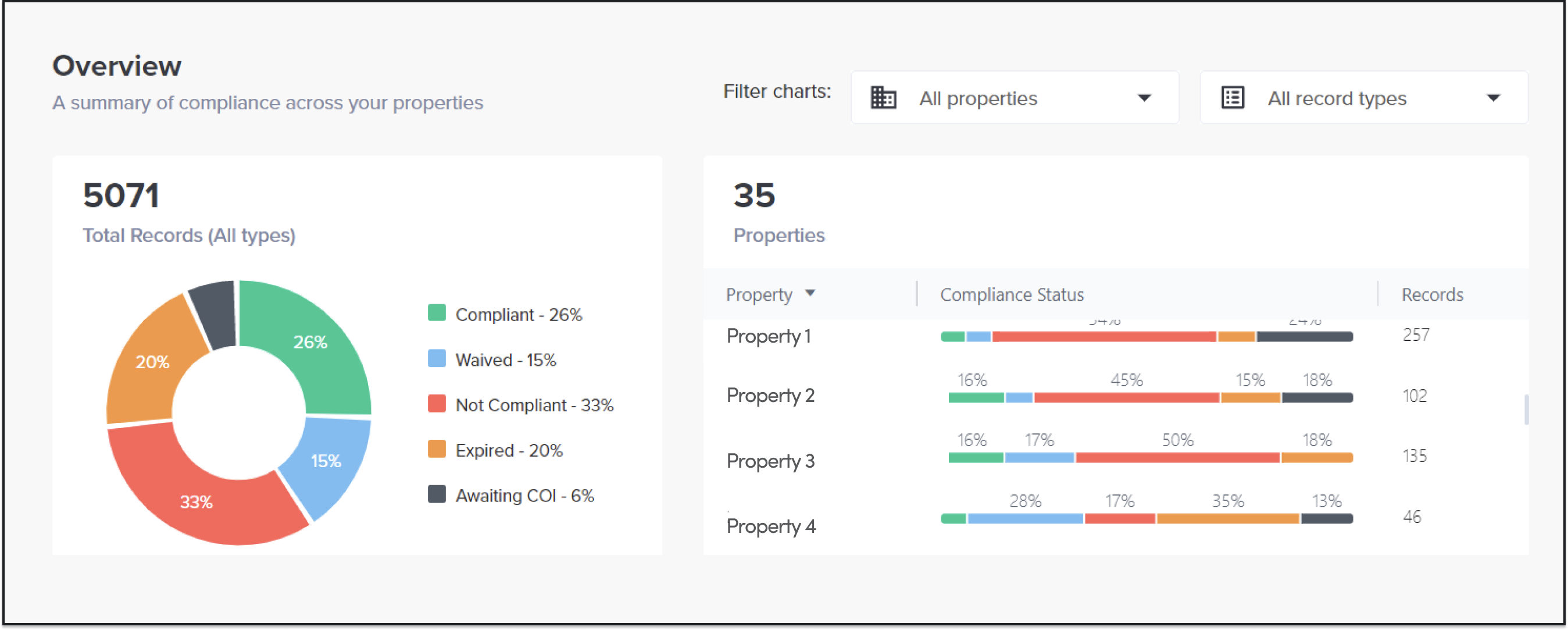
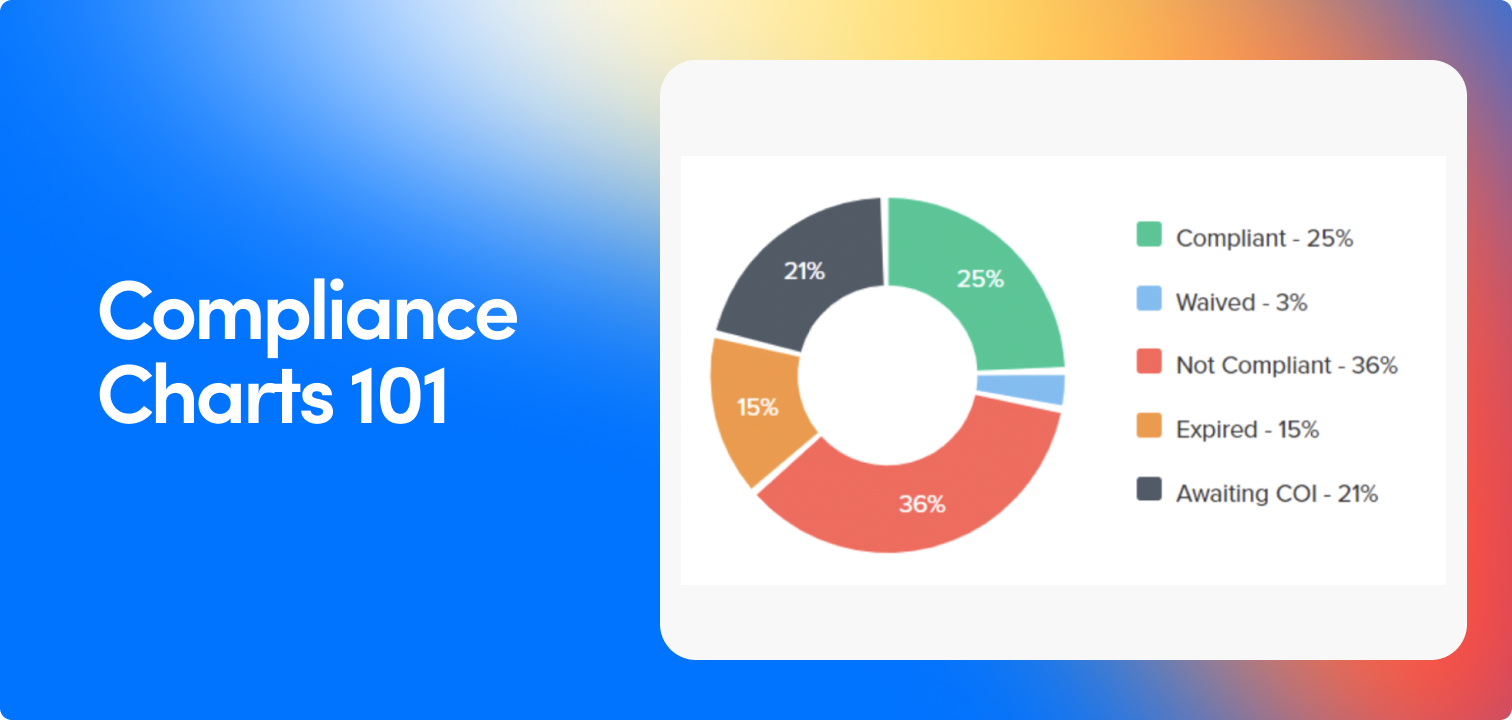
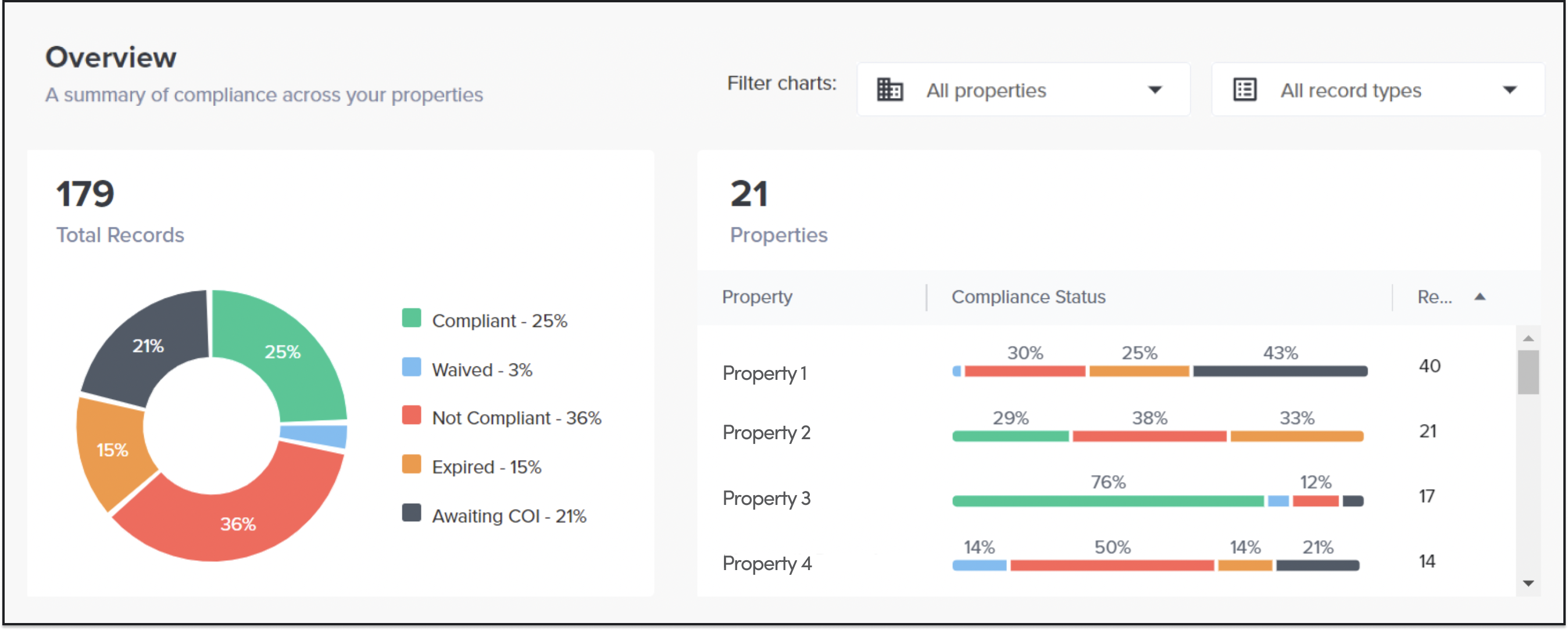
In this example, if you look at the compliance statuses data (pie chart to the left), the portfolio has a significant percentage of non-compliant records.

However, on a property basis, you will see that it’s the particular property, Property 4, has a disproportionate number of non-compliant records as compared to other properties.

💡 Action item:

Follow up with Property 4’s property manager to get their perspective on how the compliance process is working and not working. Have that manager connect with a peer that is seeing more success and ask them to take back some best practices/next steps. Set a target for the next Q and check back in to see what progress has been made.

Perhaps, the insurance requirements for this property are stricter than those for your other assets? If that’s the case, was this intentional, and would it make sense to revise any of these? Can any waivers be granted for specific vendors/requirements?

If revising insurance requirements is not an option, you might want to consider the following:

  • Are you communicating with the right contact at the vendor/tenant? Can we connect directly with the broker? Maybe there is an opportunity to improve email communications or cadence
  • Alternatively, you might look into bringing in new vendors whose insurance requirements will be more compatible with your requirements.

2. There is a high percentage of waived records across your portfolio

Here is an example.

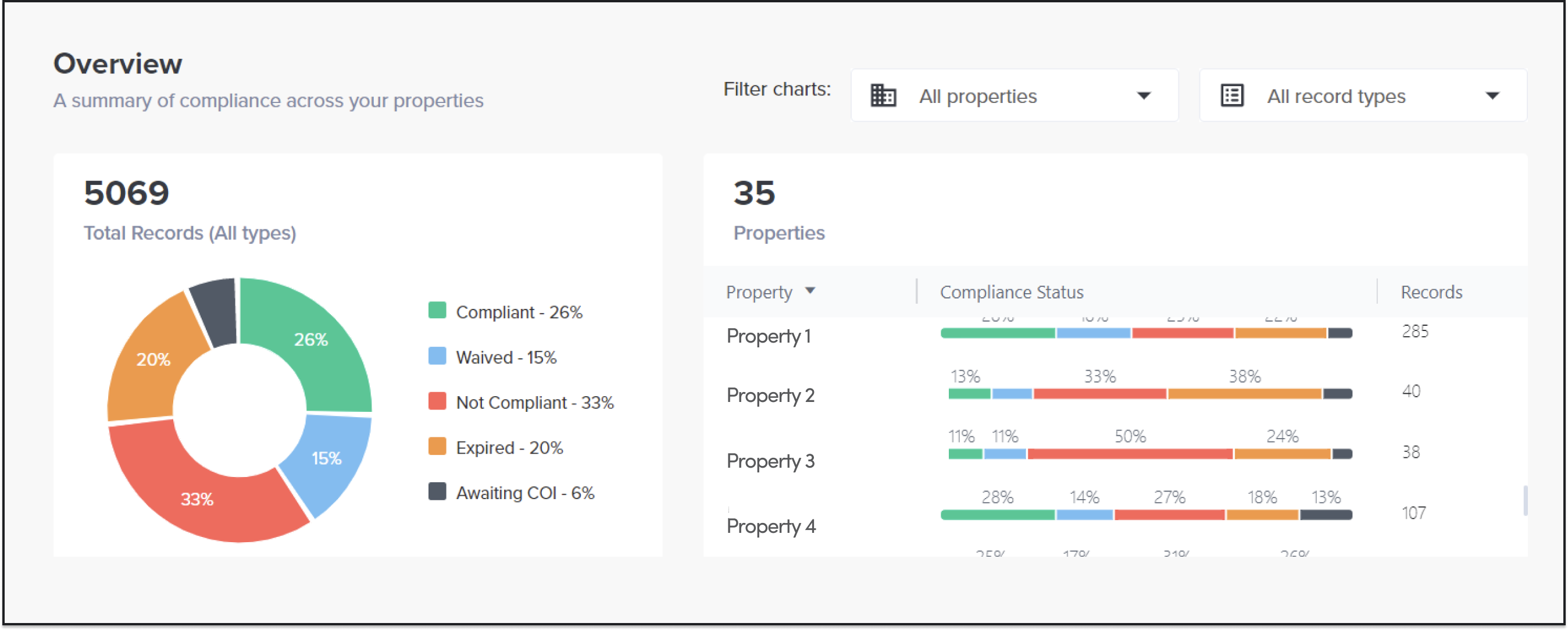
The overall portfolio, according to the pie chart above, has 15 percent of waived records, which is rather high. But how evenly are these waived records spread across assets?

As you can see on the properties’ breakdown to the right, it is Property 4 that is that is responsible for the average being so high — in fact, ~28 percent of its records ended up waived.

Why is this happening?

You might want to take a deeper dive into this property’s performance and see if there is one particular policy that ends up being waived all the time, e.g. Professional Liability. It may also be the case that certain processes for granting waivers are not being followed.

💡 Action item:

Consider the rationale for these waivers, do they make sense from a risk management standpoint? If so, can those requirements be removed from future requests? Can this be applied to any other properties to eliminate non-compliance? Conversely, should these be revised or retracted if need be?

Answering these questions may help you to alleviate compliance burdens across other similar instances within your portfolio.

3. There is a high percentage of expired records across your portfolio

Three things could be at play here.

First scenario: your renewal dates crawl upon you as they all happen roughly at the same time (according to Jones data, ~25 percent of all COIs expire in January).

Second scenario: lots of expired records might indicate difficulties in the COI renewal process.

Third scenario: There are some vendors or tenants who no longer service/occupy the property. These records can be archived for the time being if a renewed Cert is no longer required.

💡 Action item:

Determine which scenario is true. Do your COIs expire at the same time and does it happen across your entire portfolio? If yes, you might want to implement a process that helps you manage COI renewals in advance.

Here is what the Jones team recommends:

  • Pull a list of all your tenant and vendor records with insurance records expiring in January
  • Draft a communication to the primary insurance contact at their company to notify them of which one of their policies is expiring (important as they may have specific brokers for specific policies) and instructions on how to submit a renewed COI
  • Be sure to send follow-up communications over the course of the month to ensure you are collecting all outstanding policies as they begin to expire and are renewed.

If there is a higher percentage of expired COIs at one of your assets, or if your COIs expire at different months, then you might need to fix your COI management process.

Things to examine:

  • Do you have a system in place to be notified of expiring COIs at least 1 month in advance?
  • Are all your tenants and vendors responsive?
  • How many emails does it take on average to receive a COI from your tenant or vendor?

Insurance Compliance is a Silent Killer of Tenant Experience. Here are Three Ways To Fix It.

Tenant Experience

Here at Jones, we have identified the three key strategies you need to focus on to deliver a great tenant experience (or a less horrible one):

#1. Vendor Procurement

This is the most impactful of the three strategies because it is proactive.

Create a Rolodex of pre-approved vendors who you know are compliant in your building and share it with your tenants. This simple strategy will allow tenants to bypass the whole COI verification process and get vendors in the door so much faster. If you already have an up-to-date COI for an electrician that has worked in the building before, why not encourage your tenants to hire them?

Make sure this Rolodex is easily accessible to your tenants. It can be hosted on your website, a platform such as Notion, or even created and maintained as a PDF, as long as your tenants can easily find the link (hint: drop it in your email signature!).

If a tenant requires an ad-hoc vendor who is not in the Rolodex, help them bring this vendor into the building fast by accelerating the COI approval process. This is where the pre-approved vendors and compliance come into play, so be sure you tend to both.

#2. Communication Strategy

The moment your tenants receive an email request for an insurance certificate, they cringe. Most of such emails are a) confusing b) full of jargon and c) sound as if they were addressed to a robot.

Designing great emails is a science, but here are some general rules:

Use short sentences that are extremely clear on the nature of the request (“Your vendor’s COI has expired. Please provide an updated one by clicking on the button below”). That goes for the subject line too!

Try to avoid, or at least explain insurance jargon. If you must use insurance terms, always include reference links that provide a simple explanation of the term, what is needed and why it is needed.

If you use a COI management tool, make sure you can control the branding of the email, the domain host, and the frequency so that tenants recognize the email and can respond accordingly. Emails that are confusing, untrustworthy, and too frequent will only add to your tenants’ frustration.

#3. Available Resources

Offer your tenants a variety of resources to assist them with the compliance process, and make sure resources are easy to access! For instance, help centers, blogs, insurance glossaries – all of these options will work as long as they are clickable and instantly available on both desktop and mobile.

Include a guide for your “jobs to be done”. For example, if you are missing a Waiver of Subrogation and requesting it from your tenant’s vendor, specify where they can find it (ACORD 25 or Additional Insured Remarks) and provide screenshots to show what these documents look like.

If you are using software to manage compliance, make sure to include resources on how to use the software product as well, such as a step-by-step guide on how to upload a COI into the system for review and how to escalate any issues with your property management.

Leverage your relationship with your insurance broker and allow tenants to reach for clarifications if needed. Open a line of communication between your broker, your tenants’ brokers, and those of their vendors, as a means to streamline the approval process and leverage experts in the workflow.