COI Mismanagement Horror Stories to Learn From

Horror Stories from COI mismanagement

A Policy that Expired 1 Day Before an Incident Occurred
A real estate company in Houston, Texas had an insurance policy that covered burglary. However, the policy ended on March 27th and was not promptly renewed. On March 28th, a large-scale burglary occurred on the property. Due to the fact that the insurance policy expired the previous day and was not renewed in time, the insurance company has no obligation to cover this claim.

Key Takeaway: It can be easy to overlook or forget about an expiring insurance policy, but any lapse of time in coverage creates a tremendous amount of risk. As seen from this incident, it’s imperative for insurance policies to be renewed on-time.

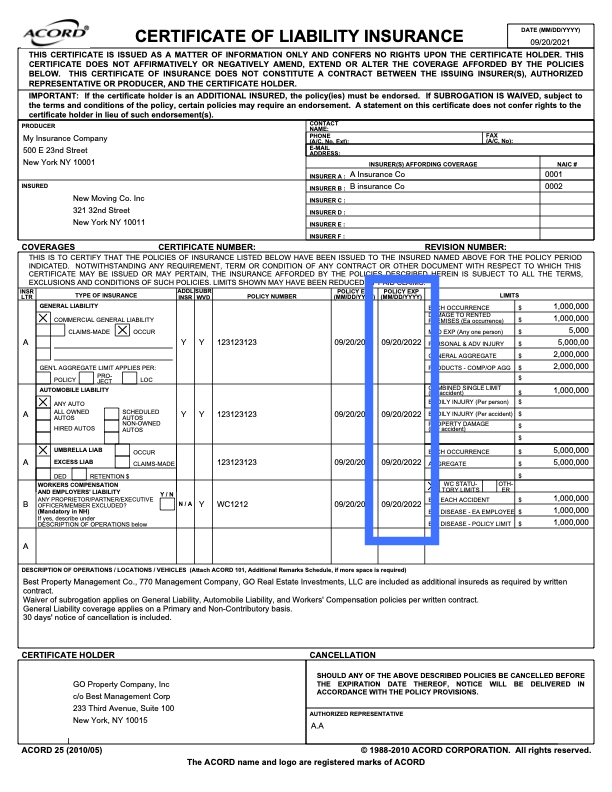
Picture of where policy expiration dates can be found on a COI

This is where the expiration date of a policy can be found on a COI

Incorrect Additional Insured Listed on a Policy
A Colorado-based property management company was seeking coverage for an incident, but cannot do so because it was never listed as the insured party on the professional liability policy. A similar name was listed, but the exact name of the property management company was not listed. Because of this, the insurance company does not need to cover the claim.

Key Takeaway: It’s very important to make sure the correct names are listed as additional insured on all policies. If this is overlooked, the company may not be covered by the policy. You can learn more about the “Additional Insured” term here in Part 3 of the Jones Compliance Course.

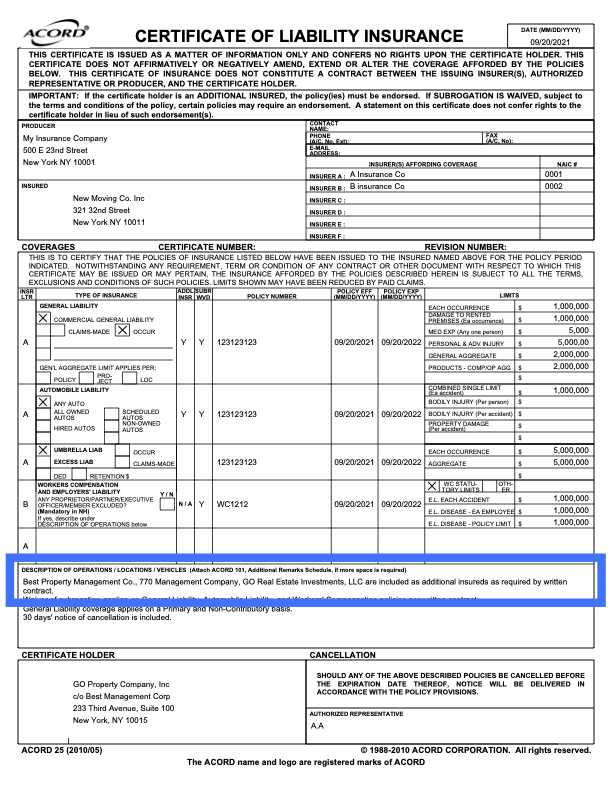
Picture of where an additional insured can be found on a COI

This is the most common place to find the ‘additional insured’ on a COI

A Policy that Does Not Protect a Contractor From a Claim
A contractor in Georgia was sued by a real estate company for $250,000 due to issues arising from their work. The contractor was hired to repair and replace stucco on many buildings within a portfolio. They created widespread hairline cracks in the stucco, applied failed sealants, and created multiple fit and finish issues. The contractor’s insurance provider told the Georgia federal court that it has no duty to cover this claim because the commercial general liability policy it issued contained multiple exclusions barring coverage for property damage arising out of its work. The real estate company who hired the contractor for this work may be stuck with the burden of paying the hefty bill to repair these damages.

Key Takeaway: It’s very important to understand the exact language and coverage amounts of the insurance policies that all contractors and vendors have.

Crack in stucco

The damage from the contractor may not be covered by their general liability policy

Being proactive instead of reactive with COI management would have saved all of these companies a large amount of time, stress, and most importantly: money.

Through advanced compliance dashboards, AI driven auditing, and COI workflow automation, Jones could have helped prevent each of these incidents.

Ready to protect your company from risk and completely automate your COI management process?

Fill out the form below to get started!

Filing taxes as an independent contractor

Doing independent contractor taxes

Starting your own business can be very rewarding, both personally and professionally, but it is also a LOT of work. You have to find a suitable space, get insurance, build a customer base and manage your finances. Among your financial responsibilities will be filing and paying your taxes, which can be tricky, especially as an independent contractor.

How does an independent contractor pay taxes?

Independent contractors are obligated to pay self-employment tax (SE tax) as well as income tax. SE tax is primarily Social Security and Medicare tax, similar to those withheld from the pay of most waged employees. You are expected to pay estimated tax quarterly and then file an annual tax return.

The IRS provides the handy Form 1040-ES to help you estimate the ES tax that you will pay quarterly. If it is your first year as an independent contractor, you will estimate your anticipated income; after that, you will pay quarterly taxes based on the previous year’s income. Adjustments can be made quarterly. These taxes can be paid online.

You do not have to file an annual tax return if your net earnings are less than $400. You determine this by subtracting your business expenses from your earnings. If you made less than $400 or lost money from your business during the year, you typically don’t have to file a tax return. You may still be required to file the form if you meet any other requirements listed in the Form 1040 instructions. You can file your taxes using a IRS forms Schedule C or Schedule C-EZ. These instructions can help.

If you made or received a payment, you are most likely required to file a Form 1099 with your annual return.

What is a form 1099?

A Form 1099 is what is called an “information return” by the IRS. An information return is a required report to the IRS on certain transactions, such as wages and other forms of compensation to employees, non-wage income, interest received, cancelled debt, etc. Basically, the IRS uses these forms to match data against tax returns and ensure that you are giving them their due.

There are sixteen types of Form 1099s, but let’s go over the few most relevant Form 1099s for independent contractors.

  1. 1099-MISC: The most common version of this form and the one you will almost certainly encounter, as it is used to report your income as an independent contractor.
  2. 1099-INT: This form is used to report any income over $10 from interest, like that from a savings account.
  3. 1099-DIV: This 1099 is for the reporting of dividends and distributions from investments.
  4. 1099-C: This form is for the reporting of cancelled debt. Cancelled debt is treated by the IRS as income and is taxable, so it must be reported.

Where do you get a 1099?

The good news is that, as the payee, it will be sent to you. Anyone who paid you more than $600 for a job or jobs during the year is required to file a form 1099 with the IRS and send you a copy by the end of January. The form will largely be empty, since most of the fields don’t apply to you. Typically, the form will only include your tax information and that of the payer and field 7 of form 1099-MISC, for non-employee compensation.

In order to receive this form, you should ensure that you complete a form W-9 before beginning any job. A W-9 is a request by the employer to receive your name, address and taxpayer identification information. They need this information in order to complete and file the 1099.

If you don’t receive a Form 1099 from a client from whom you expected to receive it, don’t stress. While you can reach out to the payer and request the form, this could create duplicates and actually cause more issues. You’re better off keeping your own records throughout the year and filing all your income, regardless of any Form 1099. The onus is on the payer to file the form 1099, but you can report income without it, and you should.

What do you do with a Form 1099?

In principle, a Form 1099 is to help you figure out how much income your earned in a given year. Ideally, a responsible business owner should keep his or her own records and be able to file an annual tax return without receiving any Form 1099s. In reality, things can get lost in the course of a year, so getting 1099s can fill in the gaps.

Keep in mind that you will only receive a 1099 from clients that paid you at least $600 throughout the year. You’re still required to report all your income, regardless of the 1099. When completing your annual return, you must include all of your 1099s and list your total income, whether or not it’s all listed on a 1099.

If you receive a Form 1099 from a client and think the information is inaccurate, address it with them immediately. If you can’t convince them, you can always explain your stance to the IRS. For example, if a client claims they paid you $4,500 for a project, per your initial contract, but in the end, the project was cut short and you only received $3,200, then you can explain this on your tax return and provide receipts as evidence. The IRS can adjust your taxes accordingly.

Preparing a Form 1099

Some independent contractors may also hire subcontractors and therefore be required to send Form 1099s at the end of the year. A few basics to keep in mind:

  • File a 1099 for any independent subcontractors and unincorporated businesses to whom you paid at least $600 during the year.
  • Do not file a 1099 for employees. Employee wages and non-wage compensation are reported on a Form W-2.
  • Do not file a 1099 for corporations. You’ll be able to see a business’s classification on the Form W-9 that you should have requested from them when you hired them.

Having anyone who works for you fill out a W-9 is critical to ensuring that you complete all tax obligations. Without the W-9, you will have to track down the Taxpayer Identification Number and other information after the fact. If you can’t get this information, then you can’t file you W-2s and 1099s and you will be penalized by the IRS as a result.

You can get up-to-date Form 1099 instructions from the IRS website. You’ll fill out the form using the information you have from the W-9. Mostly, you’ll only need to fill in section 7: non-employee compensation, but always be sure to review the form and include any other relevant information.

Submitting a Form 1099

You can file 1099s by mail or electronically. Regardless, you must send your subcontractor Copy B of the form; if you want to send it to them electronically, you must get their consent first. Check the specific rules the IRS has for how you must obtain consent to send a 1099 electronically.

To file with the IRS electronically, you will use their FIRE (Filing a Return Electronically) Feature. You can submit via any number of compatible accounting software programs to submit your forms directly. In order to do so, you’re need a Transmitted Control Code (TCC), which you can request with a Form 4419. Be sure to do so at least 30 days before the deadline. You’ll receive your TCC and can use it to set up your FIRE account.

If you choose to file by mail, you can get a printable Form 1099 on the IRS website. Take note that you can print only Copy B; a physical Copy A is available only from an IRS office.

You will need to send copy B to the subcontractor by January 31st, so that they can file their own taxes on time. You must send Copy A to the IRS by the end of February, if you’re filing by mail, or March 31st if you’re filing electronically. If you’re submitting a physical copy of the 1099 to the IRS, you must also submit a Form 1096, which tracks every 1099 that you are filing for that particular tax year. The deadline for Form 1096 is the same as the deadline for 1099s. Be sure to check with the IRS to confirm the relevant deadlines for that year.

The IRS is serious business…

If you file late, you will be penalized. If you fail to file, you will be penalized. Penalties are assessed on each Form 1099 that is late or missing and they can add up.

Remember that whether you are the payer or payee, the IRS has ways of finding out what you paid or made. Be honest, be thorough and you’ll be ok. If you’re unsure or it’s your first year filing taxes as an independent contractor, you might want to consider hiring a professional.

The 5 Best Apps for Contractors

Apps for Contractors

The right app can do wonders for your business. Whether it helps you bill your clients, keeps track of your employees or saves you a buck, a good app can be a real life saver. Here are five of the best apps for contractors that can help you and your business grow and flourish.

Estimates and Invoices: Joist

While you can always go to Quickbooks, which is common and popular, Joist tailors itself to contractors and can provide some additional features that put them at the top of the field. Joist can be used for onsite estimates, project management, payment tracking and invoices.

Features

  • Include your company logo for professional estimates and invoices
  • Compile a list of your frequently used items for quick estimates
  • Quick emailing or printing of estimates and invoices
  • Easy conversion from estimate to invoice
  • Client information and project management
  • Export data directly to your accounting program

Price: Free!

Download: Google Play | App Store

Timesheets: TSheets

From the developers of Quickbooks, Tsheets helps you easily schedule your workers and track their hours.

You can build schedules by shift or by task, using easy drag and drop. The schedule is automatically exported to your employees. They’ll also receive push notifications about new shifts or shift changes via the app.

Using the time tracking function, your employees can track shifts quickly and easily, with handy shift reminders and overtime alerts to keep everyone on the same page. Employees can use their desktop, laptop, or mobile phone using the app, text messaging or dial in.

Features

  • Facial recognition to avoid buddy punching and GPS to track employees while they’re on the job
  • Ensure proper practice with reminders for breaks and clock outs
  • Choose manual entry, clock in or customizable and submit timesheets via the app
  • Sync schedules directly to Apple iCal, Microsoft Outlook or Google Calendar

Price: $20 + $5/user per month – $100 + $5/user per month (Discounts available for new users and annual subscriptions.

Download: Google Play | App Store

Safety: Red Cross First Aid

This app provides instructions for first-responder skills. You can get videos and step-by-step instructions on how to care for broken bones, strains, sprains, and more.

Construction is one of the most dangerous industries to work in. The “fatal four” are responsible for more than 500 construction worker deaths each year. Knowing how to handle those injuries quickly and correctly on the job site can be the difference between life and death.

Features

  • Videos, quizzes, and illustrated step-by-step instructions
  • Easy-to-use Spanish language toggle for Spanish-speaking workers.
  • 911 integration lets you can call for emergency services, directly from the app, so you can continue administering aid while calling.
  • Additional safety tips for everything from heat waves to chemical exposure to help you prepare for emergencies.
  • Quickly and easily locate the nearest hospital using your current location.

Pricing: Free!

Download: Google Play | App Store | Text GETFIRST to 90999

Money Saving: GasBuddy

Although GasBuddy is not specifically a construction app, it can save you money and that is something we can all appreciate. It show you where to find the least expensive gas by location. It uses gas price information provided by its community of 70 million users.

Features

  • A Gas Price Map shows you where the least expensive gas is in relation to your location.
  • Enter to win free gas! The more you use the app, the better your chances.
  • Earn points and achievements for your involvement in the GasBuddy community.
  • Information is updated in real time, so you’ll never miss out on the lowest prices.

Pricing: Free!

Download: Google Play | App Store

Management: Autodesk BIM 360

Autodesk BIM 360 is a field management app that enables programs for quality, safety, commissioning, and documentation, including building information management (BIM).

The app allows teams to make management programs and store information in one easy-to-access place. With mobile technology at the construction site, you can organize your team more efficiently and handle problems as they arise.

Features

  • Simple, customizable templates help your team collaborate and track projects.
  • Pushpin markers mark and record the exact field location and include details of any issues found in the field.
  • Web-based reporting helps turn data collected in the field into information that assists in management, ensures better safety, and minimizes risk for contractors.
  • Reports and dashboards allow users to easily share information with everyone on the project and quickly identify trends and measure quality.

Pricing: Free

Download: Google Play | App Store

Health Building Trends

Hardhats hanging on an orange trailer

And you only just caught up on the eco-friendly building fad… Now we have to build buildings that aren’t trying to kill their occupants, too?? In a survey of 140 corporate facility executives last fall by Structure Tone, 92% described wellness features as “essential, mainstream or an emerging need” for buildings occupied by their employees.

Indoor Air Quality

Recent studies have found that improving the air quality in office spaces can improve productivity by a startling amount. As a result, many businesses are revamping their existing spaces or building new spaces with HVAC systems that take air quality into account. Being able to design, market and install these types of systems will be a big business boost for architects, general contractors and HVAC techs in the coming years.

Healthy Construction Materials (Material Disclosure)

So this one is related to the health of the occupants, but also the health of the contractors who install them. It’s not always easy to get manufacturers to disclose the makeup of their materials, especially proprietary or patented materials. The demand for disclosure has been increasing and seems to be hitting a peek. In 2018, material transparency is becoming a standard and will allow consumers and contractors to make informed choices in selecting green building materials that are better for the environment and the people building and occupying a space.

Improved Lighting

Cited as one of the most important issues facing building occupants, contractors, and designers will be incorporating more natural lighting and lighting fixture. More natural and effective lighting in design layouts has the propensity to improve occupant energy levels, productivity, and overall mood.

Outdoor Space and Natural Exposure

Another way to cultivate mental and emotional wellbeing of building occupants is incorporating outdoor space and natural elements. The benefit of office plants is well researched, so take it to the next level by opening up to the outdoors or bringing nature inside. I’ve shared my enthusiasm for vertical forests in the past and in offices you can incorporate the little brother of the vertical forest: the living wall. The living wall doesn’t just look pretty, but also improves air quality and occupant morale and productivity. A landscape architect or carpenter (or a team of them) that can construct one of these is opening him or herself up to a whole new market.

A living wall at Cisco Systems in California

With conscientiousness about employee and resident health on the rise, a contractor that can break into this market is going to do his or her business a favor by providing expertise in a new and growing field.