How to Read a Certificate of Insurance: Everything You Need to Know + Downloadable PDF

In this guide on how to read a certificate of insurance:

Why You Need to Know How to Read a Certificate of Insurance
Getting Started
Policy Basics
Policy by Policy
Additional Information
Bonus: How to Read Endorsements

Why You Need to Know How to Read a Certificate of Insurance

Certificates of insurance play a pivotal role in supporting the risk transfer process. They allow you to get a comprehensive overview of a third-parties’ insurance coverages, with a variety of policies that cover the risks that come with running a business or doing work on a building. It’s important to note that the COI itself is not a copy of these insurance policies but rather a proof of insurance, given as evidence by an insurance broker that the coverages are in place at the time the COI was issued. A COI itself does not replace an insurance policy, and says right on top of the form that they are “issued as a matter of information only and confer no rights on the certificate holder.”

So, why do you have to make sure you know how to read a COI? Well, checking that your vendors and tenants have the right insurance is crucial in the event there’s an injury or lawsuit as a result of their actions or in their rented space. If the third-parties that come onto your properties to work aren’t insured, you run the risk of your organization being forced to step in and defend a claim that would otherwise be the responsibility of the vendor or tenant’s insurer. Being able to ensure that their policies meet required limits, extend coverage to all the right parties, and contain all the right types of coverage is a key part of any property manager’s job. 

Let’s turn our attention to the ACORD 25 form (another name for standard COI form you’re probably used to seeing) and start unpacking the different sections.

Note: Would you rather have Jones manage the collection and review of your COIs and endorsements? Talk to our team of experts today!

Let’s Chat!

How to Read a Certificate of Insurance: Getting Started

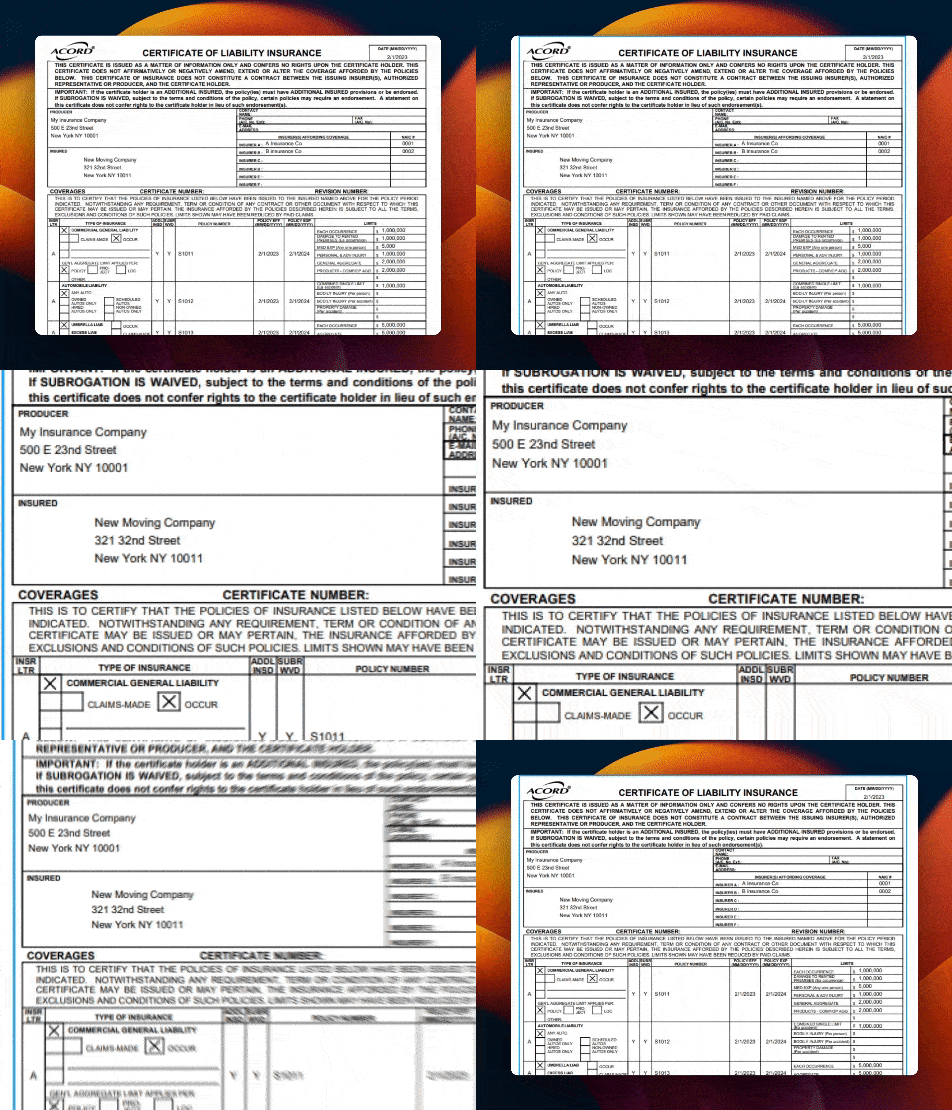
The first thing you should do when you read a certificate of insurance is check the insured name located in the box near the top left of the document. 
how to read a certificate of insurance zoom in

When checking the insured name it’s crucial that the insured name matches the vendor or tenant’s name on the contract your organization signed with them. If it doesn’t exactly match, you should consult your organization’s guidelines on how to handle these cases. A completely wrong insured name could result in coverage for a claim being denied, so being specific when you check is crucial. 

What if I see a DBA name on a certificate of insurance?

Some businesses use a “DBA,” or “Doing business as” name, in their outward facing business rather than their legal corporate name. There’s a variety of reasons a company may do this, but what’s important for you to know is that if the DBA matches the name in the contract you can mark it compliant.

Let’s move onto a trickier part of the review process: checking insurance policy coverages and limits.

How to Read a Certificate of Insurance: Policy Basics

Let’s go over some basic details you’ll want to review for every policy. 

  • Policy Number: While you won’t necessarily be able to tell much about a policy by its number, each policy should have one. You should request a new COI with a valid policy number if any policy number is TBD, Pending, Quote, or something similar.
  • Effective Date: If the effective date is later than the date you are reviewing the COI, it means that the coverage is not yet effective. In this case, any claims that occurred before the effective date would not be covered.
  • Expiration Date: The expiration date should not have already passed, as that would make the policy expired.
  • Policy Limits: Put simply, the policy limits should be higher than or equal to the required limits in a vendor’s contract or tenant’s lease. If the limit is below what’s required, it’s not compliant.

Follow these basic guidelines for each coverage to tell if they’re compliant or not. Now we’ll look at the different coverages you’ll find evidenced on an ACORD 25.

How to Read a Certificate of Insurance: Policy by Policy
how to read a COI zoom in 2

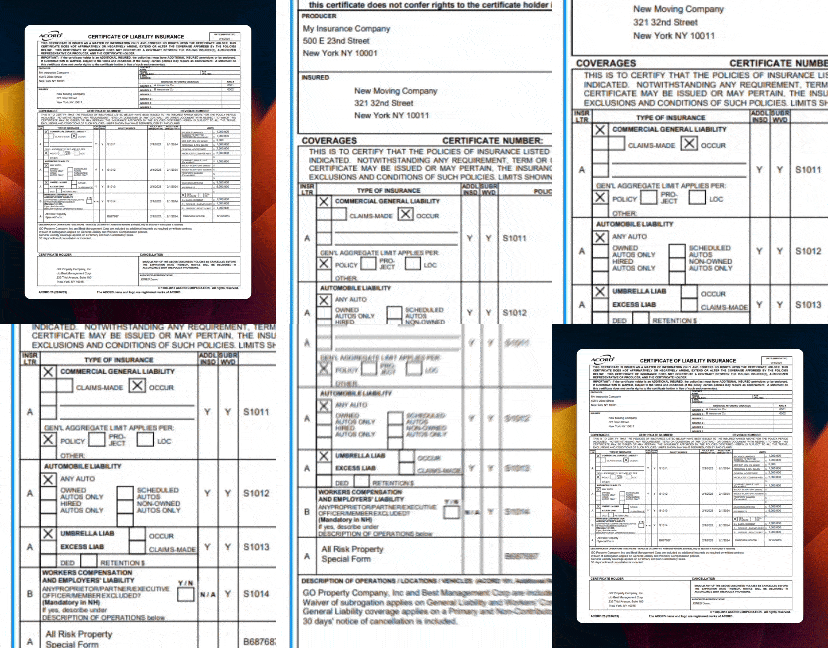
The ACORD 25 has four main structured policy sections, as well as one free text section at the bottom for other miscellaneous coverages. The first section contains details on Commercial General Liability coverage, policies that cover a lot of the standard risks that come with running a business. 

Certificate of Insurance Policy #1: Commercial General Liability

CGL screenshot

When checking Commercial General Liability (CGL) coverage, you’re going to encounter a variety of terms and concepts that you might not be familiar with. One such example is the checkboxes labeled “Claims Made” and “Occur” on the left side. What do these mean? In short, claims-made policies cover claims filed within the policy period, whereas occurrence-based (what Occur is short for) policies cover incidents during the policy period, regardless of when claims are filed. These may or may not be something your company is concerned with, depending on how your leases and contracts are structured, so consult with your risk team for what to look for here.

For CGL, the most important limits for you to review are “Each Occurrence” and “General Aggregate.” “Each Occurrence” refers to the amount an insurer is willing to pay out for any one claim, whereas “General Aggregate” is the total amount an insurer will pay over the life of a policy. With that in mind, “Each Occurrence” should be higher than “General Aggregate.” 

If the required limits in your vendors’ contracts or tenants’ leases aren’t met by the “Each Occurrence” and “General Aggregate” limits, the COI is not compliant. However, depending on your company’s guidelines an insufficient “General Aggregate” limit can potentially be supplemented with umbrella liability insurance (more to come later).

Certificate of Insurance Policy #2: Automobile Liability

automobile liability policy

Automobile liability insurance covers damages from any claims arising out of incidents or accidents involving vehicles. The “Combined Single Limit” is what you should look to compare your limits against when checking compliance for auto liability. 

What about those checkboxes underneath automobile liability on the left? They give you crucial information about what vehicles are and aren’t covered under the automobile liability policy. Here’s what they mean:

  • “Any Auto” means all categories of automobiles are covered 
  • “Owned Autos Only” refers to coverage for vehicles owned by the tenant or vendor’s business
  • “Non-Owned Autos” refers to employees using personal vehicles for business
  • “Scheduled Autos” refers to a select group of automobiles that you’ll find listed on a separate schedule form
  • “Hired Autos Only” covers leased or rented vehicles 

Depending on your company’s risk tolerance and requirements, some of these coverage categories may or may not be acceptable. “Any Auto” offers the widest coverage, whereas the other ones may have gaps in coverage that could result in claims. With this in mind, confirm what is acceptable with your organization’s risk management team. 

Certificate of Insurance Policy #3: Umbrella/Excess Liability

automobile liability

Umbrella and excess liability coverages come into play when the limits set for CGL, auto liability, and Workers’ Compensation limits are exceeded as a result of a claim. In these cases, Umbrella coverage would step in to cover any shortfall. When checking umbrella for compliance, you’re going to want to compare the limits with those required in your contracts and leases. 

Umbrella can also potentially come into play when covering shortfalls for additional coverages like crime, pollution, and professional liability, but make sure to discuss this with your risk team before assuming that’s the case. 

Certificate of Insurance Policy #4: Workers’ Compensation

workers' compensation screenshot

Workers’ Compensation covers an employee’s lost wages and medical expenses as a result of an injury without the need for a lawsuit. This coverage is no-fault, meaning it is paid out regardless of the circumstances of the injury. 

Depending on the state you are located in, you may have some special considerations when checking Workers’ Compensation. Ohio, North Dakota, Wyoming, and Washington all require Workers’ Compensation to be purchased through a state-run fund, so if you see a private insurance company listed as the insurer you may have an issue.

While leases and contracts generally set the limits for other policies, state governments are responsible for setting Workers’ Compensation limits. If the checkbox next to the limits marked “Per Statute” has an X, it means that the coverage exceeds the state mandated amount. If not, it might be too low. 

Certificate of Insurance Miscellaneous Policies

The final coverage section you’ll find on an ACORD 25 is a free text section where brokers will list out other coverages, which could include policies like Professional Liability, Crime, Pollution, or Property Insurance. Depending on the unique risk appetite of your organization and the type of work different vendors are doing, you may find some non-standard coverages evidenced in this row.

How to Read a Certificate of Insurance: Additional Information

Certificate Holder
how to read a certificate of insurance: zoom in on certificate holder

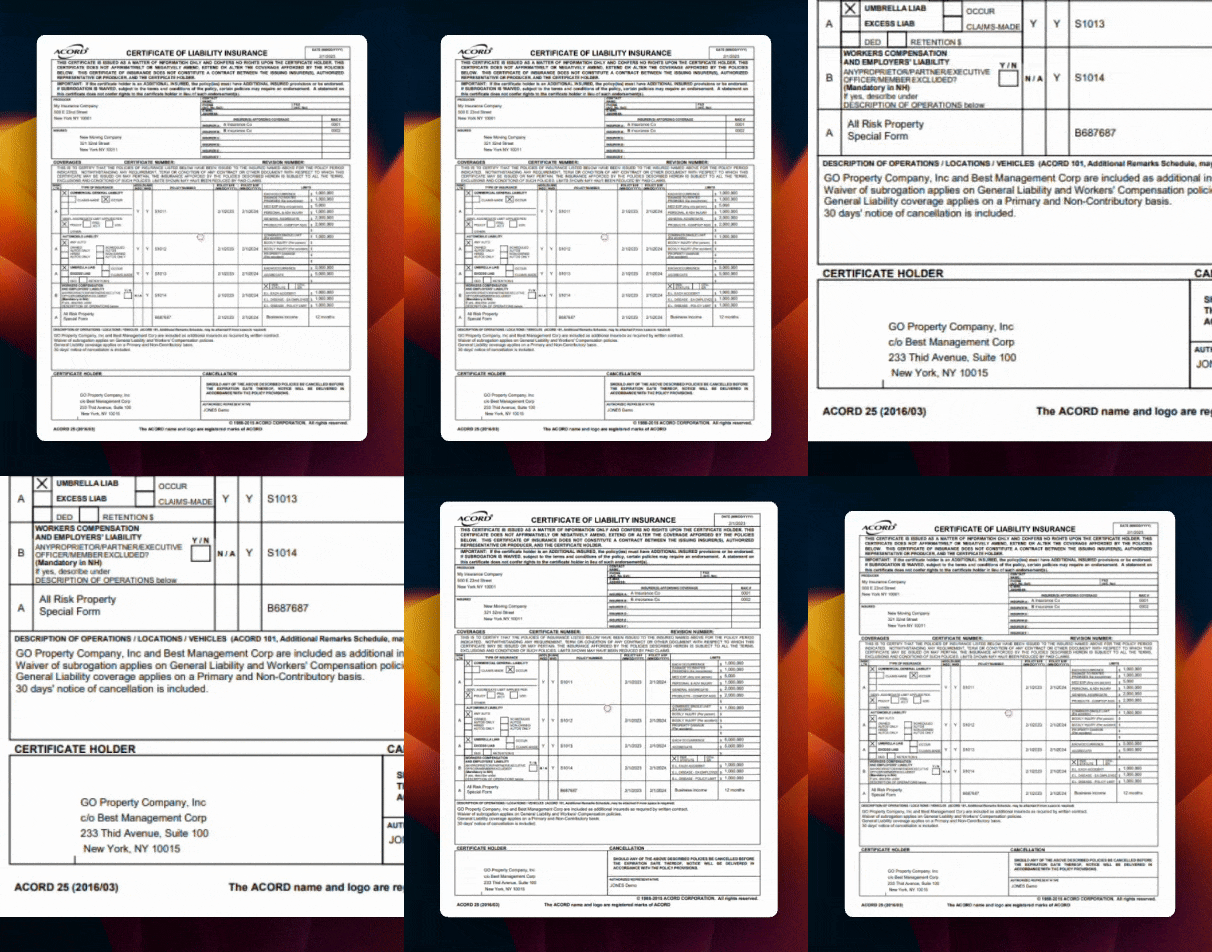
Certificate holder can be a topic of confusion for some property managers. While it’s important to check and confirm that the certificate holder matches the one in your insurance requirements, it’s also just as important to understand that being a certificate holder confers no rights or legal status.

Additional Insured

Getting all the right Additional Insured names listed on a COI is key, as it extends the coverage from the policy to the names or entities listed. Chances are your property owner and property management company name are required to be listed as AIs, which would allow you to tender claims to a third-party insurer. 

how to read a certificate of insurance: description of operations

Additional Insureds are often listed in the Description of Operations section of a COI, located towards the bottom. Ensure all the entities required in your insurance requirements agreement are listed without any typos and that they were explicitly conferred Additional Insured status.

Some organizations accept Blanket Additional Insured verbiage that extends coverage to all required parties based on existing contracts or leases. You’ll have to check if this is something accepted by your organization. 

Miscellaneous Coverage

You might find other assorted policy details in the Description of Operations box, or DoO. Sometimes, if there’s not enough room, brokers might add a form called ACORD 101 to give more space for this information. Look in the DOO first if you’re searching for specific provisions like a Waiver of Subrogation or Primary & Non-Contributory.

Signature

Lastly, every COI must be signed to be valid. This signature can be electronic or by hand, but if it’s not signed you shouldn’t accept it as compliant.

And with that, we’ve made our way through every section of the ACORD 25 form!

Bonus: How to Check Endorsements for Compliance

Want to learn how to go beyond just reviewing COIs for compliance? Download our comprehensive “How to Review COIs and Endorsements” blueprint for a deep dive into checking common endorsements, including: 

  • Waivers of Subrogation
  • Primary and Noncontributory Coverage
  • Additional Insured Endorsements, including schedule vs. blanket forms and ongoing and completed operations
  • 30 Days Notice of Cancellation

Download your copy

Tired of Reviewing COIs and Endorsements Manually?

Jones automates the collection and review of COIs for property management companies, owner-operators, and general contractors across the US. Reach out to us via the form below to find out more about how Jones can help your organization manage your insurance documents.

The Jones Insurance Insider #8: Dangerous New York Labor Law Exclusions in Vendor Insurance Policies

Here’s a nightmare New York Labor Law scenario we recently heard from a risk manager for a New York-based real estate company:

A vendor’s employee fell off a scaffolding while working on the facade of a commercial property and was injured. Even though they received workers’ compensation they filed a lawsuit against the property owner. 

The property owner and management company were doing the right things to protect themselves from insurance risk. They had checked the vendor’s COI and endorsements and required that they be listed as an additional insured. With that in mind, they tendered a claim to their vendor’s insurer and assumed they would step in to defend them. They were right…for the most part. The vendor’s insurer ended up paying over $8M to settle the suit, but the property owner was still forced to pay $500K.

How did this happen even though they had checked their COI and endorsements? This property manager and property owner found out the hard way that some insurance gaps can’t be found on an ACORD 25 form. How could they have prevented this? First, we need to understand how a unique set of laws in New York State allowed this lawsuit to go forward even though the vendor’s employee received workers’ compensation.

New York Labor Law: Creating exposure for property managers, developers, and owners

Vintage photo of men eating lunch on an iron girder suspended above new york city, in violation of New York Labor Law
The most iconic New York Labor Law violation in history


New York Labor Law was enacted in 1938 to protect workers on commercial properties in the case of injuries or death. While workers’ compensation is designed to ensure injured employees still get lost wages and medical care from their employers without a lawsuit, New York Labor Law puts absolute responsibility on property owners and managers to maintain safe workspaces. This allows employees of your vendors to sue the property owner and property manager who hired their company. 

And unfortunately, the potential consequences of a NY Labor Law claim could be devastating.

The impact of a NY Labor Law related lawsuit

If the immediate financial impact of a settlement from a NY Labor Law claim wasn’t bad enough, there can be long term consequences for your building’s insurability. According to Jason C. Schiciano, CPIA, President at Levitt-Fuirst Insurance, all it takes is one NY Labor Law claim to:

  • Increase renewal premiums by 200 percent or more for years to come.
  • Cause limitations or exclusions in coverage for similar types of claims in the future.
  • Cause your carrier to impose penalties for failure to require contractor risk transfer and policy vetting
  • Limit your ability to secure favorable renewal outcomes in a tightening NY insurance market 

How can you protect yourself from one of these nightmare outcomes? First, let’s review the three key sections of NY Labor Law that allow for these lawsuits. 

Three sections of NY Labor Law to note:

1) Section 200 mandates that building owners and managers ensure safe work environments.

2) Section 241(6) holds building owners strictly liable for injuries caused by inadequate safety equipment, unless they can prove the worker was at fault (which is hard to prove in a court of law).

3) Section 240(1), or the “Scaffold Law”, imposes absolute liability on building owners, contractors, and project managers for gravity-related accidents, regardless of the worker’s employment status or fault. 

Man in orange shirt works while standing on a very short ladder, New York Labor Law claim waiting to happen
A “gravity-related accident” waiting to happen


In the example the risk manager shared with us, it was Section 240(1) that the vendor’s injured employee used to sue the property owner. Because the worker was injured in a gravity-related incident, they had cause to sue due to the absolute liability placed on the building owner.

But wait—why was the property owner still on the hook for $500,000 if they tendered a claim to the vendor’s insurer? Here’s where the insurance gaps that can’t be found on an ACORD 25 form come into play. The vendor’s insurance policy contained a New York Labor Law “Action Over” exclusion, which is NOT visible on a COI or endorsement. An exclusion to an insurance policy is language that states an insurer will either only pay a certain amount, or not pay at all, in the instance that the accident listed was excluded. In this case, the exclusion restricted the amount the vendor’s insurer would pay out in the specific event of a NY Labor Law claim, meaning the property owner was still liable for part of the settlement amount.

NY Labor Law Exclusions: What they look like and how to spot them

How can you protect your organization from NY Labor Law exclusions? There’s only one foolproof way: checking your vendor’s full insurance policies for exclusionary verbiage. Here’s one example of how an exclusion might be phrased. 

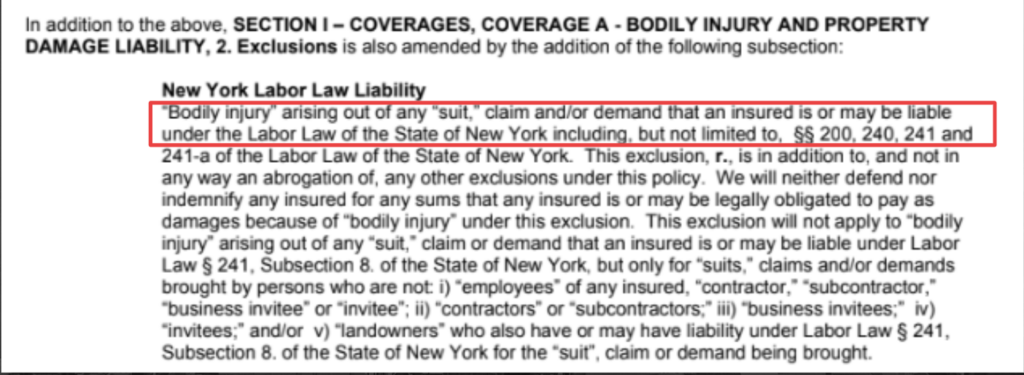
example of a New York Labor Law exclusion in a vendor insurance policy

This is a very straightforward example of a NY Labor Law exclusion that you couldn’t find on a COI or endorsement. The passage states clearly that the insurer “will neither defend or indemnify any insured” in the case a suit or claim is brought about under the NY Labor Law sections we listed above. 

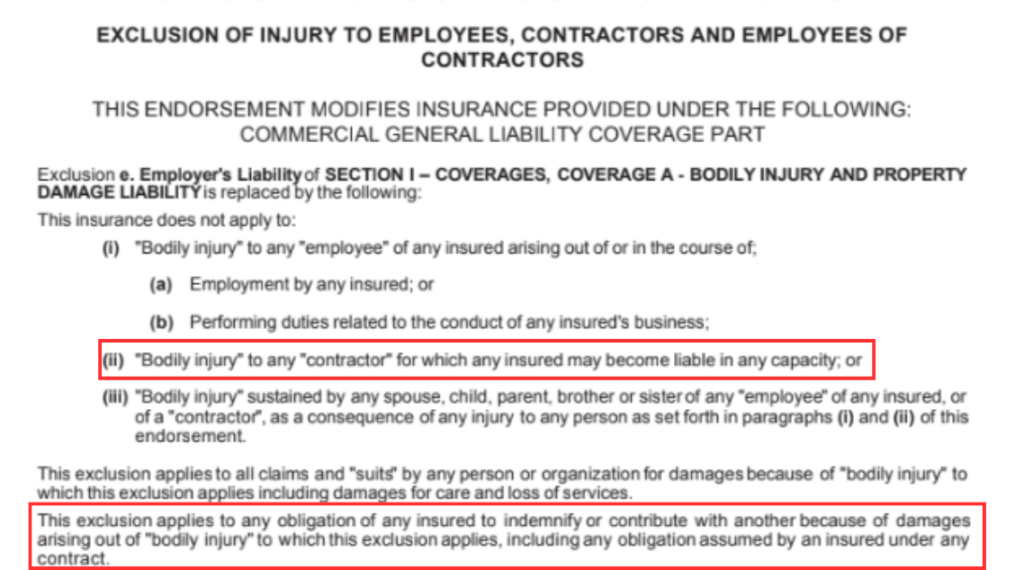
Unfortunately, it’s not always that easy to spot NY Labor Law exclusions when checking vendor insurance policies. The language used in these exclusions can be sneaky. Here’s one example where NY Labor Law isn’t mentioned explicitly, but context allows us to see that it would be excluded.

example of New York Labor Law exclusionary verbiage in a vendor insurance policy

As NY Labor Law imposes “absolute liability,” we can see that language in (ii) would indicate this insurance isn’t applicable to a third-party vendor working on a property. In addition, the bottom section excluding coverage for damages due to “bodily injury” is an absolute exclusion that would keep an insurer from having to step in for any such claim. 

It’s never been more important to learn about how to review vendor insurance policies for troubling exclusions, seeing as the amount of NY Labor Law related claims has gone up 500% since 1990.

Learn more about reviewing NY Labor Law exclusions in our webinar recording

We be hosted a webinar on March 28th at 1pm EDT with Jason C. Schiciano, CPIA, President at Levitt-Fuirst Insurance that dove even deeper into spotting troubling exclusions lurking in your vendor insurance policies. We covered:

  • Different verbiage used for NY Labor Law exclusions
  • How to spot NY Labor Law exclusions when reviewing vendor insurance policies
  • How to protect yourself from NY Labor Law related exposure

Watch recording on demand

Top 3 myCOI Alternatives for Efficient COI Tracking

In this guide, we’ll dive into the strengths and weaknesses of the myCOI platform for COI tracking, as well as analyze the pros and cons of three myCOI alternatives: Jones, Ebix, and Docutrax. Here’s a quick recap:

—Jones is known for its quick document review times (under 24 hours), as well as experience reviewing complex and uncommon insurance documents and endorsements. In addition, Jones offers integrations with common accounting software like Viewpoint Vista, CMiC, and Sage 300, as well as being the only insurance compliance software with an embedded Procore integration.

—Ebix manages subcontractor communications, and helps to centralize all insurance information in one single source of truth. However, in light of their recent bankruptcy filing we have more questions than answers about the long term health of their COI tracking solution. 

—Docutrax offers their services at a reasonable price point, and can help construction companies and CRE brands gain visibility into the reason third-party insurance documents are noncompliant. Their lower price point does come at a cost, with a dated interface, no COI collection, and slow implementation times being concerns for Docusign customers.

In this guide:

—myCOI

—Jones

—Ebix CertsOnline

—Docutrax

Note: interested in exploring how Jones can help you automate your compliance management end-to-end and de-risk your buildings? Talk to our team of experts today!

Let’s Chat!

Key Features of myCOI Alternatives

Below is a side by side overview of the core product offerings of leading myCOI alternatives. This comparison highlights how each platform approaches turnaround time, audit depth, integrations, and day to day operational impact.

Jones

Best for
Construction and Commercial Real Estate teams that need fast turnaround without sacrificing audit depth.

Turnaround time
Under 24 hours for COIs and endorsements through a fully managed service model.

Audit depth
Reviews complex endorsements and nuanced policy language, not just surface level OCR field checks.

Vendor experience
Designed to eliminate portal friction for vendors and subcontractors, supported by clear and branded outreach.

Integrations
Embedded Procore app experience, alongside integrations with construction and accounting systems such as CMiC and ERP platforms.

Operational impact
Teams can request, track, and manage COIs directly inside Procore, keeping compliance workflows aligned with project execution.


Ebix CertsOnline

Best for
Organizations that prefer a legacy, process driven compliance portal with centralized recordkeeping.

System model
Web based portal with controlled access, permission levels, and required logins.

Recordkeeping
Maintains document images and historical records for both current and past insurance documentation.

Availability
Marketed as offering continuous access and monitoring for insurance compliance data.

Business risk consideration
Ebix underwent a Chapter 11 restructuring process and exited in 2024. Organizations evaluating CertsOnline should assess post restructure product continuity, roadmap clarity, and long term support model.


Docutrax

Best for
Teams prioritizing a managed service approach combined with a traditional, legacy portal experience.

Collection channels
Accepts insurance documents through multiple channels including email, fax, mail, and direct upload, supported by a service center.

Coverage footprint
Positions itself as managing compliance across large commercial real estate portfolios.

Core workflow
Provides COI tracking services that include document collection, renewal requests, and compliance confirmation.


myCOI (Baseline Comparison)

Baseline capability
Centralized COI repository with configurable workflows and integration options via API and pre built connections.

Procore integration
Offers a Procore integration focused on syncing visibility and data, rather than managing compliance tasks directly within Procore.

Vendor workflow nuance
Third party submission flows may require account setup or login, depending on how the compliance program is configured.


Overview of myCOI

myCOI is a legacy player in the COI tracking space, managing COIs and endorsements for organizations in various industries for over 15 years. 

Strengths of myCOI

Wide Range of Industries Served

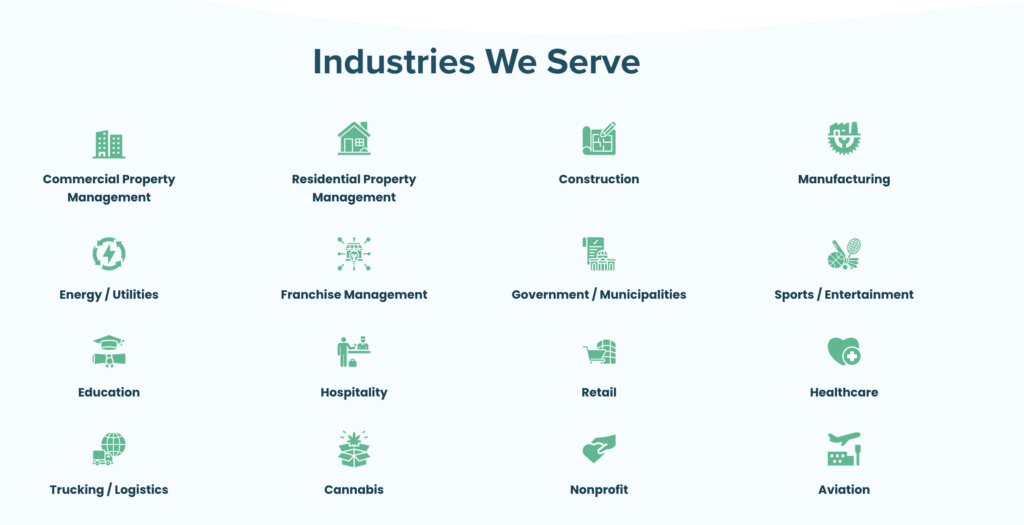
mycoi industries served

myCOI serves a broad and disparate range of industries, including manufacturing, aviation, and cannabis sales. Regardless of your sector, if you’re an organization looking to collect and review third-party COIs and endorsements there’s a good chance myCOI will be willing to work with you.   

Expiration Date Tracking Capabilities

Having all of your vendor, tenant, or subcontractor insurance documentation stored in a central repository is great, but what about giving you visibility into when the documents are due to expire? myCOI provides alerts to keep users up to date on expiring documents, and can help ensure renewals are managed in a timely manner. 

High Quality of Support Staff

Multiple online reviews highlight the supportive and informed nature of the myCOI team. Even when issues around long document review times or a lack of standardized document naming system bubble to the surface, the myCOI team has been noted for their helpful attitude and problem solving skills.

Weaknesses of myCOI

Users Report Slow Document Review Times

Many myCOI users looking for myCOI alternatives will be all too familiar with myCOI’s difficulty turning around insurance document reviews in a timely manner, particularly during busy periods of the year. Multiple former myCOI customers who have since switched to Jones have cited lengthy document review times as their primary reason for exploring different software.

Poor Experience for Vendors and Subcontractors

mycoi alternatives subcontractor review

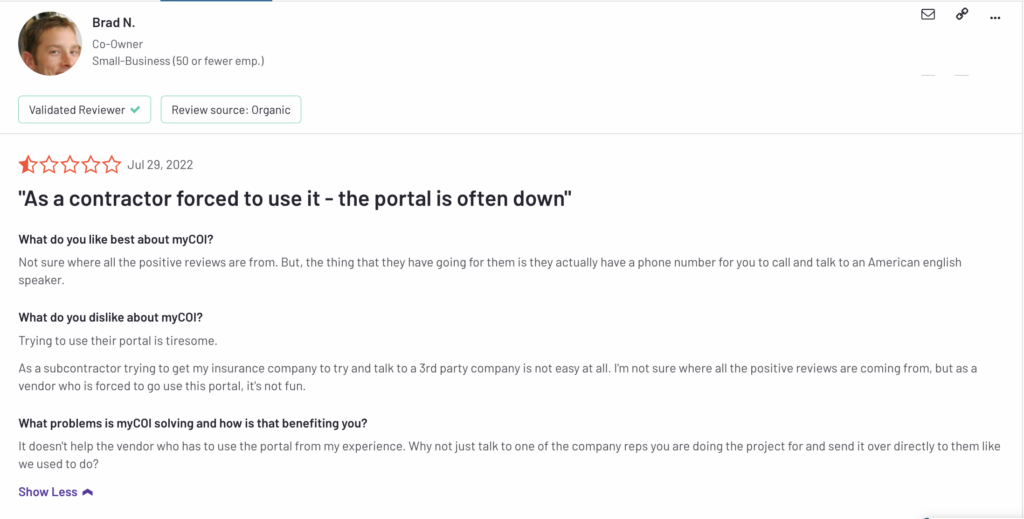
Online reviews from vendors and subcontractors who have to upload insurance documents to the myCOI portal cite network instability, unclear instructions, and complicated login credentials as major pain points. Alienating your vendor or subcontractor base by implementing a software that makes submitting their insurance documents more difficult is not an ideal result when trying to improve your insurance compliance program.

Limited Capabilities of Procore Integration

Former myCOI customers have reported that their Procore integration is “there, but not wonderful” and doesn’t always function as intended. They’ve cited inconsistencies in information syncing between myCOI and Procore, limited COI management options within Procore, and the need for repeated data entry as pain points of myCOI’s Procore integration. While myCOI’s Procore integration is functional, construction companies that use Procore would be better off finding a software solution that allows them to handle subcontractor compliance tasks like requesting a COI directly from within Procore.

Quick Recap of myCOI

myCOI’s breadth of experience and helpful support team make them an attractive option for organizations in niche industries, but customers in the commercial real estate and construction sectors should consider alternatives due to lengthy review times, poor experiences for vendors and subs, and underwhelming integration capabilities.

myCOI Alternatives #1: Jones

Jones manages the collection and review of COIs and endorsements for property management and construction companies. With several CRE portfolios over 20 million square feet and multiple ENR top 100 GCs as customers, Jones has a track record of supporting insurance compliance strategies for leaders in these two risk-heavy industries.

Strengths of Jones

Powerful Procore Integration Allows GCs to Manage Subcontractor COIs within Procore

https://giphy.com/gifs/ro41E9ZcRNtAHt8EvJ?utm_source=iframe&utm_medium=embed&utm_campaign=Embeds&utm_term=https%3A%2F%2Fapp.getguru.com%2F

Jones is the only insurance compliance software with an embedded Procore integration (learn more about embedded integrations here). Put simply, that means Procore customers who use Jones can do things like request a subcontractor COI from directly within Procore. As one contract manager who currently uses Jones and Procore said, “Jones isn’t the only compliance company out there, but the strength of their direct integration with Procore clinched the deal for us. We decided we weren’t even going to waste our time talking to anybody else because of how much we liked the Jones-Procore integration!”

Document Review Times Under 24 Hours

Every delayed COI and endorsement review adds up to cost overruns and pushed back project completion dates. For GCs looking to get jobs on time and under budget, Jones is an excellent choice for managing subcontractor insurance compliance as Jones reviews COIs and endorsements in under 24 hours. With Jones, enforcing subcontractor compliance no longer runs in opposition to getting projects done on time. 

Familiarity with Construction-Specific Insurance Documents and Endorsements

Worried about using a software to manage the collection of your subcontractor COIs and endorsements because it might not be specific or specialized enough to implement your insurance risk strategy? Jones is familiar with construction-specific endorsement language, including tenants-only and contractual privity verbiage, and GCs can customize the way Jones reviews their subcontractor insurance documents. For example, Jones would flag a CG 72 46 11 15 as noncompliant for Additional Insured for Completed Operations because of contractual privity language that precludes coverage to a project owner. Read on here for more on how Jones reviews complicated insurance documents for compliance. 

Weaknesses of Jones

Only Serves Two Industries

mycoi alternatives jones industries

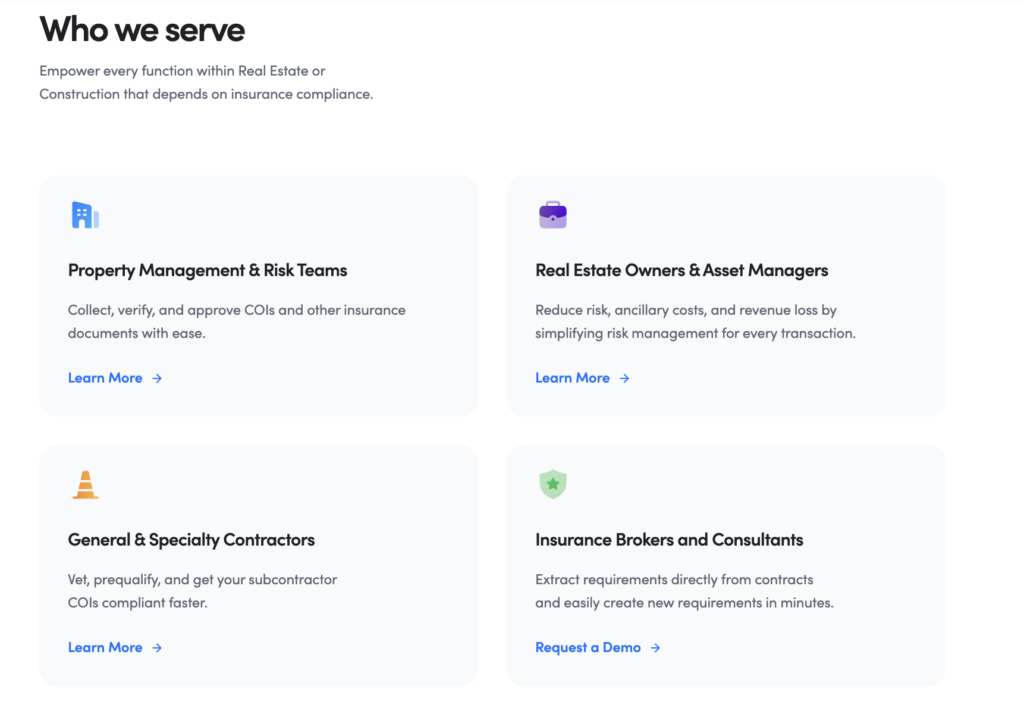
Unfortunately for companies that aren’t in either construction or commercial real estate, Jones is not an option for them. Jones is built with the needs of GC and CRE organizations in mind, and has been optimized for the unique needs of these two sectors. Companies that aren’t in one of these industries will have to look elsewhere when trying to select an insurance compliance management solution. 

No Self Service Model

Some companies would prefer a self-service model that puts them in charge of the collection and review of third-party COIs and endorsements rather than having it be managed by an external organization. There are companies in the insurance compliance management industry who do offer self-serve models that are essentially just well organized spreadsheets with conditional formatting. If you’re confident in the ability of your team to quickly and accurately collect and review subcontractor insurance documents and just want a better spreadsheet to enable them, Jones probably isn’t the right choice for your organization. However, if you want granular, expert quality insurance document review, you shouldn’t be looking for a self-service model.

Quick Recap of Jones

Jones is a great choice for construction companies or commercial real estate organizations looking to reduce their insurance risk through better management of vendor, tenant, and subcontractor COIs and endorsements. With specialized insurance document review expertise, powerful embedded integrations with popular ConTech and PropTech software, and the fastest review times amongst its competitors, Jones should be the first stop for any risk-focused GC or CRE organization looking for myCOI alternatives.

myCOI Alternatives #2: Ebix CertsOnline

Ebix is a multinational, publicly traded enterprise software company that offers a COI tracking solution called CertsOnline. While the fact they are one of the largest software companies that offers a COI tracking module might inspire some confidence for companies shopping for myCOI alternatives, their recent bankruptcy filing should cause any organization looking into their services to reconsider. 

Strengths of Ebix CertsOnline

Publicly Traded Company

mycoi alternatives ebix stock price

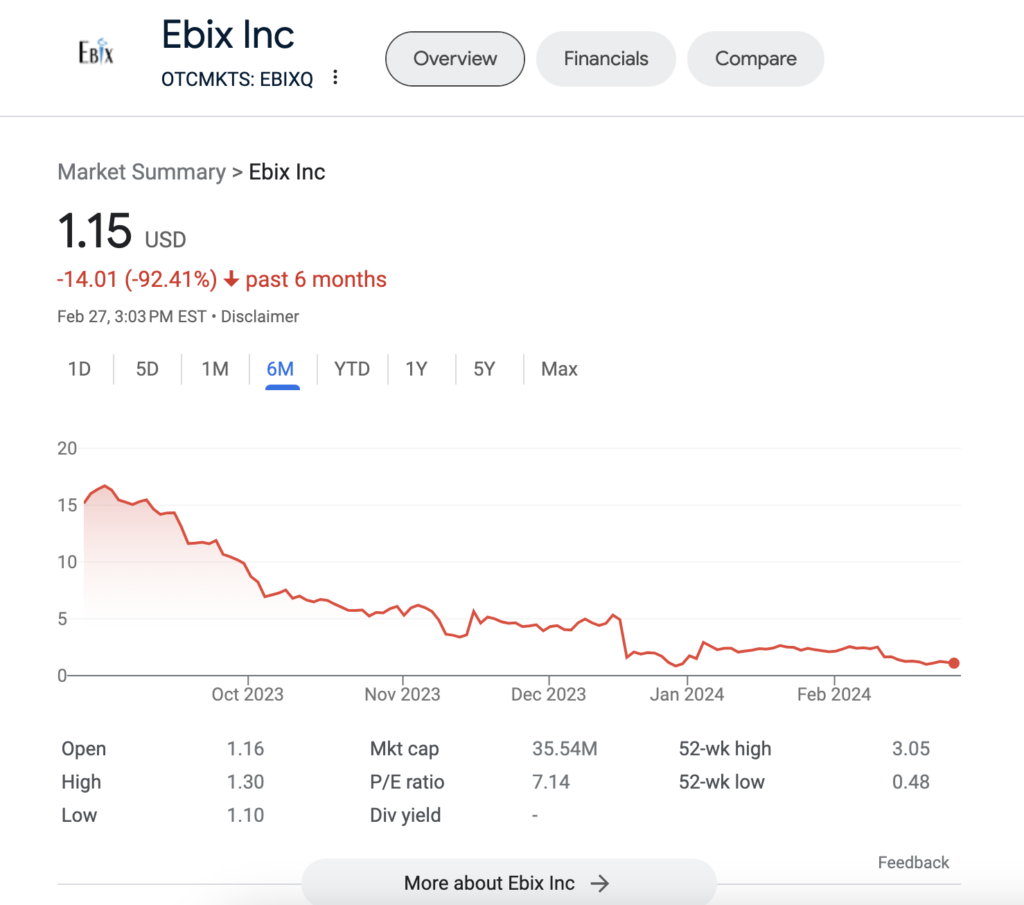
Ebix is a publicly traded company, listed on the NASDAQ stock exchange. For organizations that are apprehensive about working with a startup (like several of the companies on this list), a publicly traded presence might be reassuring. However, in wake of the bankruptcy, their status as publicly listed is probably less reassuring. 

Handles Communications with Subcontractors and Vendors

One positive point that we saw cited in a variety of reviews of CertsOnline was that the Ebix team handles requests for new COIs and endorsements as well as renewals, which takes work off the plate of teams at customer organizations. By managing one of the more cumbersome parts of the COI collection and review process, CertsOnline gives PMs, contract managers, and risk teams time back to prioritize other responsibilities rather than playing phone tag with subcontractors and vendors.

Weaknesses of Ebix

Uncertain Future Following Bankruptcy Filing

Ebix filed for bankruptcy in December 2023 after defaulting on a 617 million dollar loan. While there has been discussion of sales of parts of Ebix’s book of business, the overall lack of clarity around the future of the company is a large red flag for companies looking for a software to manage their COIs and endorsements. Former Ebix customers who have since switched to Jones reported disruptions to their day to day workflows that necessitated a rapid change. Fortunately, Jones specializes in transitioning companies off the Ebix platform.

Users Complain About Slow Software Speed

ebix review

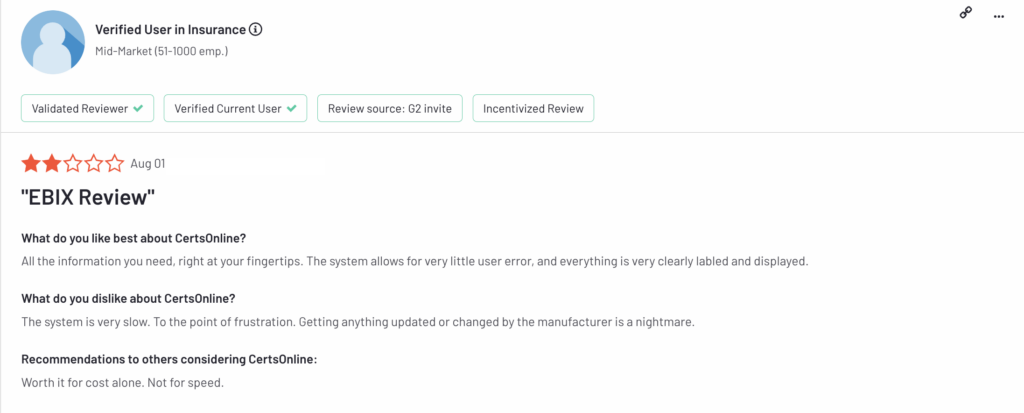
Multiple online reviews cited the slow speed of CertsOnline being a major and consistent inconvenience. This extends to both the user experience for GCs/CRE portfolios, as well as for the vendor or subcontractor experience. The slow operating speed of the application means neither your internal teams nor your vendor or subcontractor base will be particularly fond of having to use CertsOnline to manage their insurance compliance documents.

Document Reviews Can Take Several Days

Several former Ebix customers have noted that document reviews can take days, if not weeks, to be completed. While the bankruptcy could be a factor in disrupting day to day operations, we had heard complaints about Ebix’s slow document review times prior to the bankruptcy. For several former Ebix customers now on Jones, the slow speed of Ebix’s document reviews were one of the primary reasons they began exploring other COI management solutions. 

Quick Recap of Ebix CertsOnline

While Ebix appeared to be a solid option for COI management before late 2023 due to their size and publicly traded presence, their recent bankruptcy declaration and the lack of clarity over the future of CertsOnline means organizations should look at other myCOI alternatives for help managing the collection and review of their vendor and subcontractor COIs.

myCOI Alternatives #3: Docutrax

Docutrax is another legacy software vendor in the insurance document compliance space, operating since 2009. Their low cost, no-frills offering is lacking premium features but often comes in cheaper than other myCOI alternatives.

Strengths of Docutrax

Provides Visibility Into Subcontractor Insurance Gaps

Reviews highlighted the fact that it’s easy to check compliance status in Docutrax as a strength of the program. By hovering over a vendor, tenant, or sub, you can immediately get insight into the third-party’s compliance status, as well as highlighting areas of noncompliance. 

Inexpensive Compared to Competitors

The price of Docutrax compared to some of the more robust solutions in the industry can be a selling point for a company not looking to spend a large amount on an insurance compliance platform. However there are serious tradeoffs to the low price point of Docutrax, as we’ll get into when examining the weaknesses of the platform.

Weaknesses of Docutrax

Dated Interface

docusign UI

Both online reviews and feedback from former customers cited the dated and unintuitive user interface of Docutrax as a major drawback of the software. Trying to navigate around the product is difficult and time consuming, and it doesn’t always function as you’d expect. 

Former Customers Report Slow Implementation Time

Several current Jones customers who switched from Docutrax were initially apprehensive about switching to Jones because of how lengthy and frustrating their implementation with Docutrax was. However, after transitioning to the Jones platform these customers quickly realized that a long and painful onboarding experience was not a commonality of all insurance compliance tools and was in fact just a major issue with Docutrax.

Does Not Handle Collection of Third-Party COIs

Former Docutrax customers have mentioned that they still had to do quite a bit of manual outreach to vendors, tenants, and subcontractors to collect insurance documents. Instead of Docutrax going out and collecting COIs and endorsements from third-parties, property management or contract teams using Docutrax have to manually request and upload all the COIs and endorsements they need reviewed. For a COI management platform, collection of vendor, tenant and subcontractor documents is a bare minimum requirement—here’s how Jones makes sure no third-party insurance documents go uncollected.

Quick Recap

Construction companies and CRE portfolios that are looking for a cheap, no-frills insurance compliance management software can do worse than Docusign, but should realize that they’re still going to be in charge of much of the heavy lifting required to enforce their insurance risk strategy.

Key Takeaways About myCOI Alternatives

If you’re looking to leave myCOI for a better COI management solution, you’re not alone. Fortunately, there are strong myCOI alternatives out there that make the collection and review of third-party insurance documents easy. If you’re looking for the top solution on the market, look no further than Jones. Get in touch with us via the form below to learn more about how you can successfully transition from myCOI to Jones.


Frequently Asked Questions About myCOI Alternatives

Both platforms offer Procore integrations, but they are fundamentally different in how they are used. myCOI’s integration focuses on syncing data and visibility between systems. Jones provides an embedded Procore experience, allowing teams to request, track, and manage subcontractor COIs directly within Procore. This reduces duplicate work and keeps compliance aligned with day to day project workflows.

Ebix CertsOnline and Docutrax are both legacy platforms that emphasize centralized recordkeeping and managed compliance services. Ebix is typically positioned as a structured portal with controlled access and historical documentation, while Docutrax emphasizes multi channel document intake and service driven collection. Organizations evaluating either option should consider software usability, review turnaround times, and long term platform stability when making a decision.

Vendor experience varies by platform configuration, but Jones is designed to minimize friction for vendors and subcontractors. Jones emphasizes clear, branded communication and avoids unnecessary portal complexity. Some myCOI workflows may require vendors or their agents to create accounts or log in, depending on how the compliance program is set up.

Organizations often explore myCOI alternatives due to slow document review times during peak periods, limited depth when reviewing complex endorsements, or integration workflows that require manual follow up. For construction and real estate teams operating on tight timelines, these limitations can lead to project delays and increased administrative overhead.

For construction and commercial real estate organizations that prioritize fast approvals, deep insurance review, and tight integration with systems like Procore, Jones is often the strongest fit. Its industry focus, turnaround times under 24 hours, and embedded workflow approach make it well suited for managing insurance compliance at scale.

An embedded integration both sends data to and receives data from Procore, and appears directly within the Procore app. Put simply, that means the two software communicate back and forth, and users don’t need to switch between Procore and Jones in order to perform COI management tasks. For example, the Jones Procore integration allows you to request a COI from a subcontractor directly in Procore rather than from the Jones app.