The Additional Insured Trap: How to Verify Coverage Beyond the COI

Why “Additional Insured” on a COI doesn’t equal coverage

A COI is a collection document, not a risk transfer instrument. The endorsement is. A COI can reference Additional Insured status without proving the endorsement actually grants it, or grants it in the way your agreement requires.

The certificate itself puts you on notice: the ACORD 25 includes a disclaimer stating that the certificate is issued as a matter of information only and confers no rights upon the certificate holder—and cannot amend, extend, or alter the coverage afforded by the policies. The carrier has no obligation to recognize Additional Insured status unless the actual policy and endorsements confirm it.

What’s in those documents determines whether a claim is covered or denied—and whether risk transfer holds up when it matters.


The 5 Additional Insured gaps that cause the most surprises

These are the issues that most often turn a “compliant” file into a coverage dispute.

1
Blanket vs. scheduled Additional Insured endorsements

Many teams expect blanket additional insured language: if a written contract requires it, status applies automatically. It’s scalable and common in large programs.

But you’ll still see policies where the COI reads like blanket coverage, while the endorsement is scheduled—meaning it only applies if the entity is specifically named. There’s also a subtler version of this trap: blanket language can appear inside a schedule box, where instead of naming specific entities, the endorsement refers broadly to “any person or organization as required by written contract.” The presence of a schedule doesn’t automatically mean it’s a scheduled endorsement—the actual wording determines how coverage applies.

What to do: When you require blanket status, read the endorsement wording—don’t assume a schedule box means scheduled coverage, and don’t rely on the COI description alone.

2
Ongoing vs. completed operations (the expensive miss)

A lot of serious claims show up after the work is done. That’s why many construction contracts require additional insured status for both ongoing operations (work in progress) and completed operations (after the work is finished).

The common form pairing is CG 20 10 (ongoing) and CG 20 37 (completed). But the CG 20 26—labeled for ongoing operations—contains broad language that may cover completed operations as well, and is often accepted for both. The catch: if there’s a separate completed operations exclusion elsewhere in the same endorsement, that broad language gets overridden. Always check for conflicting exclusions before accepting a single form for both.

More generally, if an endorsement uses language like “arising out of your work” or “your operations” without limiting it to a time period, it may be acceptable for both—but that requires reading the full text, not just the title.

What to do: Confirm which time periods the endorsement actually covers. Don’t rely on form names or COI summaries—check for completed operations exclusions even when the wording looks broad.

3
“Required in a written contract with you” (the contractual trigger problem)

Many endorsements—especially blanket ones—condition additional insured status on a written agreement, sometimes specifically a written contract “with you.” That privity requirement can create unintended gaps in multi-tier construction projects.

Owners often don’t have direct contracts with subcontractors; they contract with the GC. If the endorsement requires a contract “with you,” the owner may not qualify as an additional insured—even if the GC does. This is one of the most common ways upstream parties get left out despite everything looking compliant on paper.

What to do: Confirm whether the endorsement language requires privity (“with you”) and whether your program structure relies on coverage flowing to parties who may not have a direct contract with the named insured.

4
Entity-name mismatch (the technicality that breaks coverage)

Your contract requires ABC Painting LLC. The COI lists ABC Painting Inc. The project team moves on. But entity mismatches don’t disappear—they resurface when endorsements schedule parties by name, or when a claim handler is looking for a reason to deny coverage.

What to do: Standardize legal entity naming across contract templates and requirement sets, then enforce consistent matching in your verification workflow.

5
Broad wording that looks sufficient but isn’t (the fine print problem)

Some endorsements use language that appears to cover everything—”arising out of your work,” “your operations,” no time restrictions—but contain restrictions buried further in the text. A completed operations exclusion on page two can quietly undo the broad language on page one.

This is exactly where workflows that stop at extraction fail. OCR can pull the broad phrase; it can’t reliably cross-reference it against exclusions buried in endorsement schedules or multi-page policy documents.

What to do: Treat broad wording as a starting point, not a conclusion. Confirm there are no conflicting exclusions before accepting an endorsement as meeting your requirements.


Additional Insured Enforcement: The Step Most “COI Tracking” Workflows Skip

Most teams don’t lose Additional Insured protection because they forgot to collect a COI. A green dashboard can make compliance look like protection—and Additional Insured is one of the easiest places for that illusion to hold.

A COI might say “Additional Insured per attached endorsement.” But the endorsement itself may not grant status at all—or may grant it only under conditions that don’t match your contract.

That’s why the real standard for Additional Insured isn’t “we have the COI.” It’s verifying the endorsement—who is granted status, when it applies (ongoing vs. completed ops), what contract language triggers it, and whether any limitations undermine your requirement.

If Additional Insured is a contractual requirement you’re counting on, treat it as something to verify and enforce, not something to collect and record. The COI is the starting signal. The endorsement is the finish line.


A verification checklist: what to request and what to confirm

What to request

  • COI package (ACORD 25 + any certificate schedules)
  • Additional insured endorsement(s)—not just “referenced”

What to confirm

  • Endorsement grants status to the right parties
  • Applies to ongoing and completed operations, if required
  • Contractual trigger doesn’t exclude upstream parties
  • Entity names match across contract, COI, and endorsements

COI tracking tools help you collect paperwork. Real risk management is verifying what that paperwork can’t prove—endorsements, triggers, and exclusions that decide whether risk transfer works when it’s time to pay.


How to verify at scale without creating a manual bottleneck

Verification gets hard because it’s high-volume and high-variance—not because each case is intellectually difficult. The approach that holds up operationally is:

1
Fast intake: Collect COIs and required documents consistently, without manual chasing.

2
Rules-based checks: Flag what’s missing and what doesn’t match requirements before anyone reads a single page.

3
Endorsement interpretation for the subset that needs it: High-risk scopes, exceptions, nonstandard forms—where human judgment matters most.

Avoid both extremes:

“COI-only and hope”—accepting documents without verifying endorsement language
Manual review of everything—an unsustainable bottleneck at volume
Structured standards defining acceptable language and forms
Consistent exception handling so review effort is predictable


Make your requirements verifiable

If you want fewer surprises, reduce ambiguity in your program requirements:

  • Which Additional Insured endorsement language and forms you accept
  • Whether you require ongoing and completed operations
  • How you handle contractual trigger language (“with you”)
  • Exact legal entities to be named

That’s how “Additional Insured” stops being a checkbox and becomes a requirement you can verify—consistently, at scale, and in a way that holds up when the claim hits.
Jones Named a Leader in COI Tracking Software by CB Insights

What Is the CB Insights ESP Ranking?

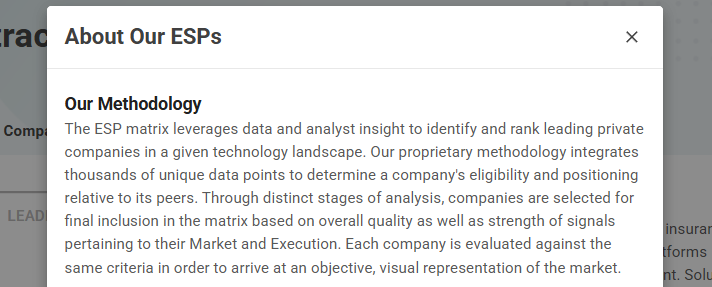
For those unfamiliar, CB Insights is a technology market intelligence platform trusted by Fortune 500 companies, investors, and enterprise buyers to evaluate private-market technology vendors. Their ESP (Execution, Strength, and Positioning) matrix integrates thousands of unique data points to identify and rank leading companies in a given technology landscape.

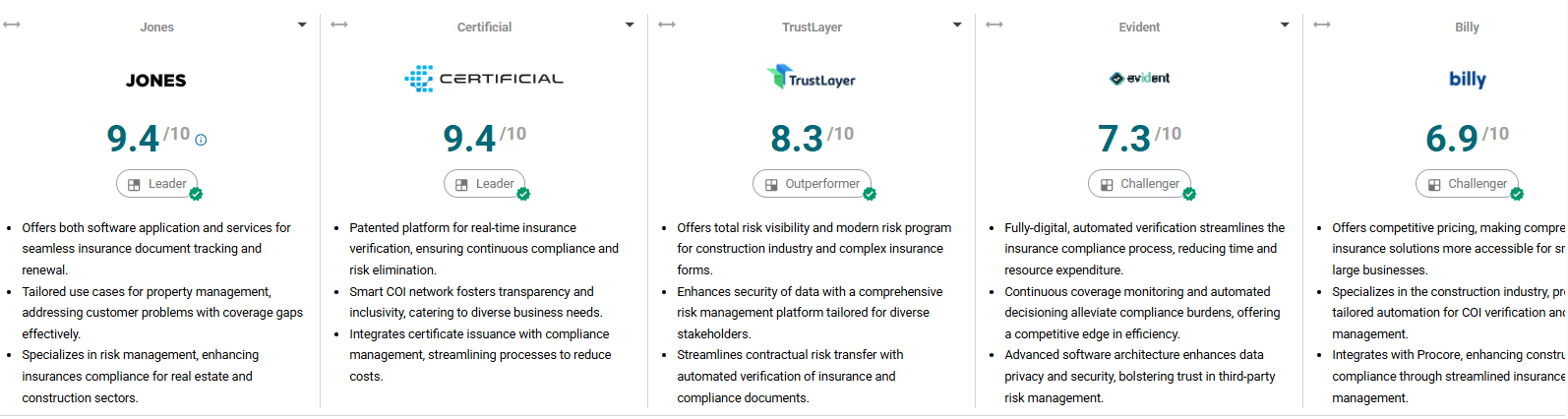
Jones earned a Leader designation—the highest quadrant—alongside Certificial. The remaining ranked companies included TrustLayer (Outperformer), Evident, Billy, and Certificate Hero (Challengers).

Jones Scorecard: 9.4/10

CB Insights also publishes detailed scorecards for each ranked company. Jones received a 9.4/10 overall score, with a 9.8/10 in Execution Strength and a 9.1/10 in Market Strength.

9.4
Overall Score
9.8
Execution Strength
9.1
Market Strength

CB Insights cited the following as key win reasons for Jones:

  • Offers both software application and services for seamless insurance document tracking and renewal.
  • Tailored use cases for property management, addressing customer problems with coverage gaps effectively.
  • Specializes in risk management, enhancing insurance compliance for real estate and construction sectors.

And highlighted the following as key product features:

  • Automated COI management with seamless software workflows and data sharing capabilities.
  • Network effect integration connecting PMs, tenants, vendors, and brokers for compliance checks.
  • Specialized in real estate and construction sectors with risk management and insurance compliance automation.

How the ESP Methodology Works

The ESP matrix evaluates each company against the same criteria across two primary dimensions: Market Strength and Execution Strength. Through distinct stages of analysis, companies are selected for final inclusion and placed into one of four quadrants:

Leaders — the most established service providers, with the breadth to address various customer needs.

Highfliers — the most innovative, with resources to address evolving needs.

Outperformers — the most specialized, with expertise for unique customer needs.

Challengers — the most promising, with agility to address emerging needs.

Jones scored a 9.8/10 in Execution Strength—the highest in the category—and a 9.1/10 in Market Strength, placing it firmly in the Leader quadrant.

What This Recognition Validates

For us, this isn’t just a badge. It’s external confirmation of a positioning we’ve been building toward since day one: that insurance compliance at scale requires both accuracy and speed, and teams shouldn’t have to choose between them.

The COI tracking market has evolved rapidly. Many platforms now claim “AI-powered” automation, but the reality is more nuanced. Based on our product research and competitive analysis, the market breaks into three functional models:

Professional Service Model — basic automation for collection, but auditing and verification remain manual. You get depth when service teams are well-trained, but turnaround stretches to days or weeks.

Self-Service Model — OCR and AI extract data, but don’t encode insurance logic. Your team still carries the burden of interpreting compliance gaps and edge cases.

Full Scale Model — AI agents trained on insurance logic handle extraction, classification, auditing, and compliance verification, while insurance experts validate edge cases where AI confidence is low or exposure is material.

Jones operates the Full Scale Model. Our AI agents are trained on tens of millions of COIs and 50,000+ insurance rules, working alongside a team of insurance auditors who validate the nuances that matter most in high-stakes construction and real estate environments.

The result: full audits in under 24 hours (with instant AI Compliance Snapshots), comprehensive depth, and no forced trade-off between speed and accuracy.

The CB Insights Leader designation validates this approach—not just as differentiated marketing, but as a model that scores highest on execution in the category.

For a deeper look at how these models play out across all major platforms in the space, see our full guide: 7 Best AI-Powered COI Tracking Tools for Construction & Real Estate.

The Broader Market Context

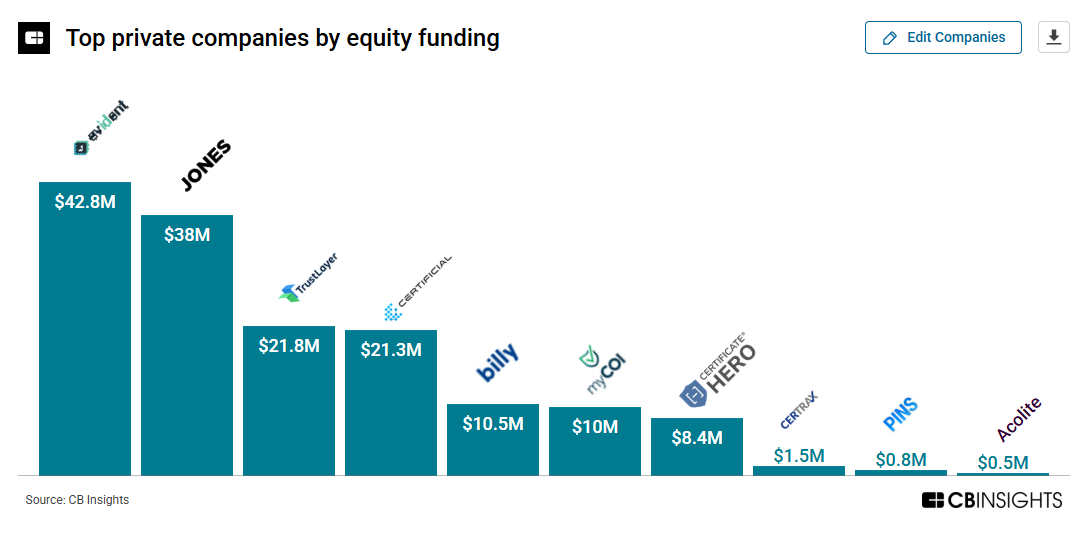
The CB Insights ESP data also reveals some interesting market dynamics. According to their Charts section, Jones ranks as the second-highest funded private company in the category ($38M in equity funding) and leads in headcount with 231 employees—signals of both investor confidence and operational scale that support the Execution Strength score.

Funding is increasingly concentrated among the leaders, suggesting the market is maturing and buyers are gravitating toward proven platforms rather than experimental tools.

Explore the full CB Insights ESP ranking for COI Tracking Software →

What’s Next

This recognition comes at an important moment. Jones is actively expanding the tools that make insurance compliance faster, simpler, and more connected:

AI Compliance Snapshot

When a COI is uploaded, the AI Auditing Agent classifies every document into a navigable table of contents, audits the coverage, and generates an instant compliance snapshot. Within seconds, teams can see exactly which lines of coverage are compliant, which fall short, and by how much—like catching an umbrella shortfall before a vendor arrives on site. The full expert audit still follows within 24 hours, but the Snapshot gives project teams the clarity they need when decisions can’t wait.

AI Support Agent

Now in Beta, the AI Support Agent lets vendors, subcontractors, and tenants open a conversation directly from their gaps notification email to understand exactly what’s noncompliant, why, and how to fix it. Instead of waiting for email responses or navigating support queues, they get real-time guidance—the Agent breaks down specific coverage issues, walks through resolution steps, and can even draft a ready-to-send email requesting the right updates. Early results show a 70% automated resolution rate, meaning most questions are resolved instantly without human intervention.

The Jones Network

The Jones Network gives every Jones client a single, centralized view of over 120,000 vendors and subcontractors across the platform. Teams can search by trade, filter by market sector, sort by distance or popularity, and evaluate vendors through detailed profiles that include insurance coverage, policy limits, endorsements, and a Jones Risk Rating based on historical compliance. When a vendor fits, one click sends the invitation, creates the record, and starts the compliance flow—no manual entry, no scattered lists, no project-by-project searching.

Combined with deepening integrations across Procore, Sage, Vista, CMiC, MRI, Yardi, and other systems of record, Jones is making compliance invisible: fast enough to keep projects moving, deep enough to catch coverage gaps before they become claims.

We’re proud of the CB Insights recognition and grateful to the customers who push us to keep improving. If you’re evaluating COI tracking solutions for your construction or real estate portfolio, we’d love to show you how this works in practice.

Source: CB Insights (ESP) — Market ranking updated 12/21/25

Book a Demo